
Error dns_probe_finished_nxdomain on the phone often makes users unable to access some websites, even though the Internet connection is still working normally. Don't worry! In this article, Antidetect Browser Hidemium will guide you through how to fix this DNS error simply and effectively, restoring web accessibility in just a few steps.
1. What is dns_probe_finished_nxdomain error?
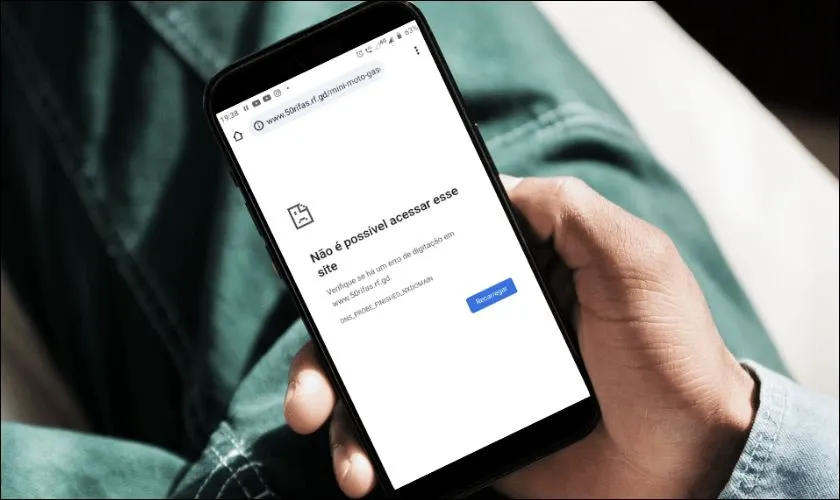
Error DNS_PROBE_FINISHED_NXDOMAIN occurs when the browser is unable to resolve the domain name you are visiting into its corresponding IP address. This results in the message"NXDOMAIN", which means the domain name does not exist or the host cannot be found.
>>> Learn more: What is DNS 1.1.1.1? Easy guide to install & change DNS 1.1.1.1
2. Signs of dns_probe_finished_nxdomain error on phone
You can easily detect this error through the following symptoms:
Certain websites are inaccessible, while others work fine.
Other devices on the same network can access the website, but your phone cannot.
The screen displays error messages such as:“Server not responding” or “DNS server not responding”, indicating that the DNS server is not responding.
>>> Learn more: How to Fix "Network Blocking Encrypted DNS" Error on iOS
3. Common causes of dns_probe_finished_nxdomain error
Error dns_probe_finished_nxdomain can originate from a variety of causes, including:
Incorrect URL entered: If you type the domain name incorrectly, the browser will not be able to access the corresponding IP address correctly.
Problem from DNS server: The DNS server being used is faulty or unstable, which can cause domain name resolution to fail.
Inappropriate VPN or Proxy Settings: VPN or Proxy applications can change DNS settings, causing conflicts and errors.
Incorrect network configuration: Errors in the configuration of IP addresses, DNS or gateways on the phone are also common causes of DNS errors.
>>> Learn more: What is Chrome net internals DNS? How to clear DNS cache in Chrome
4. Instructions to fix dns_probe_finished_nxdomain error on phone simply and effectively
Error dns_probe_finished_nxdomain is one of the common problems that prevent the phone from accessing the Internet. In this section,Hidemium will guide you how to handle this error quickly and easily right on your mobile device.
4.1. Change the web browser you are using
When you encounter the dns_probe_finished_nxdomain error, you can try switching to other browsers such as Microsoft Edge, Firefox, instead of default browsers like Google Chrome good Safari. Changing browsers can help fix temporary DNS errors and improve your browsing experience.

4.2. Reset Wi-Fi connection
If switching browsers doesn't solve the problem, it's possible that the problem lies with your Wi-Fi network configuration – specifically, your static IP settings don't match your device's dynamic IP. Follow these steps to reset:
Step 1: Access the application Setting on phone → select item Connect→ click on the icon gear of the Wi-Fi network you are using.
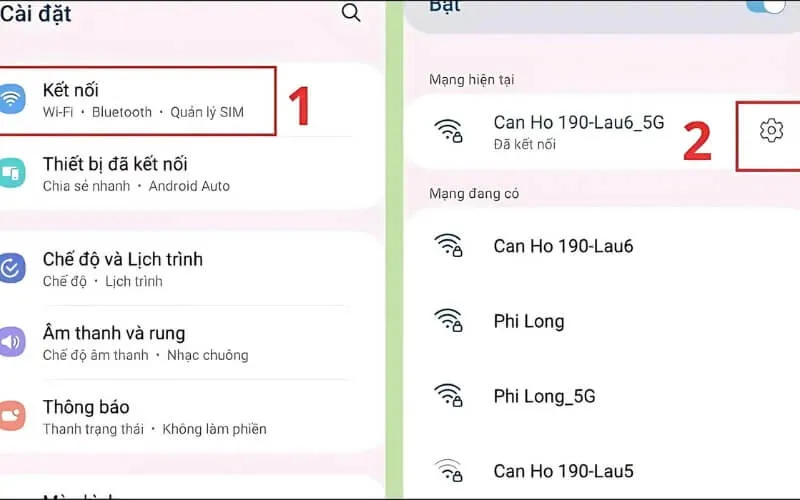
Step 2:Select section IP Settings and switch to mode Static.
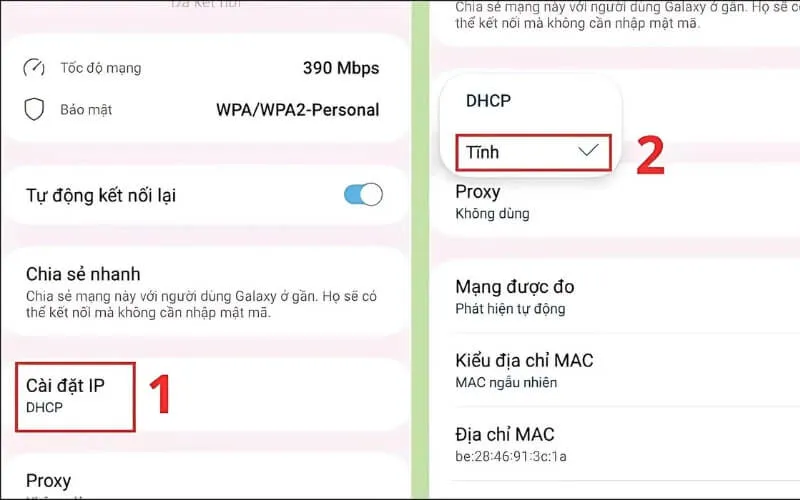
Step 3:Enter complete information including IP, DNS1, DNS2 and Gateway, then press Save to complete.
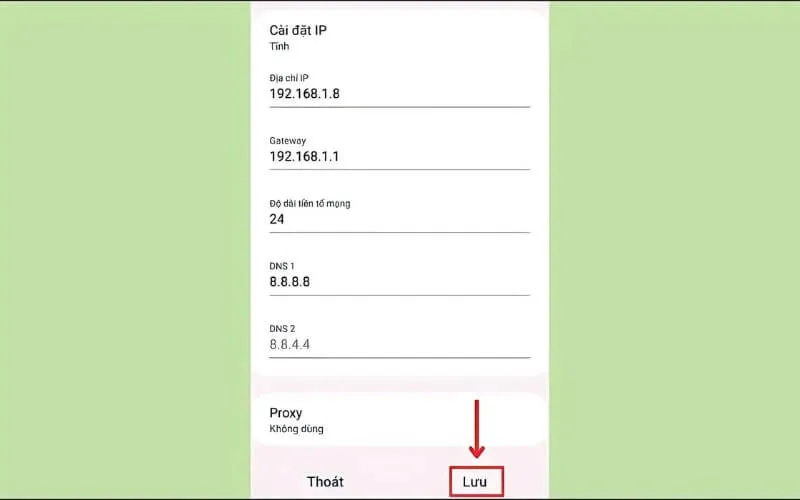
With the three simple steps above, you can fix the error. dns_probe_finished_nxdomain and restore network connection easily.
Above are ways to handle dns_probe_finished_nxdomain errors on your phone that you can do yourself at home. Hopefully the information from Hidemium will help you quickly fix problems and maintain a stable connection. Don't forget to follow us for more useful tech tips!
>>> See related articles:
Related Blogs

Google Gemini, also known as Google’s new AI, is reshaping the field of artificial intelligence with impressive multimodal capabilities. Developed by Google, Gemini not only processes text but also supports images, videos, and integrates tightly with Google tools. This article provides an overview of Gemini, compares it with traditional AI models, and explores how Hidemium supports Gemini in[…]
What is the best Dolphin Anty alternative in 2026?The best Dolphin Anty alternative in 2026 is Hidemium for teams that need stronger control over browser profiles, proxies, workspaces, team access, and multi-account operations.Dolphin Anty is known among affiliate marketers and media buyers. It can be useful for campaign-focused workflows where speed matters. But not every team wants only a fast[…]
.png)
In the context of rapidly advancing technology, mastering how to check Proxy and Firewall settings is crucial for protecting personal information and optimizing web browsing experiences. Let’s explore simple methods for checking Proxy and Firewall through detailed instructions in this article.What Does Check Proxy And Firewall Mean?The ERR_CONNECTION_REFUSED error is usually caused on the server[…]

When managing multiple accounts on the same device, many individuals and businesses face issues such as unstable profiles and frequent account suspensions due to overlapping fingerprints, IP addresses, or behavioral patterns. This is where Antidetect Browsers become a foundational solution—giving each account its own distinct “digital identity,” enabling more stable operation and making detection[…]
.png)
Protecting your identity is essential for any business managing multiple accounts. And your IP address is first. In this article, we will guide all you need to know about hiding your IP and using another IP. From information consistency to data center solutions, from proxies to more.How to hide your IP addressWhat do you want to hide your IP address for?Websites track multiple browser[…]

Running a dropshipping business on eBay can be highly profitable, but it also comes with a major risk: unexpected account suspensions. For dropshippers, managing multiple accounts on the same computer without proper protection can easily lead to account bans.Even a small mistake—such as using duplicate IP addresses or exposing your browser fingerprint—can result in immediate suspension. So how[…]
