
Managing multiple online identities or scraping data securely requires more than just a browser extension — it demands a reliable proxy solution. If you're using Hidemium, a popular anti-detect browser, combining it with QuarkIP’s high-quality proxy services can take your anonymity, stability, and performance to the next level.
In this guide, we’ll walk you through how to set up QuarkIP proxies in Hidemium — from selecting the right proxy type to configuration tips for maximum efficiency.
1.What is QuarkIP
QuarkIP, meanwhile, offers high-quality residential and datacenter IPs sourced from real ISPs. Whether you need static IPs for account farming or rotating IPs for automation tasks, QuarkIP provides flexible, stable, and high-anonymity solutions.
Together, they provide:
- 🔒 True browser-level isolation with fresh digital fingerprints
- 🌐 IP addresses that mimic real users from specific locations
- 🚀 Improved account survivability and lower risk of bans
- ⚙️ Easy integration—no advanced tech skills required
| Plan Type | Description | Price | Best For |
| Residential Proxies | Real ISP IPs with rotating or sticky sessions | Starting from $1.6/GB | Ad verification, secure logins |
| Datacenter IPv6 Proxies | High-speed, cost-effective static IPs | Starting from $1.74/Proxies | Automation, bulk actions |
| ISP Proxies | Fixed IPs from real ISP carriers | Starting from $7.48/Proxies | Long-term nurturing, high-trust platforms |
| Datacenter Proxies | High-speed IPs from cloud data centers | Starting from $4.52/Proxies | Account creation, social platforms |
2. Setting Up a Hidemium Proxy With QuarkIP
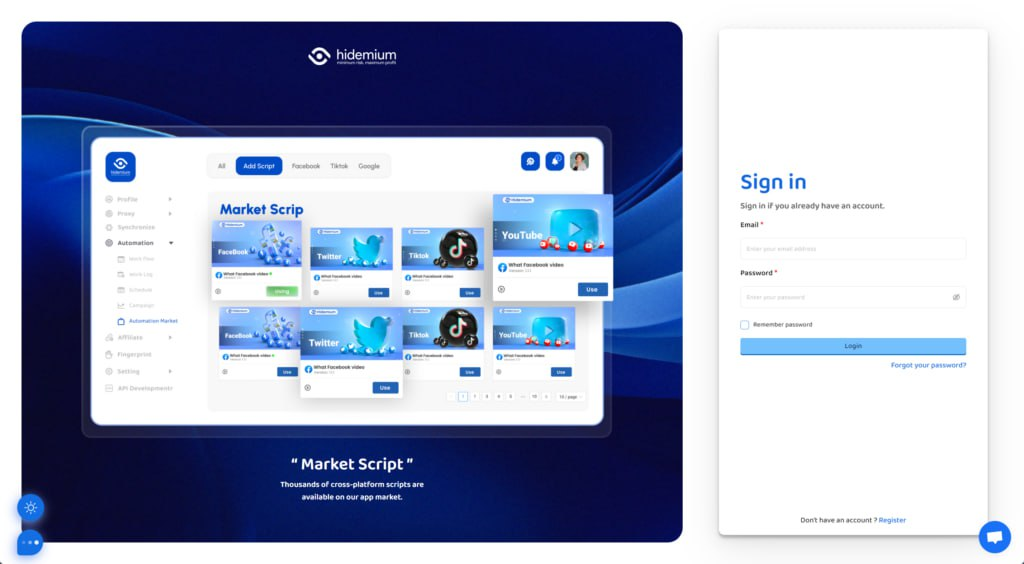
1.Download Hidemium, sign up if needed, and sign in
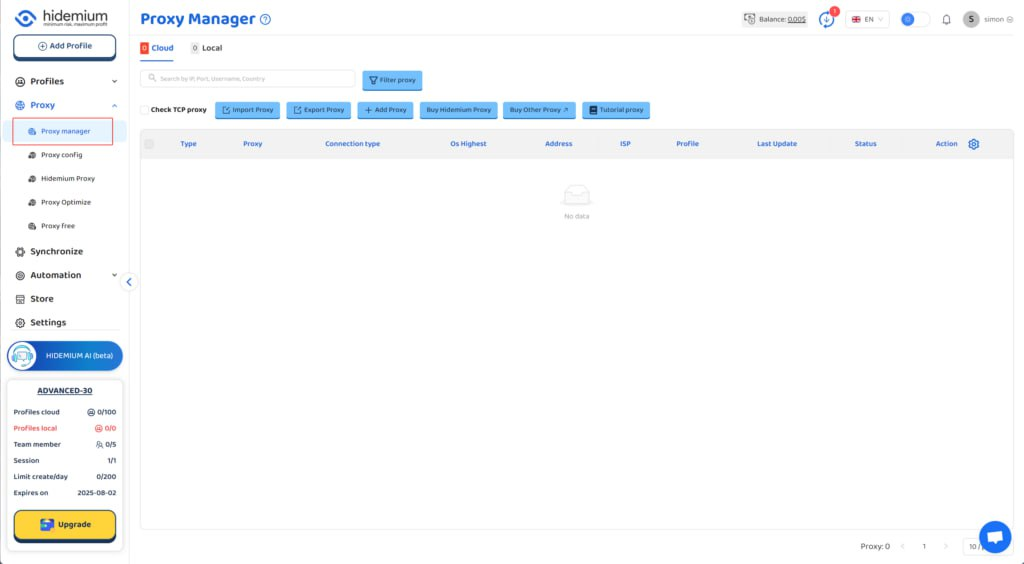
2.Go to Hidemium and click on 'Proxy manager'
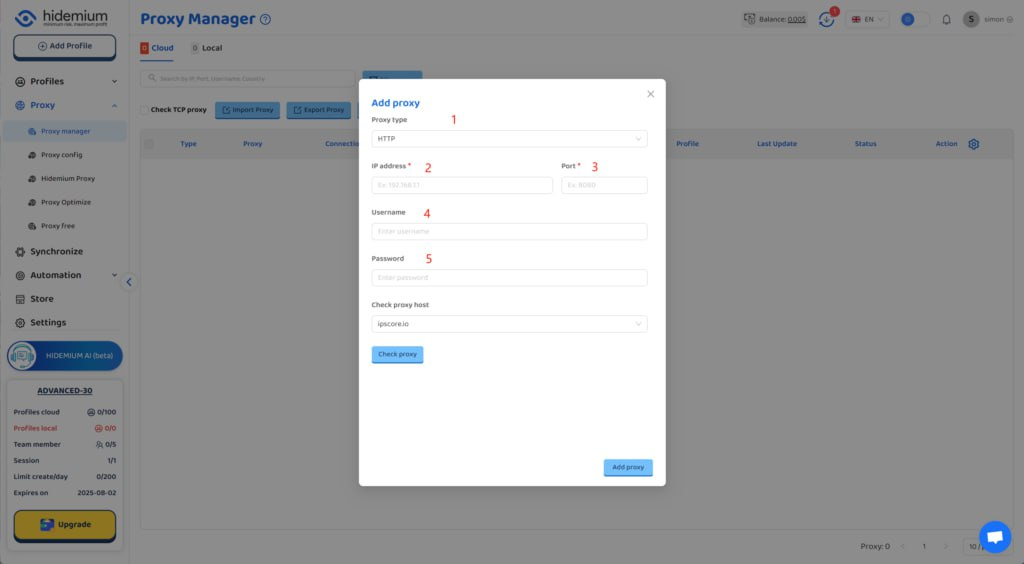
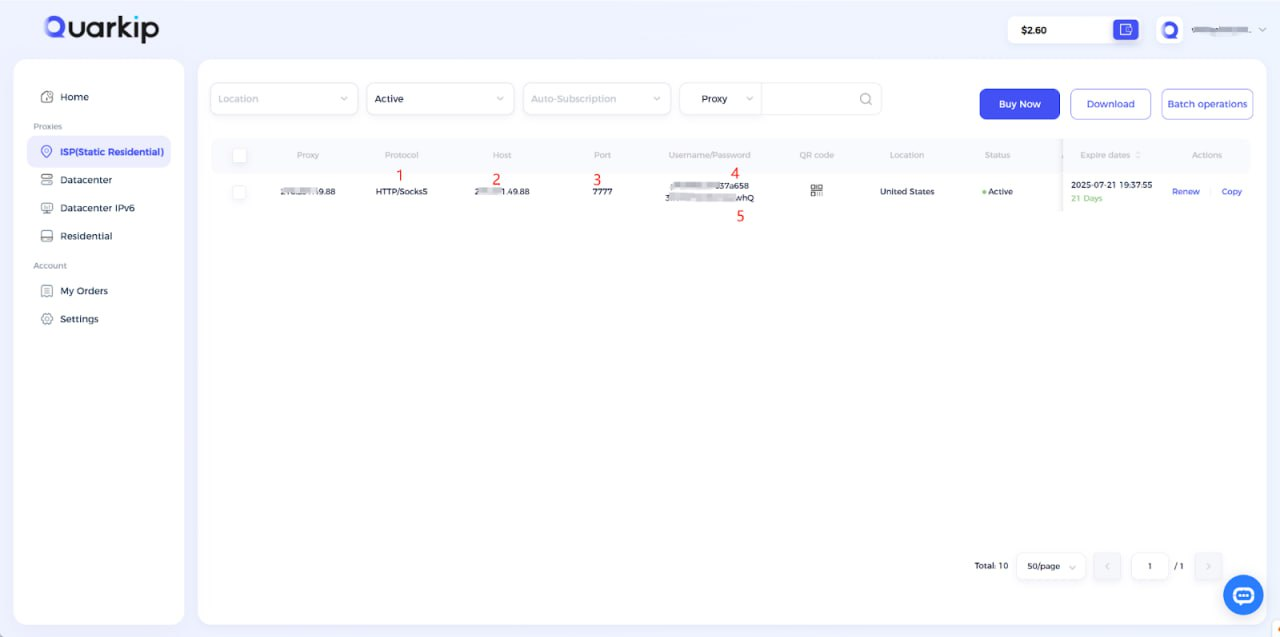
3. According to the content in the screenshot, enter the proxy protocol, proxy address, port, username, and password into their respective input fields, then click the confirm button.
Using QuarkIP's United States ISP proxies as an example, enter the corresponding proxy information into MoreLogin based on the provided labels.
Unlike other proxy products, you can freely select HTTP or Socks5 protocols without having to change the port number.
How do I purchase QuarkIP ISP proxies?
4. After the proxy is added and tested successfully, click the 'Add Profile' button at the top left
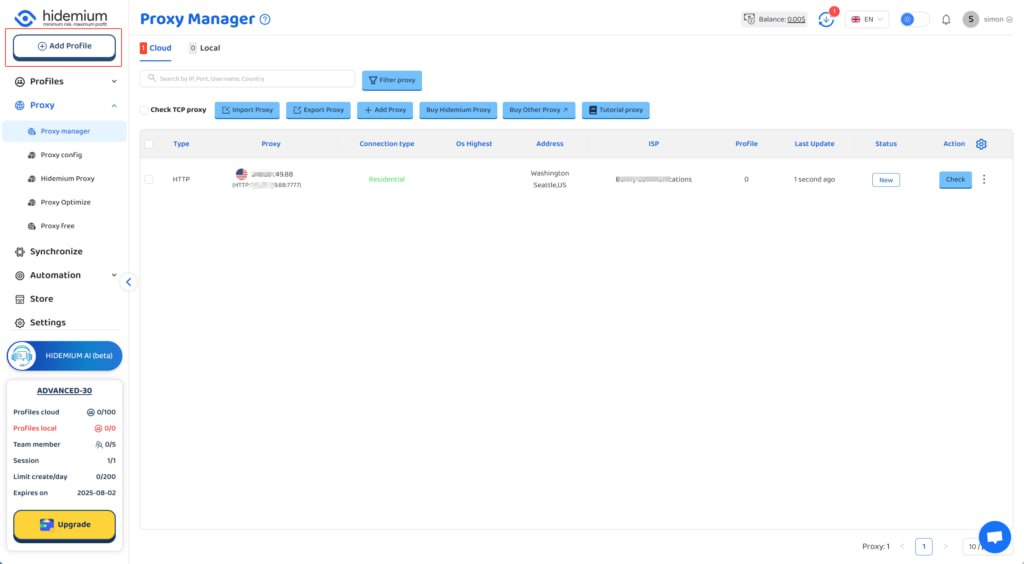
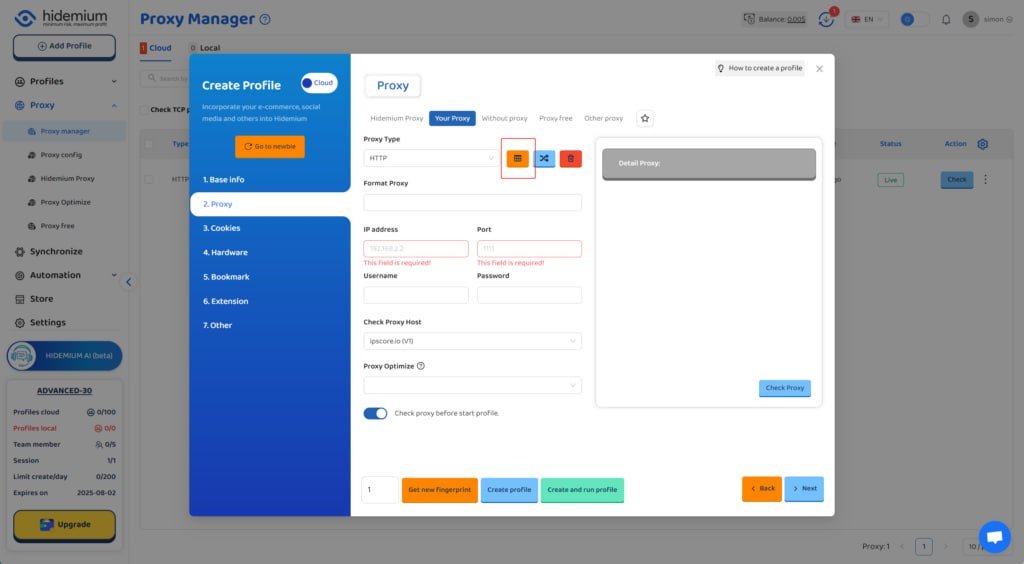
5. After filling in the other information, select the QuarkIP ISP US proxy we just added under the 'Proxy' section
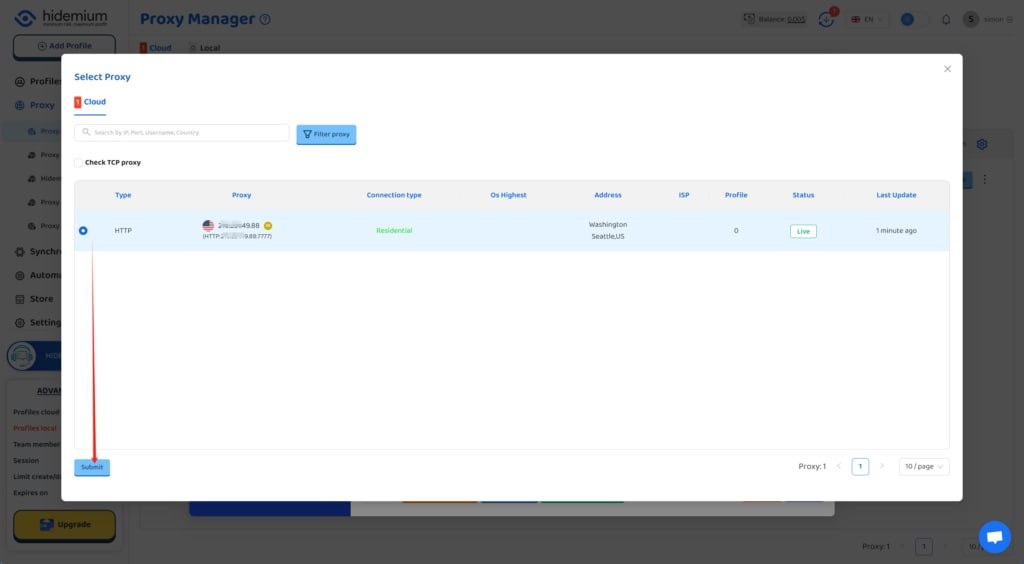
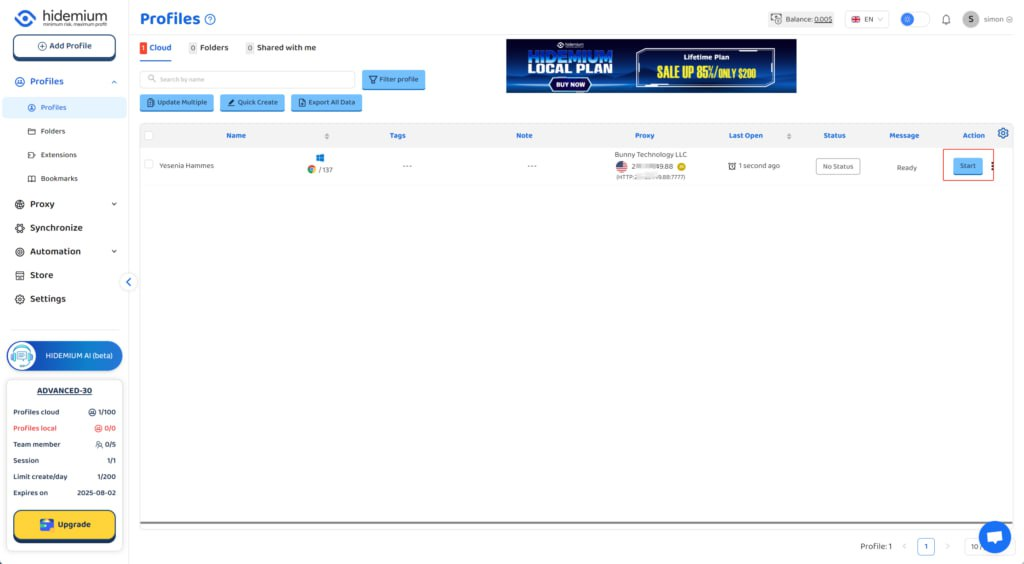
6. Click the start button, and you’ll see that the IP address has been changed
3. Best Practices When Using QuarkIP with Hidemium
To maximize performance:
- Rotate IPs regularly if using residential proxies.
- Use different fingerprints for each browser profile.
- Avoid logging into the same account across multiple profiles.
- Monitor proxy usage and switch countries as needed for testing or automation.
4. Final Thoughts
Pairing QuarkIP with Hidemium creates a powerful, stealthy browsing experience. Whether you're scaling operations or just starting out, setting up your proxy the right way can save you time, reduce friction, and boost success across your online tasks.
Have questions or need help? Contact QuarkIP support — we're here 24/7.

Related Blogs
Fiverr is one of the leading marketplaces in the world where employers can hire a freelancer to perform various digital services. Those services range from creating a website or logo for your business to video editing, photo design, video scripting, web analytics, etc. Nearly 4 million people rent digital services on Fiverr each year, and […]

Selling on Amazon offers great profit potential, but success requires the right strategies. With fierce competition among millions of sellers, optimizing Amazon search engine optimization (SEO) and using Amazon Sponsored Products ads are the keys to increasing visibility and achieving sustainable sales growth. This article will guide you on how to increase Amazon sales by combining these two[…]

2025 is the time of explosion of AI (artificial intelligence) and MMO (Make Money Online – make money online). It is no longer a game for the technology giants, now anyone who owns a laptop, internet connection and a little curiosity can also make money from the digital world.From writing content in ChatGPT, designing photos with Midjourney, to automating your money making with Hidemium API— all[…]
Do you think your canvas fingerprint blocker made you anonymous? Think again. As many understand information, canvas fingerprinting is the most recent development to track the web. In the past, the easiest way to prevent web tracking was to block out the monitoring method completely. For example, you disable cookies in your browser to prevent […]
.png)
GenLogin is marketed as a user-friendly software with a simple interface and basic security features. However, claiming to be "safe" and "user-friendly" is not enough to confirm its actual effectiveness. Many users have reported concerns about the platform potentially exposing personal information and raised issues regarding lack of transparency, particularly related to the integration of the P2P[…]
 (1).png)
Dropshipping has become one of the most popular dropshipping business models due to its ability to reduce storage and operational costs. This is particularly appealing for new startups. But the key question is: which platform should you choose to start your business journey?Among the many platforms available today, eBay and Amazon are two prominent names, highly regarded for their professionalism[…]
