

IPFoxy TikTok Proxy Review: Performance and How to Test Them
TikTok’s global reach demands reliable residential proxies to avoid IP hopping flags and boost local traffic. Yet most proxies fall short—data center IPs get blocked, cheap options risk contamination, and blacklisted IPs trigger bans.
Now we test IPFoxy’s residential proxies and share a review and tutorial to dodge these risks.
1. Why Does TikTok Require Residential Proxies?
As one of the world’s most popular short-video platforms, TikTok users and operators often face these challenges:
- Multi-Account Management: Avoid association risks when managing multiple accounts.
- Local Account Access: Unlock geo-specific content or trending hashtags for local traffic advantages.
- Marketing & Data Monitoring: E-commerce and ads require precise regional targeting.
IP Stability: Frequent IP changes may trigger TikTok’s risk controls, leading to issues like zero views.
Residential proxies, with their authentic home IP addresses, effectively mimic local user behavior, making them essential for TikTok operations.
2. What Is IPFoxy Residential Proxy?
IPFoxy is a premium proxy provider specializing in dynamic/desicated residential IPs and data center IPs. Covering 200+ countries/regions, its services cater to social media management, cross-border e-commerce, and data modeling. Key features include:
- High Purity: IPs from real residential networks reduce platform detection risks.
- Massive IP Pool: Over 50 million residential IPs claimed.
- Protocol Support: Switch freely between HTTP(S)/SOCKS5 for diverse use cases.
3. IPFoxy Performance Tests
- Test Environment
Target IPs: U.S., Japan, U.K. residential IPs.
- Testing Tools:
- Ping0 (IP type & blacklist detection).
- Scamalytics (IP fraud risk score).
- ipjiance.com ( IP tool for geolocation & DNS leaks).
- fast.com (speed test).
Key Metrics
| Metric | Result | Rating (5★) |
| IP Purity | Scamalytics fraud score ≤30 (low risk); some IPs scored 0. | ★★★★☆ |
| IP Type | 99% confirmed as residential (Ping0), low risk score (3%-11%), no data center traits. | ★★★★☆ |
| Speed | Avg. latency: 110ms; download: 38Mbps. | ★★★★ |
| Geo-Accuracy | Location error ≤3km (ipjiance.com). | ★★★★★ |
| Anonymity | No DNS/WebRTC leaks; complete proxy headers. | ★★★★☆ |
| Cost-Efficiency | Dynamic IP: $15/GB; static IP requires custom pricing. | ★★★☆ |
Below are some screenshots of the results:
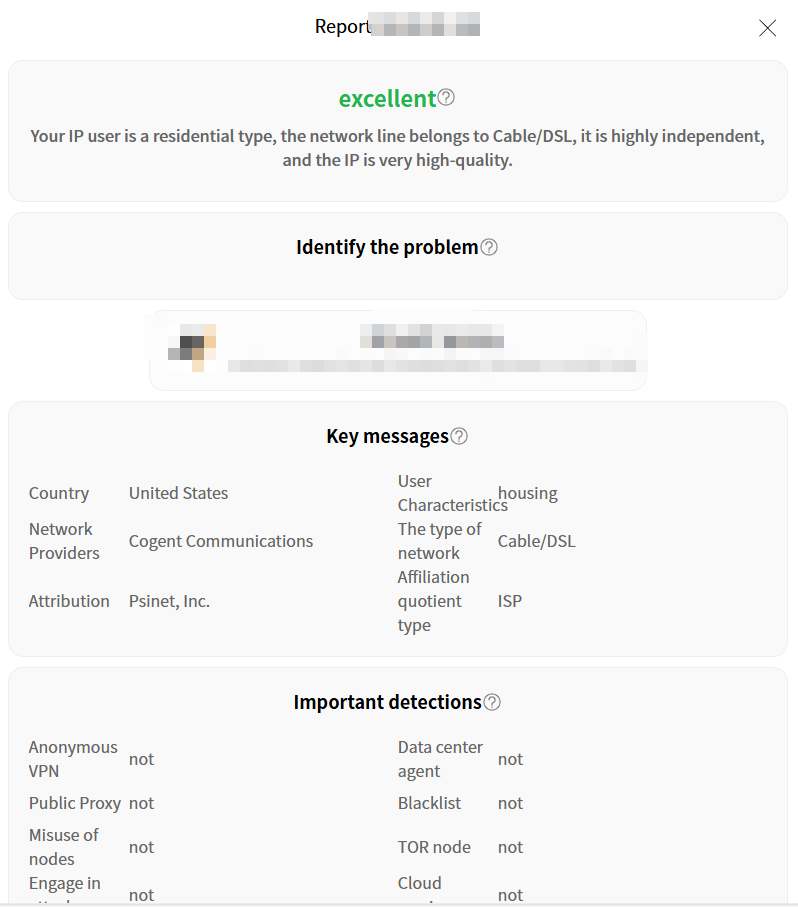
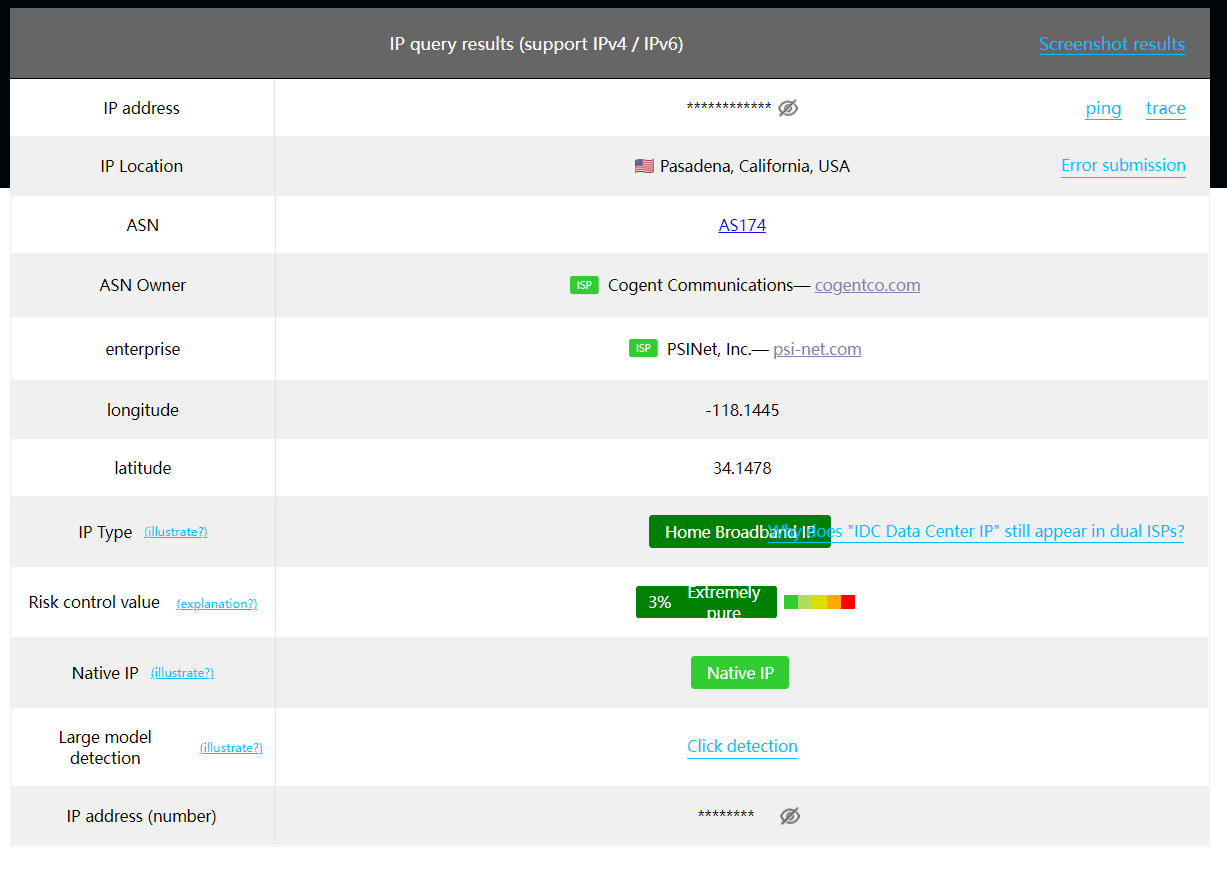
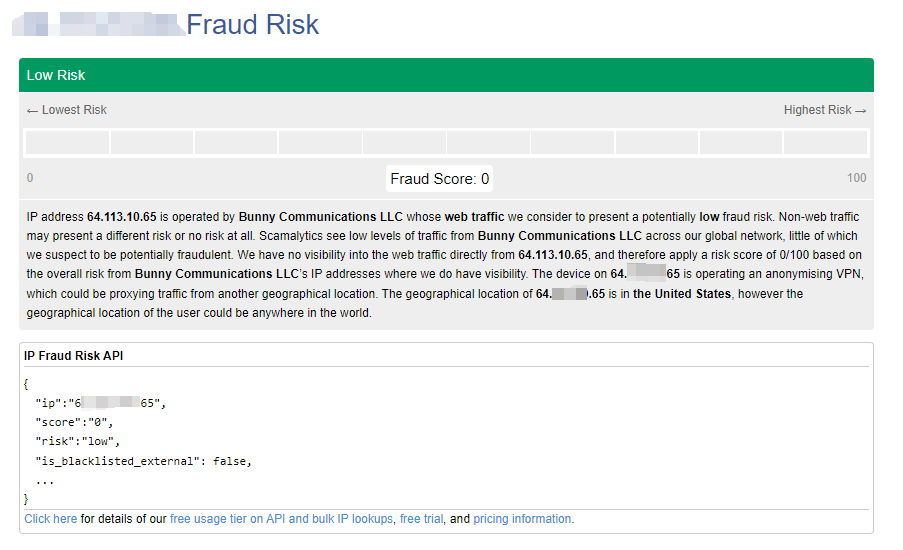
TikTok-Specific Tests
- IP Masking: Confirmed via ipjiance.com that IPs matched TikTok account regions.
- Risk Avoidance: High-risk IPs (Scamalytics score >75) triggered TikTok verification, while IPFoxy IPs (score <30) operated smoothly.
- Stability: 98.7% uptime over 24 hours (Ping0).
- Account Registration: Successfully created U.S./Japan accounts without SMS verification.
- Video Upload: 1080P videos loaded in ~8 seconds without lag.
4. IPFoxy Setup Guide (For TikTok)
Step 1: Sign Up & Purchase
Register on IPFoxy, choose residential rotating IP (pay-as-you-go) or dedicated IP (monthly plan).
After payment, obtain proxy details (address/port/credentials).
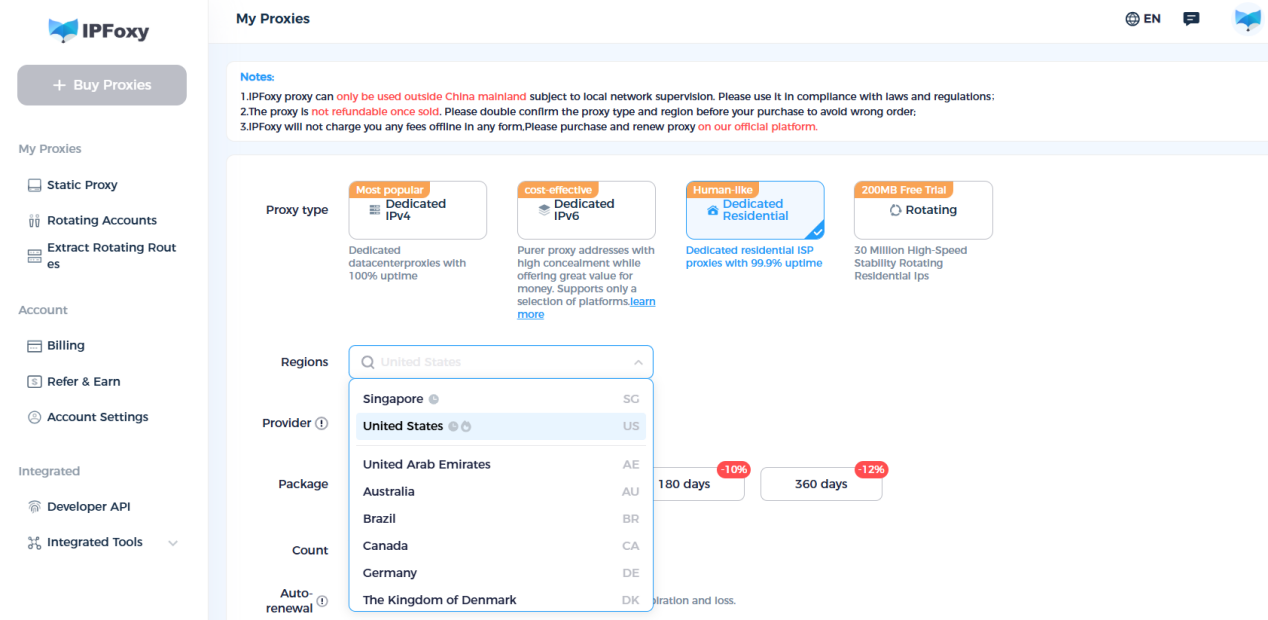
Step 2: Configure Proxy
Option A: Browser Setup (Single Account)
- Install a Chrome extension (e.g., FoxyProxy、ZeroOmega).
- Enter IPFoxy’s proxy details (HTTP/SOCKS5).
- Verify IP via IPapi or ipinfo.io.
Option B: Anti-Detect Browser (Multi-Account)
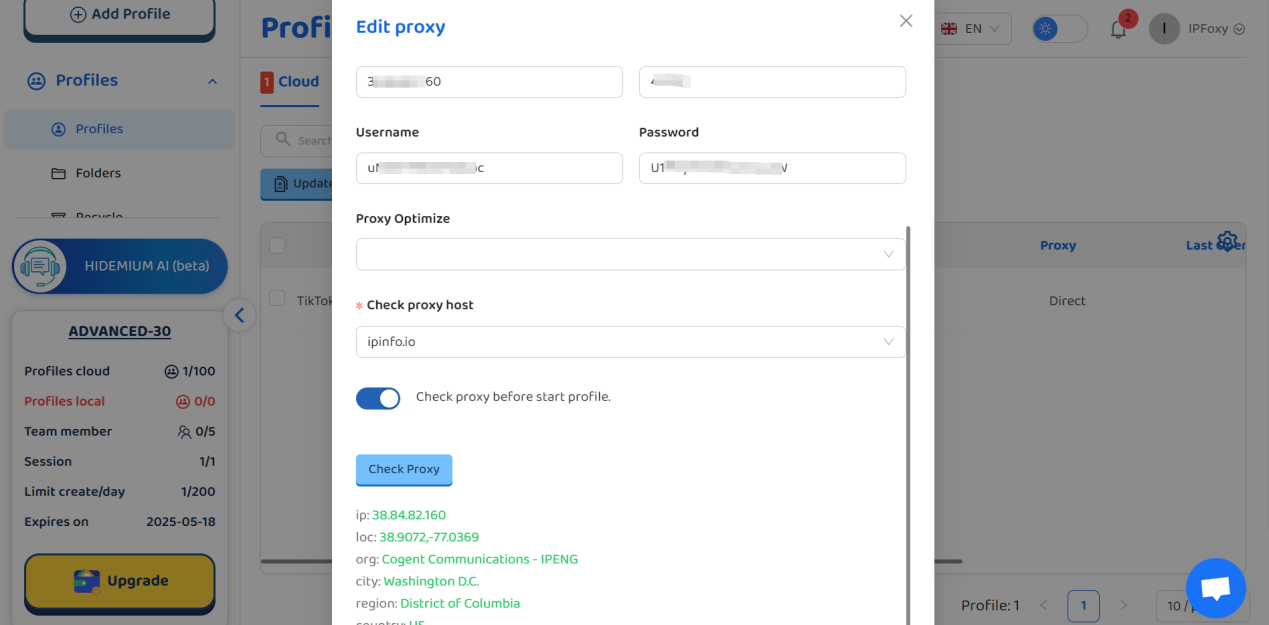
Use Hidemium to create isolated browser profiles.
Assign unique IPs per TikTok account (format: username:password@host:port).
Step 3: TikTok Verification
Check if "For You" page aligns with target region.
Post a test video to monitor traffic.
Confirm account region under: https://www.tiktok.com/settings/account.
5. Pros & Cons
✅ Strengths
- High-quality residential IPs for long-term account growth.
- SOCKS5 support outperforms competitors.
- Responsive customer service.
❌ Considerations
- Dynamic IPs consume traffic quickly; budget accordingly.
- Limited IP availability in developing regions.
Conclusion
IPFoxy residential proxies offer reliability and cost-efficiency for TikTok operations, especially for small-to-medium multi-account management. Pair them with anti-detect browsers and localized content strategies to minimize risks.
Pro Tip: Always comply with TikTok’s community guidelines. Avoid frequent IP switches and prioritize localized content.
Related Blogs

In the digital age, online identity protection and multi-account management are crucial for many industries. Online platforms are tightening moderation policies and using digital fingerprinting technology (browser fingerprinting) to detect and restrict unusual activities. This creates challenges for individuals and businesses operating multiple accounts, running advertising campaigns, or engaging[…]

Scaling a YouTube channel from a side project into a major marketing asset is a high-stakes endeavor. You need rapid growth to capture the algorithm's attention, but aggressive tactics can trigger YouTube's sophisticated detection systems, putting your entire channel at risk. The central challenge for every ambitious marketer is how to push the boundaries of growth without crossing the line into[…]

The choice AweSun – secure remote access software plays a vital role in helping large businesses, freelancers, and remote workers overcome the barriers of connecting and controlling computers in different locations. The right tools will give you the ability to seamless collaboration, session access and remote file transfer fast, efficient troubleshooting support anywhere in the world.To help you[…]
.png)
In an era where artificial intelligence is increasingly developing, anti-bot systems and automatic detection mechanisms are also increasingly sophisticated, making finding a antidetect browser Being truly effective is more difficult than ever. However, Hidemium and MuLogin still stand out as two options worth considering with strong anonymity capabilities, helping to maintain stable operations[…]
Best Octo Browser Alternative in 2026: Hidemium vs Octo Browser for Growing TeamsThe best Octo Browser alternative in 2026 is Hidemium for growing teams that need browser profiles, proxies, workspaces, team access, and scalable account operations. In the Hidemium vs Octo Browser comparison, Octo Browser is strong for polished profile control, while Hidemium is stronger for teams that need[…]

How to Change MAC Address on Mac: Complete Privacy GuideIn today's hyper-connected world, protecting your digital identity has never been more important. Every time your Mac connects to a network, it broadcasts a unique hardware identifier that can be logged, tracked, and used to build a profile of your behavior. If you've ever wondered how to change MAC address on Mac, you're not alone — it's[…]
