



.png)
Managing multiple online accounts becomes increasingly complex as teams expand across e-commerce, advertising, affiliate marketing, and digital operations.
Every account may require its own login session, browser settings, network configuration, and authorized operator. Without a structured system, even a small mistake—such as opening the wrong customer account or changing an important proxy setting—can disrupt daily operations.
This is where Hidemium and FleetProxy can work together.
Hidemium provides browser-profile management and session separation, while FleetProxy supplies proxy connections for workflows that require specific network configurations.
Together, they help businesses organize multi-account operations without relying on dozens of separate browser installations.
1. What Is Hidemium and FleetProxy Integration?
1.1 Quick Answer: How Do Hidemium and FleetProxy Work Together?
Hidemium + FleetProxy integration combines isolated browser profiles with configurable proxy connections.
Hidemium manages the browser environment, including cookies, local storage, profile settings, and sessions.
FleetProxy provides a network connection that can be assigned to a Hidemium profile.
This combination helps users separate browser workflows, organize account access, and verify network configurations from a centralized setup.
However, neither an antidetect browser nor a proxy guarantees protection against account restrictions. Users must still comply with the policies of the platforms they access.
1.2 What Does Hidemium Manage?
Hidemium is an antidetect browser designed for multi-profile workflows.
Depending on the available software features and plan, users can organize browser profiles with separate configurations for:
- Browser sessions and login data
- Cookies and local storage
- Browser fingerprint settings
- Proxy connections
- Account or project organization
- Supported team-management workflows
- Permitted browser automation
For agencies and e-commerce teams, these features make it easier to distinguish one client environment from another.
Learn more: How Hidemium supports multi-account management.
1.3 What Does FleetProxy Provide?
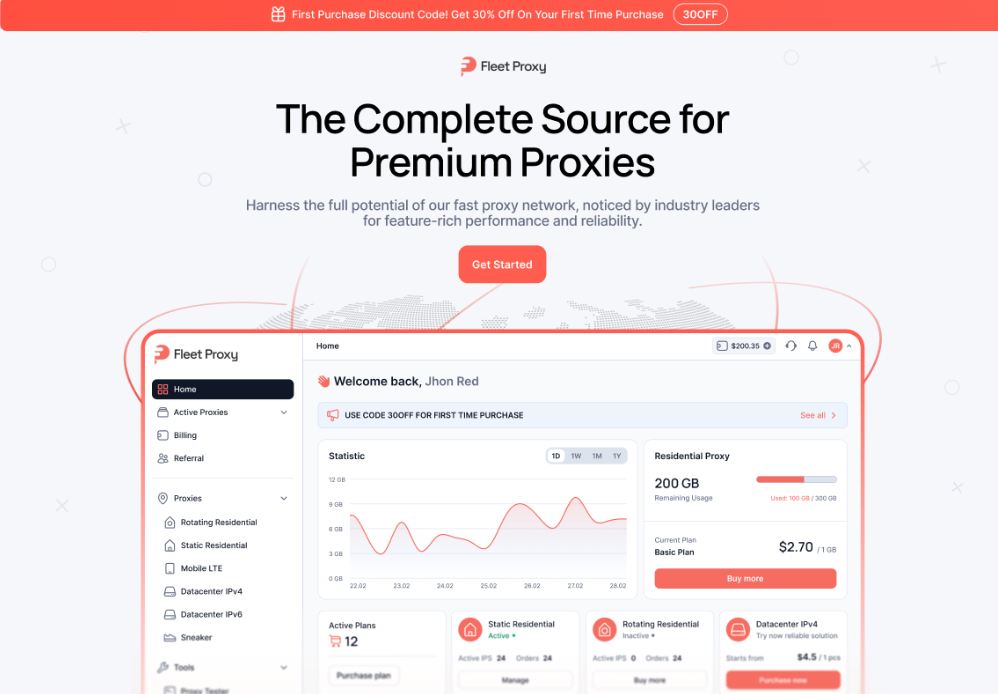
FleetProxy is a proxy service offering several network options, including residential, mobile, and datacenter proxies.
Its available products include rotating and static connection types, allowing businesses to choose a configuration based on workflow requirements.
FleetProxy supplies the proxy endpoint and authentication details. Hidemium uses those details to connect the relevant browser profile.
A proxy changes the route used for the network connection. It does not automatically change every browser fingerprint characteristic, and it does not create a new verified identity.
2. Why Combine an Antidetect Browser with a Proxy?
Using a proxy alone does not separate browser cookies, local storage, or account sessions.
Likewise, creating separate browser profiles without checking their network configurations can lead to unexpected connection behavior.
Hidemium and FleetProxy address different parts of the workflow.
Component | Main function | Practical benefit |
| Hidemium browser profile | Separates browser sessions and profile data | Helps reduce account mix-ups |
| Browser configuration | Controls supported browser-environment settings | Makes profiles easier to configure and review |
| FleetProxy connection | Routes traffic through the selected proxy service | Supports workflow-specific network requirements |
| IP verification | Confirms the visible outgoing connection | Detects incorrect proxy configurations |
| Profile organization | Groups environments by project or client | Simplifies large-team operations |
| Team procedures | Define ownership and responsibilities | Reduces accidental access and changes |
The objective is better operational control, rather than attempting to make every account invisible to platform security systems.
3. Can Hidemium Support 10,000 Browser Profiles?
Large-scale browser-profile management involves more than creating a high number of profiles.
The original Hidemium and FleetProxy article refers to scaling 10,000 profiles daily. However, the exact number of profiles that can be created, stored, or operated concurrently should be confirmed against the current Hidemium plan and technical specifications.
These are different capacity measurements:
- Profiles created: The number of configurations generated during a period.
- Profiles stored: The total number of saved browser profiles.
- Concurrent profiles: The number of browser sessions running at the same time.
- Automated tasks: The number of workflows that can execute with available resources.
A tool may support large numbers of saved profiles without supporting the same number of simultaneous browser windows.
3.1 What Determines Real-World Scaling Capacity?
Actual performance depends on several factors:
Hardware resources
Each active browser process requires memory, processor resources, and storage. The available hardware can become a bottleneck long before the total profile count is reached.
Proxy capacity
Connection limits, data allowances, latency, and the selected proxy plan affect how many workflows can operate concurrently.
Task complexity
Opening a lightweight dashboard is different from running complex web applications, processing media, or executing automation.
Platform requirements
Every service has its own account rules, usage limits, and automation restrictions.
Team operations
Clear naming, permission management, monitoring, and recovery procedures become more important as the number of profiles increases.
For serious deployments, test representative workloads before committing to a large-scale rollout.
4. How to Choose the Right FleetProxy Type for Hidemium
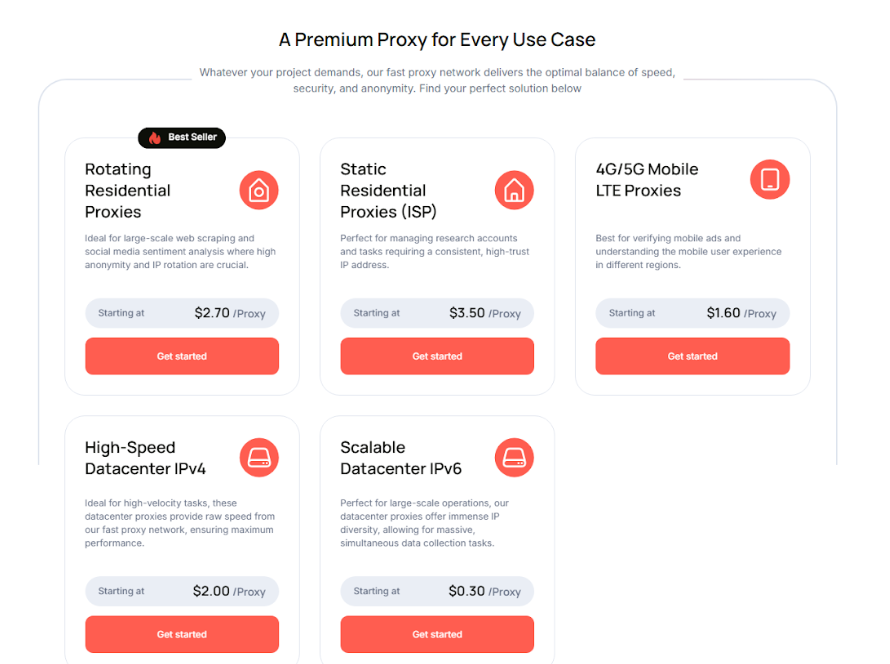
FleetProxy offers different proxy categories for different technical and operational needs.
Proxy type | Typical characteristics | Potential use |
| Rotating residential | Residential IPs that may change according to session settings | Authorized web research and workflows requiring rotating endpoints |
| Static residential | More persistent ISP-associated connection | Workflows that benefit from a consistent network endpoint |
| Rotating mobile | Mobile-network IPs with rotation options | Testing mobile-network access and regional connectivity |
| Mobile LTE | Mobile carrier connectivity with plan-specific settings | Mobile-network testing and business connectivity needs |
| Datacenter | Server-based IP infrastructure | Speed-sensitive tasks where the destination permits this access type |
4.1 Should Every Hidemium Profile Have a Different Proxy?
Not necessarily.
The appropriate proxy configuration depends on the account, purpose, platform policies, and operational needs.
For a long-running authorized business session, a stable network can be more useful than frequent IP rotation.
For permitted data collection or testing, a rotating connection may be appropriate.
Avoid changing proxies without a clear reason. Record which connection is assigned to which profile and verify its behavior after changes.
4.2 Residential vs. Mobile vs. Datacenter: Which Is Best?
There is no universally best proxy category.
Consider the following criteria before purchasing:
- Required countries or regions
- Static versus rotating IP behavior
- Connection reliability
- Bandwidth consumption
- Authentication method
- Protocol compatibility
- Supported concurrent connections
- Provider pricing and usage terms
Choose based on the actual workload instead of assuming a particular IP category will prevent account reviews.
5. How to Set Up FleetProxy in Hidemium: 7 Steps
The following workflow follows the general integration process documented by FleetProxy.
Step 1: Install Hidemium and Prepare Your FleetProxy Account
Download Hidemium from its official website:
Next, open FleetProxy and select a suitable proxy plan:
Make sure your proxy service is active and that you have access to its connection credentials.
Step 2: Retrieve Your FleetProxy Credentials
Open the FleetProxy dashboard and locate the active proxy product you want to use.
Depending on the product, the dashboard provides or generates:
- Proxy host
- Port
- Username
- Password
- Supported proxy protocol
Some products also allow selection of location and IP rotation behavior.
Use the actual values provided by your dashboard. Do not copy example credentials from public tutorials into a production profile.
Step 3: Create a New Browser Profile in Hidemium
Open Hidemium and select the option to add a profile.
Choose a descriptive profile name that identifies the workflow.
For example:
Client-A | E-commerce | Support
Agency-B | Advertising | Reporting
Project-C | QA | Regional-Test
Select the browser and operating-system configuration appropriate for the task.
Unless you have a documented reason to change advanced settings, starting with the recommended configuration is generally easier to maintain.
Step 4: Add FleetProxy to the Profile
Within the Hidemium profile settings, open the proxy configuration section.
Select the option for a custom or existing proxy and choose the protocol supported by your FleetProxy plan.
Enter or paste the required connection details:
- Host
- Port
- Username
- Password
Ensure that the protocol and endpoint match the settings generated by FleetProxy.
For the current interface, FleetProxy provides a dedicated guide:
Official FleetProxy + Hidemium Setup Guide
Step 5: Test the Proxy Connection
Use Hidemium's available proxy-checking function before saving or starting the profile.
Confirm that the connection succeeds.
Review the reported:
- Outgoing IP address
- Country and approximate location
- Network provider or ASN, where available
- Connection status
If the test fails, check the credentials, protocol, port, and proxy subscription status.
Step 6: Verify the Browser Environment
After launching the profile, test the connection from inside that profile's browser window.
Check whether the visible public IP matches your selected proxy session.
You can also review:
- Browser version and User-Agent
- Time zone
- Language settings
- DNS behavior
- WebRTC information
- Canvas and WebGL characteristics
A proxy test and a fingerprint test measure different things.
A correct IP address does not prove that every browser setting is configured as intended.
Read more: How to Check Your Hidemium Profile's IP and Browser Fingerprint.
Step 7: Save, Organize, and Review Profiles
Once the profile works as expected, save the configuration and record its purpose.
Keep a simple register containing:
- Profile name
- Client or project
- Assigned operator
- Proxy type
- Network region, if relevant
- Last configuration check
- Access permissions
- Notes about the workflow
As the number of profiles grows, scheduled reviews can help identify inactive environments, outdated connections, and unnecessary access permissions.
6. FleetProxy Discount: How to Use Code 30OFF
FleetProxy currently advertises a 30% discount on a first purchase with the promotional code 30OFF.
To use the offer:
- Visit FleetProxy.
- Choose a proxy product suitable for your requirements.
- Review the selected plan and billing terms.
- Enter 30OFF during checkout if the promotion is available.
- Confirm the discount before completing payment.
Promotional terms and eligibility can change, so always check the amount displayed at checkout.
For a new setup, start with a smaller test rather than buying more proxy capacity than the workflow requires.
7. Practical Use Cases for Hidemium and FleetProxy
7.1 E-commerce and Dropshipping
An e-commerce team may work with multiple authorized storefronts or regional dashboards.
Hidemium helps keep each store's browser session separate, while a documented proxy configuration supports specific networking requirements.
Possible tasks include:
- Store administration
- Customer support
- Product research
- Regional website testing
- Authorized seller-account access
Teams must still comply with marketplace requirements for seller identities, related accounts, dropshipping, payments, and fulfillment.
7.2 Advertising Agencies
Agencies frequently work with different clients across Meta Ads, Google Ads, and other advertising platforms.
Separate browser profiles help staff avoid mixing client sessions.
A structured workflow also makes it easier to assign responsibility, document settings, and review account access.
Official business permissions and two-factor authentication remain essential. Browser isolation does not replace platform authorization.
7.3 Affiliate Marketing Teams
Affiliate teams may manage reporting portals, content websites, analytics tools, and approved campaign accounts.
Dedicated browser profiles can simplify organization across clients or projects.
Automation, where used, should follow the rules of the affiliate networks and destination websites. Avoid fabricated engagement, invalid traffic, and deceptive account activity.
7.4 QA Testing and Market Research
Testing teams can use separate profiles to compare website behavior under different configurations.
When permitted, proxy connections may support regional testing and accessibility checks.
This helps teams document which network configuration was used for each test and reproduce results more consistently.
8. Common Hidemium and FleetProxy Problems and How to Fix Them
Problem | Possible cause | Recommended action |
| Proxy connection fails | Incorrect credentials, protocol, or inactive plan | Recheck the FleetProxy dashboard and Hidemium settings |
| The wrong country appears | Incorrect location selection or geolocation database differences | Verify the outgoing IP and compare the proxy session details |
| The browser uses the original IP | Proxy not saved or not applied to the correct profile | Reopen profile settings and confirm the active proxy |
| Login verification appears | Platform security checks or account-related signals | Follow the platform's official verification process |
| The browser runs slowly | Limited hardware resources, network latency, or heavy tasks | Reduce concurrent workloads and test system performance |
| Proxy usage costs increase | Excessive bandwidth or inefficient tasks | Monitor traffic consumption and optimize the workflow |
| Team members open the wrong profile | Poor naming or unclear ownership | Adopt standardized names and documented responsibilities |
For additional troubleshooting, consult the FleetProxy integration documentation.
9. Best Practices for Managing Browser Profiles at Scale
A reliable setup needs more than software and proxy subscriptions.
Use this operational checklist before expanding your workflow:
- Confirm that every account is authorized and follows platform rules.
- Use descriptive profile names and consistent categories.
- Separate unrelated browser sessions and local storage.
- Select proxy types based on technical requirements.
- Record the network configuration assigned to each profile.
- Test outgoing IP information inside the active profile.
- Keep credentials secure and enable two-factor authentication.
- Limit employee access to the accounts they are authorized to manage.
- Monitor concurrent browser usage and available hardware resources.
- Review proxy consumption and operating costs.
- Test automation on a small scale before wider deployment.
- Maintain procedures for troubleshooting, account recovery, and staff offboarding.
The goal of scaling is operational consistency—not simply increasing the number of profiles.
10. Conclusion: Build a More Reliable Multi-Account Workflow
Hidemium and FleetProxy address two complementary parts of multi-account operations.
Hidemium helps organize and separate browser environments, while FleetProxy provides configurable network connections.
For agencies, e-commerce teams, affiliate marketers, and QA professionals, this integration can make browser-profile management more structured and easier to review.
However, large-scale operations still depend on appropriate hardware, proxy capacity, platform compliance, and effective team processes.
Instead of assuming that thousands of profiles will automatically produce higher revenue or avoid restrictions, build a repeatable system, validate its performance, and expand according to real operational needs.
Ready to explore the integration?
- Get Started with Hidemium
- Explore FleetProxy and Check Available Offers
- Follow the Official Integration Guide
11. Frequently Asked Questions
1. What is Hidemium FleetProxy integration?
It is a setup that combines Hidemium browser profiles with FleetProxy network connections. Hidemium manages browser sessions and profile settings, while FleetProxy provides proxy endpoints for supported workflows.
2. Can Hidemium create 10,000 profiles per day?
The original article mentions this figure, but it should not be treated as a verified current product limit without confirmation. Profile creation, storage capacity, and simultaneous browser operation are separate technical requirements.
3. Does every Hidemium profile need a different proxy?
No. Proxy requirements depend on the workflow, platform rules, and networking needs. Separate proxies may be useful for some approved operations, but they are not mandatory for every profile.
4. Which FleetProxy type is best for Hidemium?
It depends on whether you need a persistent connection, rotating addresses, mobile-network testing, or datacenter performance. Compare the products against your actual workload and budget.
5. How do I configure FleetProxy in Hidemium?
Retrieve your proxy host, port, username, and password from FleetProxy, create a Hidemium profile, enter the proxy details, run the connection test, and verify the outgoing IP in the profile window.
6. Will Hidemium and FleetProxy prevent account bans?
No. These tools help organize browser environments and network connections. They cannot guarantee that a platform will approve an account or prevent restrictions caused by policy, identity, payment, or security issues.
7. Can I use Hidemium and FleetProxy for advertising and e-commerce?
They can support legitimate workflows involving authorized accounts. Users should review each platform's rules on multi-account access, seller ownership, advertising, and automation before deployment.
8. Is the FleetProxy 30OFF coupon available?
FleetProxy advertises a 30% first-purchase offer with code 30OFF. Confirm current eligibility and the final discount during checkout because promotional terms may change.