When you access the internet, you're not only tracked by cookies as in the past. Today, websites can identify users through a more sophisticated method.– browser fingerprint(browser fingerprint). This is a type of "digital signature" created fromYour device and browser environment are the main factors.
That's also why tools like BrowserScan were created. Instead of being anonymous, this tool helps you see clearly.What are you revealing on the internet?This will lead to more effective privacy protection measures. Hidemium Antidetect BrowserWe will explore BrowserScan with you in this article.
1. What is browser fingerprinting?
A browser fingerprint is a collection of technical information gathered from your device and browser to form a nearly unique identifier. Even if you delete cookies, websites can still recognize you based on this data.
This method is commonly used for various purposes, such as:
Personalize advertising.
Track user behavior.
Detect fraud or bots.
Some common data used to create fingerprints includes:
Browser and operating system versions
Screen resolution, system language
Installed fonts and plugins
Device time zone
Data from WebGL, Canvas (creating a unique graphic "signature")
👉 Combining all these factors, each device essentially has its own unique "hidden ID" on the internet.
>>> Learn more: 7 Free Online IP Fingerprint Verification Tools
2. Overview of BrowserScan
2.1 What is BrowserScan?
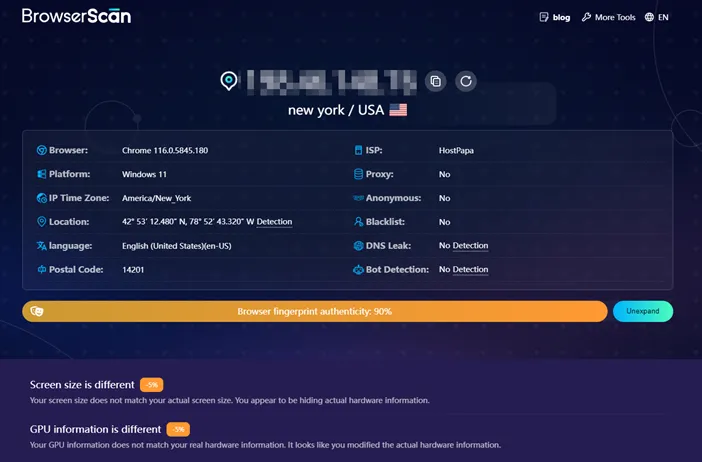
BrowserScan is a tool that helps you check all the information your browser and network connection are revealing to websites. Simply put, it acts like a "digital mirror," reflecting your level of online recognition.
The unique thing about BrowserScan is that it doesn't help you stay anonymous, but focuses on...clearly displays the digital trace.So that you can understand and control it better.
2.2 How does BrowserScan work?
During the testing process, BrowserScan analyzes several key factors related to privacy and security:
Browser fingerprint analysis
Collect information such as user agent, font, time zone, and resolution.
Check audio data and system elements.
Analyze WebGL and Canvas to identify unique "digital signatures".
Check IP & network
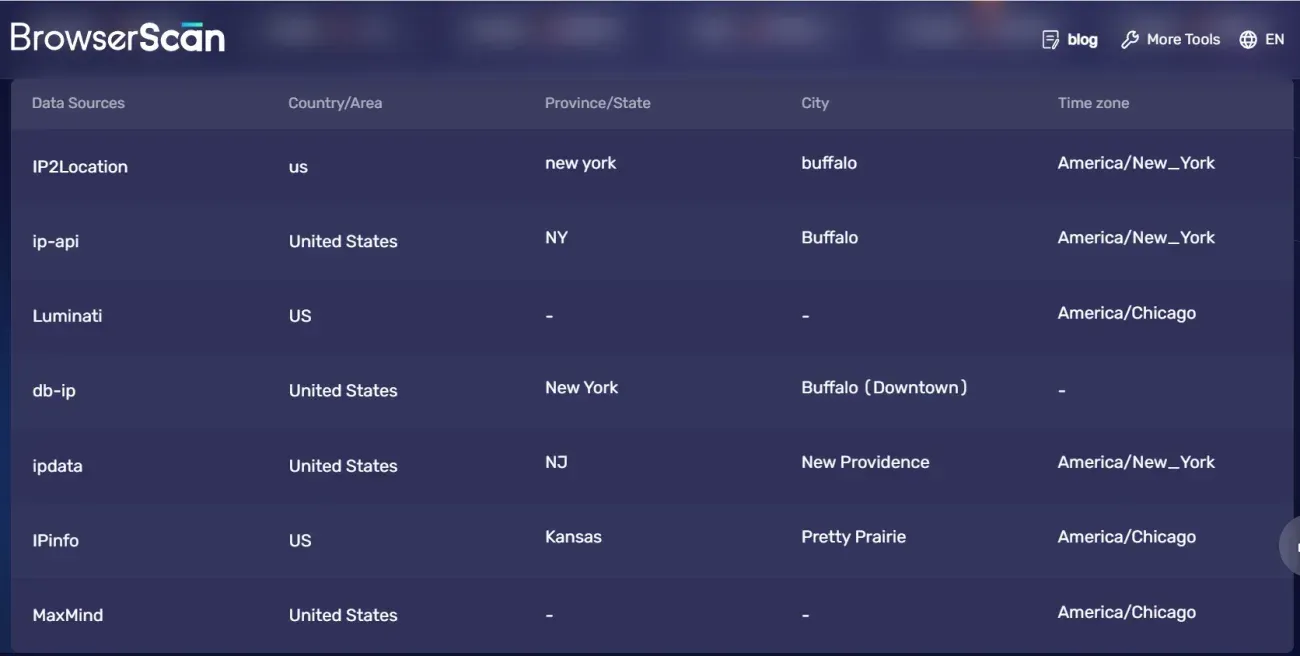
Displays the public IP address and Internet Service Provider (ISP).
DNS leak detected – a potential cause of revealing your real location even when using a proxy/VPN.
Internet speed test
Check download and upload speeds.
Evaluate the latency of the connection.
Open Ports
Identify the open ports on the device.
Warning about security risks if the configuration is not secure.
👉 In short, BrowserScan not only helps you know "who you are on the internet," but it's also the first step in building a more effective security and anonymity strategy – especially important for those in marketing, MMO, or managing multiple accounts.
>>> Learn more: How to Effectively Fake IP Using VPN and Proxy – A Complete Guide for 2025
3. Why should you use a tool like BrowserScan?
In today's digital environment, understanding your own "digital footprint" is no longer exclusive to tech professionals. Whether you're a casual user or working in marketing, knowing this is essential.How is my browser being tracked?It is an extremely important factor.
Tools like BrowserScan help transform these intangible elements into concrete data, allowing you to proactively control and optimize your online security.
3.1 For those concerned about privacy
What are you actually revealing on the internet?
Many people think that simply using incognito mode or deleting cookies is enough to protect themselves. But in reality, websites can still collect a lot of fingerprint data without your knowledge.
BrowserScan helps you:
Displays detailed information about the browser and device that is being "leaked".
Discover hidden tracking signals that you're not aware of.
Assess your level of privacy when browsing the web daily.
👉 Understanding the key issues is the first step towards more effective privacy protection.
3.2 With affiliates, media buyers, and eCommerce sellers
Reduce the risk of mass account suspensions.
When managing multiple accounts across advertising platforms or marketplaces, similar profiles can lead to detection and restrictions by the system.
With BrowserScan, you can:
Check if the profiles show any signs of being linked.
Ensure each browser environment has a unique fingerprint.
Identify risks before launching a live account.
👉 This is an extremely important "pre-check" step if you want to scale your system safely.
3.3 With the agency and marketing team
Protect customer accounts professionally.
Agencies often manage multiple accounts simultaneously. Even a small fingerprint error can affect the entire system.
Using BrowserScan helps:
Verify that each account runs in an independent environment.
Unusual duplicates detected between browser profiles.
Maintain the stability and credibility of customer accounts.
👉 This is an additional layer of protection that helps agencies minimize long-term risks.
3.4 For automation and web scraping professionals
Check before being blocked
One of the common reasons bots or scripts get blocked is that their fingerprints are too obvious or unnatural.
BrowserScan allows you to:
Assess whether the current environment resembles real human behavior.
Identifying easily detectable weaknesses in fingerprints.
Optimize configuration before running large-scale automation.
👉 This helps save resources and minimize unnecessary interruptions.
3.5 Simple tools with extremely wide applications
No matter who you are, BrowserScan acts as a "screening tool" to help you understand how websites perceive your browser.
Once you understand the potential risks, you can then:
Adjust the configuration.
Enhance security
And build a safer online environment.
👉 In this digital ageeffect,Understanding how you are being watched is your biggest advantage..
>>> Learn more: How to set up a static IP address on Windows quickly, simply, and effectively.
4. How to use BrowserScan effectively (detailed step-by-step)
Using BrowserScan is quite simple, but the real value lies in how you use it.Read and utilize the data after scanning.Below is a step-by-step process to help you not only check but also improve your online anonymity.
Step 1: Access and run the test.
Access the BrowserScan website. As soon as you enter the page, the system will automatically scan and display all the information your browser is exposing on the internet in real time.
Step 2: Analyze the returned results.
After the scanning process is complete, scroll down to see the details, such as:
Browser fingerprint
IP address and network provider
System connection and configuration data
Security-related factors
👉 This is a crucial step in understanding exactly what you are "exposing."
Step 3: Assess the level of recognition
If the results show your fingerprintextremely unique, which means that:
You are vulnerable to being tracked across multiple websites.
Online activities can be interconnected.
The risk of being detected is higher if you use multiple accounts.
👉 The more unique something is, the easier it is to be recognized.
Step 4: Optimize with antidetect browser.
After identifying the risks, you should use antidetect browsers like DICloak to improve performance.
Specifically, you can:
Create multiple completely separate browser profiles.
Customize fingerprint parameters (UA, timezone, WebGL, etc.)
Simulating natural user behavior.
Reduces the likelihood of being tracked or having your account linked.
👉 This is a popular solution for those involved in online money-making (MMO), dropshipping, and affiliate marketing.
Step 5: Review after optimization
After setting up the new profile, reopen BrowserScan in that environment to double-check.
The goal is:
Fingerprint looksdifferences between profiles
The level of "uniqueness" is reduced or becomes more reasonable.
No longer easily traceable.
👉 If the results improve, it means you have configured it correctly and more securely.
BrowserScan not only helps you check your online activity, but also serves as a "guide" to building a safe online environment. When combined with anti-detect browsers, you can proactively control your digital identity and minimize the risk of being tracked.
>>> Learn more: How to use Whoer to check your IP address and achieve complete anonymity.
5. From “seeing the risks” to “real protection”: Why should BrowserScan users combine it with Hidemium?
BrowserScan is an extremely useful tool forproblem detection— It helps you understand how you're being tracked and the extent to which your fingerprints are exposed. However, it cannot help you remain anonymous or protect your account.
That's why you need a more proactive solution like Hidemium — an antidetect browser that helps you.complete control over the browser environmentThis minimizes the risk of being tracked and optimizes the operation of multiple accounts.
Why is Hidemium the right choice?
Hidemium is designed specifically for those involved in online money-making (MMO), affiliate marketing, dropshipping, and cross-platform marketing—those who need high security and scalability.
Beyond just offering anonymity, Hidemium also helps youCreate independent browser environments that mimic real user scenarios., thereby minimizing the chances of being detected.
Key features of Hidemium
✅ Manage hundreds or thousands of accounts on one device.
Without investing heavily in equipment, you can still operate a large account system smoothly and cost-effectively.
✅ Each account = a separate environment
Independent fingerprinting (UA, WebGL, Canvas, timezone…)
Separate IP/proxy for each profile
👉 Significantly reduce the risk of checkpoints, account limits, or account suspension.
✅ Flexible proxy integration
Full support for HTTP/HTTPS, SOCKS5, easy to manage and change IP addresses for individual profiles or in bulk.
✅ Optimizing professional teamwork
Clearly define user permissions.
Share your profile safely.
Log activity transparently.
👉 Suitable for marketing teams or agencies
✅ Operational automation (Automation)
Allows you to create scripts and run repetitive actions such as:
Account nurturing
Seeding
Automatic browser operation
👉 Helps save time and scale faster
✅ Powerful batch tool
Create, import, and open multiple profiles in bulk with just a few clicks → extremely suitable when you need to scale your system quickly.
✅ Multi-platform & realistic device emulation
It supports emulating Windows, macOS, Android environments, etc., making the profile look more natural to the system.
🎯 Combining BrowserScan + Hidemium = The ultimate duo
Use BrowserScan torisk assessment and detection
Use Hidemium torepair and protection
👉 This is the standard procedure to help you:
Avoid being tracked.
Limit account suspensions.
Safe and sustainable multi-account operation
If you're involved in affiliate marketing, dropshipping, TikTok Ads, or any business model that involves multiple accounts, then investing in Hidemium is almost a must.
👉 Combining the right tools = reduced risk + increased efficiency + faster scaling.
6. Frequently Asked Questions about BrowserScan
1. What is BrowserScan.net?
BrowserScan.net is a free online tool that helps you checkbrowser fingerprintIt collects various information from your device and browser (such as screen resolution, plugins, user agents, time zone, etc.) to show you how websites "perceive" you when you visit them.
2. What data does BrowserScan collect?
To create a fingerprint, BrowserScan analyzes several factors, such as:
Browser and operating system versions
Installed fonts and plugins
Language, time zone
Device type and screen resolution
Other technical specifications related to the system.
👉 All of this data combined creates your "hidden ID" on the internet.
3. Is it legal to use browser fingerprint scanning?
Browser fingerprinting is essentiallylegaland is often used for purposes such as security or fraud detection. However, in many areas (for example, under GDPR regulations), websites need to clearly notify and obtain user permission if they use this data for tracking or advertising purposes.
4. How can I reduce the risk of getting fingerprints?
You can apply several methods such as:
Use a privacy-focused browser (e.g., Brave).
Disable unnecessary plugins.
Install a tracking blocking extension.
However, these methods are only temporary.minimize, and sometimes it can even make your fingerprint look "strange".
👉 A more effective solution is to use an antidetect browser like Hidemium to:
Create multiple different fingerprints
Control how you appear on the internet.
Minimize the risk of being tracked or having your account linked.
5. How does an antidetect browser differ from a regular browser?
Unlike popular browsers like Chrome or Firefox, Hidemium is specifically designed for:
Manage multiple accounts securely.
Deep customization of fingerprint elements (UA, WebGL, Canvas, etc.)
Set up a separate proxy for each profile.
Create a completely separate browser environment.
👉 As a result, each account functions as an independent user, reducing the risk of being detected or banned.
7. Conclusion
BrowserScan is an indispensable tool if you want to understand it thoroughly.What is my browser revealing?In an online environment, it provides a transparent view of digital fingerprints—something that was previously virtually "invisible" to users.
However, recognizing the problem is only the beginning. To truly protect your privacy, avoid being tracked, and operate multiple accounts securely, you need a more proactive solution like Hidemium.
👉 Don't just stop at "knowing" — start.Take control of your digital identity.Start browsing the web more safely and efficiently today.

Related Blogs

Trong thời đại CNTT hiện nay, việc duyệt web an toàn đang trở thành mối quan tâm hàng đầu của nhiều người. Nếu không cẩn thận bạn sẽ rất dễ bị theo dõi và thu thập thông tin cá nhân. Để giải quyết vấn đề này, Antidetect Browser đã nổi lên như một giải pháp […]
.png)
As internet users become more aware of the need to protect their personal information, hiding IP addresses and maintaining anonymity has become a priority. Whether you're trying to avoid unwanted ads, stay safe from cyber threats, or access restricted content, bypassing an IP ban can be essential. In this article, we'll explore the most popular methods to change or hide your IP address and ensure[…]
Proxies are an excellent solution for changing IP addresses, offering convenience and affordability. However, choosing a proxy provider that meets your needs isn't always easy. In this article, we'll explore TabProxy, a reputable residential proxy service, evaluating its features, performance, pros, and cons.1. What is TabProxy?abProxy is a residential proxy provider with over 200 million IP[…]

Google Gemini, also known as Google’s new AI, is reshaping the field of artificial intelligence with impressive multimodal capabilities. Developed by Google, Gemini not only processes text but also supports images, videos, and integrates tightly with Google tools. This article provides an overview of Gemini, compares it with traditional AI models, and explores how Hidemium supports Gemini in[…]
.png)
Reddit continues to maintain its position as one of the most engaging platforms today, with over 50 million daily active users. However, users cannot always access Reddit smoothly. Some regions may have restricted access, while the mechanism strict bot detection Reddit's system makes account management and data collection more difficult. Therefore, proxy has become an essential supporting[…]