
Managing multiple accounts on Instagram is not a simple thing. Photos and videos aren’t synced to one account, confusing you with posting from one account to another. Using multiple accounts also makes it easy for you to be flagged as suspicious by the platform. So what is the optimal way to manage multiple accounts on Instagram? Stay tuned to the article for more details!
What is the use of creating multiple Instagram accounts?

Managing multiple Instagram accounts effectively will bring a lot of benefits to your business:
- According to Instagram’s user behavior survey, most of them like and care about a niche topic or product. So instead of posting all of your content in a single account, you should create multiple Instagram accounts to attract more attention and higher levels of interest and engagement.
- The main reason people create multiple Instagram accounts is also that switching accounts are accessible. For example, You have a personal account and want to switch to a business or brand account without having to log out of this account and log in to another account.
- You get more specific analytics data when you have multiple Instagram accounts, personal and business. It helps you evaluate user behavior and develop an appropriate business plan.
- Favorable for those who do marketing, advertising, pr. For example, TunPham (a famous hot Tiktoker) has an account that creates food content and another account to sell junk food. It will make it easier for your followers to find products they’re interested in.
How many Instagram accounts can I create?
You may not know that “Instagram once encouraged users to register for multiple accounts in a time allowed.” That is also why Instagram still allows creating up to 5 Instagram accounts in the same email address.
However, with the Instagram application that manages multiple accounts on the same email, you need to pay attention to security. Therefore, the email you intend to register needs high security to limit the loss of access to your email account.
How to manage multiple Instagram accounts?
If you are a social media person or business on the Instagram platform, you have probably wondered, “Is there a way to manage multiple Instagram accounts?”. Here are the detailed instructions to do this at the same time, in the same place, without causing confusion or confusion.
Switch multiple Instagram accounts
Before you want to switch between accounts, it is required that you have added at least 2 accounts:
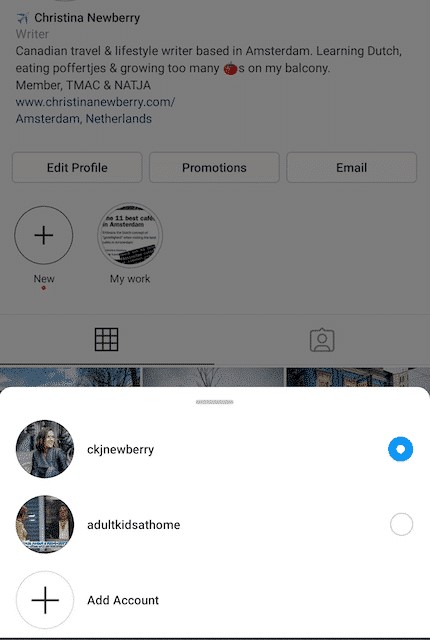
1. Tap your Profile page at the top left of the screen.
2. Continue to tap on the three dots that appear on the screen next to the account you selected.
3. When you’re ready to switch to another account, tap the name of the account you want to change.
Post content to multiple Instagram accounts at once
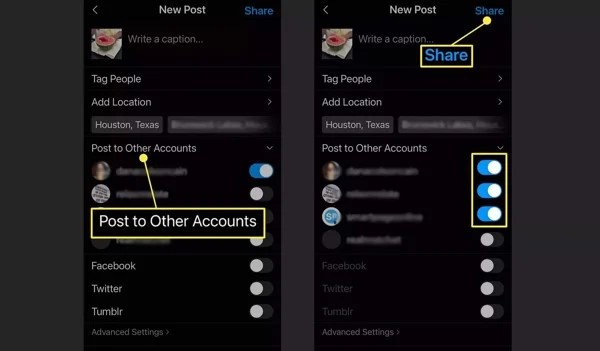
Once you’ve added the accounts to the Instagram app, you can post posts all at once. Turn on posting to another account besides the one you want to post to and continue as usual.
Press the Post button in the top right corner to post. One caveat when posting to multiple Instagram accounts at once is that you must be mindful of photos and constantly post pictures or videos to the correct account.
Enable notifications for multiple Instagram accounts
By adding a few Instagram accounts, you can receive activities and notifications from any or all accounts on your device. In particular, each notice will indicate the relevant account name in parentheses before the content of the message.
To enable this feature, you need to perform the following specific steps:
- Click on the icon with the Profile picture
- Select the three dashes (Menu)
- Click Settings
- Select Notifications
Here you have several options to enable notifications for the activities for which you want to receive notices:
- Turn on post notifications (comments, likes, etc.)
- Turn on message notifications
- Turn on notifications for new followers
- Follow the same steps as above for other accounts.
Manage multiple Instagram accounts with Hidemium( multibrowser)

Another way to manage multiple accounts on Instagram is to use a third-party app. That is Hidemium software; this application will help you manage social network accounts easily. With Hidemium, you can:
- Open different browsers at the same time on one device
- Can use an account without changing IP
- Cookie data sets and browser history are stored in the cloud
- Use a virtual browser to stay anonymous
- Manage countless accounts on social networks such as Facebook and Instagram, etc.
So it can be seen that managing multiple accounts on Instagram is not difficult. Hopefully, the detailed information on how to manage multiple accounts on Instagram will help you get the most out of the platform. From there, it allows you to save time, measure performance, and have a business development plan easier!

Related Blogs
Social media managers are tasked with producing a lot of content. Many platforms, many formats, one brand voice, daily or nearly daily publishing, all at once. Most of them now use some form of AI to help with at least a portion of that workload. There's nothing inherently wrong with using AI. The problems arise when AI-generated posts go live without getting a real editorial pass. The post that[…]

Swiftproxy 2025: Residential Proxy Service Review In 2025, Swiftproxy continues to stand out in the competitive proxy market. Whether you're an individual prioritizing privacy and anonymity or a business requiring large-scale IP resources, Swiftproxy delivers convenience, reliability, and robust performance.With high-quality IP pools, global reach, and a 99.89% connection success rate, Swiftproxy[…]
 (1).png)
Dropshipping has become one of the most popular dropshipping business models due to its ability to reduce storage and operational costs. This is particularly appealing for new startups. But the key question is: which platform should you choose to start your business journey?Among the many platforms available today, eBay and Amazon are two prominent names, highly regarded for their professionalism[…]
In this age of the internet, did you know that thousands of marketers are making money from partnering with businesses through affiliate programs every day? Affiliate marketing is one of the best ways to make money from your blog, especially if you don’t want to sell your products or services. Joining an affiliate program can help you […]

In the era of AI explosion, many businesses need to use many tools at the same time such as ChatGPT for content, MidJourney for images, or Veo3 for video. To reliably use these tools across regions, Croxy residential proxies (80M+ IPs, 195+ countries) are key to overcoming IP blocks and ensuring a stable base for account sharing. However, the cost of purchasing each tool individually or[…]
Have you ever wondered What is Amazon Marketplace? and how is it different from Amazon? In the world of e-commerce, Amazon always mentioned as a global "giant". However, many people are still confused between Amazon and Amazon Marketplace. Although coexisting on the same platform, these two models have clear differences in terms of operation, product types, sales fees as well as customer service.[…]
