
Chắc hẳn anh em sử dụng trình duyệt antidetect sẽ có những câu hỏi đại khái như:
- Trình duyệt này có uy tín hay không
- Có đáp ứng được công việc hiện tại của mình hay không
- Có bị mất dữ liệu hay không
- Giá cả có phù hợp không
…
Trong vô vàn các loại trình duyệt antidetect như hiện nay, để lựa chọn 1 trình duyệt tốt các bạn nên trang bị cho chính bản thân mình kiến thức để lựa chọn cho phù hợp. Ở đây tôi không khuyến khích nói về riêng Hidemium mà bản thân các bạn có thể tự kiểm tra để đưa ra kết luận cho bản thân mình. Ok let’s go…
Việc đầu tiên chưa biết trình duyệt nó fake được cái gì, nhưng trình duyệt antidetect đó phải giả lập dùng proxy thật tốt, ở đây tôi muốn nói đến chức năng webrtc. Các bạn nuôi hàng trăm hàng nghìn tài khoản khác nhau để không bị rủi do khóa tài khoản, ta nên trang bị cho mình kiến thức về webrtc. Để tìm hiểu sâu hơn về WebRTC các bạn có thể search trên google. Điều quan trọng nhất khi dùng các antidetect là không bị leak IP thật khi fake IP qua proxy.
Để tìm hiểu về cách check IP không bị leak qua webrtc ta đọc lại bài trước của Đạt Văn Tây: Cách nhận biết antidetect có chức năng fake Webrtc tốt – #3 by datvantay007 4
Xong bài này tôi muốn nhấn mạnh vào việc kiểm tra chất lượng của sản phẩm trình duyệt qua trang web CreepJS 5
Okie, Tôi sẽ lấy ví dụ ở đây là sản phẩm trình duyệt Hidemium với trình duyệt thực tế:
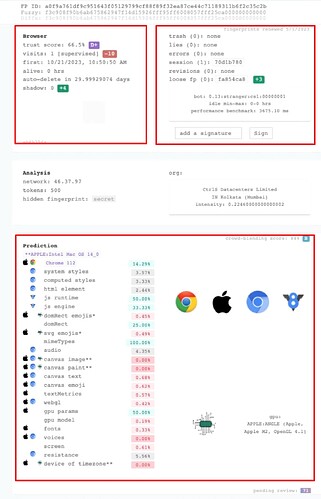
Ở trình duyệt thật, ta nhìn vào 3 chỉ số cơ bản này, với trình duyệt tốt (tôi đang ví dụ ở core cũ 112) thì trust score nằm ở trust score: 66.5% D+ là tạm chấp nhận được. Điểm trừ ở đây là supervised nên sẽ bị trừ 10 điểm. Một số core mới sẽ không bị trừ cái này có thể lên C D B thậm trí A.
kết luận khi ta bật noise hết các thông số mà trust score ở D+ là mức ok chấp nhận được với mình.
Sang bên cánh gà bên phải ta nhìn thấy các chỉ số:
trash (0): none
lies (0): none
errors (0): none
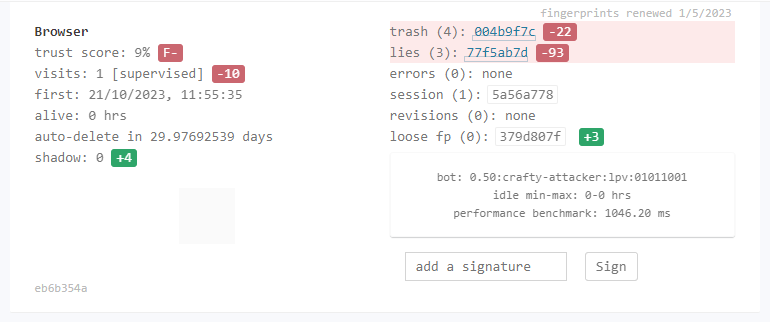
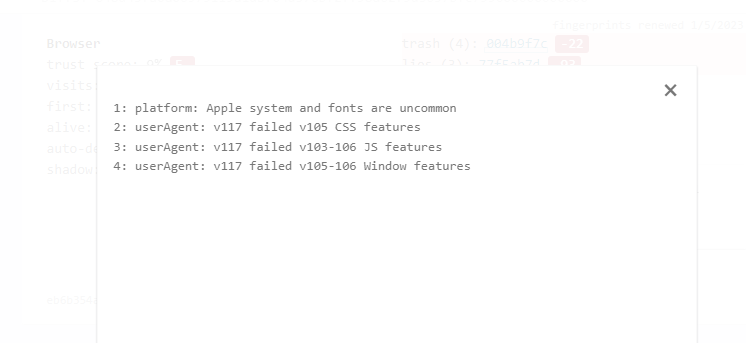
Khi nào chức năng noise không được tốt, bên trash hoặc lies sẽ hiện alert nguyên nhân trình duyệt fake không được tốt ở chức năng nào.
Để lấy ví dụ mình show ảnh của 1 bên ẩn danh nào đó:
Tiếp theo ta đi xuống khung bên dưới, sẽ mô tả những chức năng của trình duyệt đó fake có thực sự giống với máy thật hay không. Ở máy thật ta nhìn thấy:
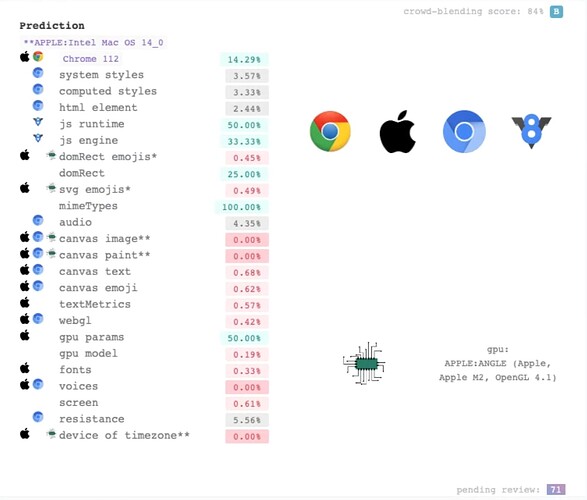
Trường hợp fake macOs ta thấy cột đầu tiên hiện hình quả táo, hiểu thực tế ở đây creepjs phát hiện đó hoạt động như một trình duyệt macOs. Nhìn vào đây ta thấy antidetect nào nhiều hình windows trong khi fake khác Os windows thì ta nên thận trọng.
Cột hiển thị logo chrome hoặc V8 đó là creepjs phát hiện công nghệ mà chức năng đó dùng để hoạt động giống với loại nào.
Với trường hợp tên chức năng bị xám xịt như trong hình:
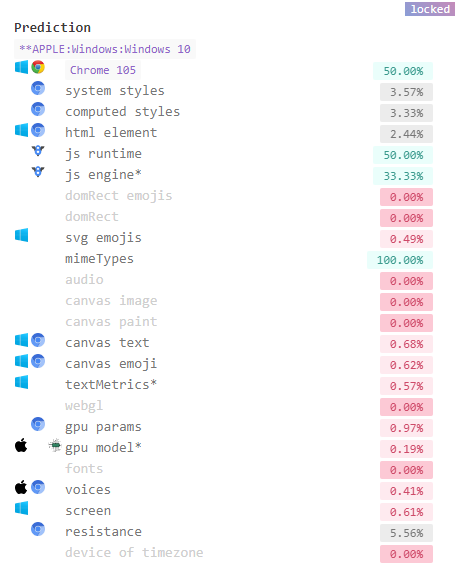
Trường hợp fake mac như này là nửa lạc nửa mỡ, các tên chức năng bị xám xịt lại nó đang hoạt động sai hoặc không đúng với trình duyệt thực tế của hệ điều hành đó (thực tế chức năng đó vẫn noise với các web check khác).
Nhìn qua đây ta có thể overview qua được rằng mức độ thực tế của antidetect browser được giả lập sâu tới mức thế nào. Để làm ra một core trình duyệt giả lập sẽ rất mất thời gian và chi phí và có thể rất khó để được như thực. Vì vậy để với các hệ thống detect chặt chẽ như bên creepjs ta nên dùng các máy thực hoặc môi trường máy thực để fake khác Os.
Phần 1 hết rồi, hẹn gặp lại anh em ở phần 2 

Related Blogs
.png)
Managing multiple online accounts has become an essential part of building a strong digital presence for businesses. Tools like AdsPower Browser, GoLogin, Hidemium, and other antidetect browsers are proving to be crucial in optimizing multi-account management, ensuring businesses operate efficiently and securely.According to Hidemium, the trend of using secure multi-account browsers is set to[…]
.png)
In the context of rapidly advancing technology, mastering how to check Proxy and Firewall settings is crucial for protecting personal information and optimizing web browsing experiences. Let’s explore simple methods for checking Proxy and Firewall through detailed instructions in this article.What Does Check Proxy And Firewall Mean?The ERR_CONNECTION_REFUSED error is usually caused on the server[…]

Reaching the image creation limit in ChatGPT can significantly disrupt your creative process. You might be experimenting with ideas, refining every detail to get the perfect image—and then suddenly you're "blocked" because you've run out of attempts. This is a common situation for many people working with AI image creation.That's why more and more people are looking for ways to...Exceeding[…]
In the SEO space, many businesses and agencies build blogging strategies from scratch, focusing on optimizing website rankings through quality content. However, a common challenge is Manage multiple Ahrefs accounts for multiple clients or share access that no additional user fees for Ahrefs.Hidemium who share how Share Ahrefs account safely, comply with terms and avoid the risk of being locked[…]

In the digital era, online platforms such as Facebook, Google, TikTok, Amazon, Shopee, and others continuously leverage AI and Big Data to analyze browser fingerprints, user behavior patterns, and connections between accounts. This puts individuals and businesses managing multiple accounts at high risk of suspension if they lack the right solution. Antidetect browsers have emerged as a “shield,”[…]
When managing multiple accounts for MMO, eCommerce, or multi-platform marketing, IP address and geographic location are always among the top risk factors. If multiple accounts log in from the same IP or an incorrect location, platforms can easily detect account linkage, leading to suspensions or bans.This is also why using a proxy alone is no longer sufficiently safe. A more sustainable solution[…]
