
I. Introduction to B2Proxy Residential Proxies
B2Proxy Official Website
B2Proxy is a professional provider specializing in global residential proxy services, offering high-purity residential IPs sourced from real ISP home networks. These proxies are widely used in cross-border e-commerce, online advertising, data collection, social media management, and account registration and verification.
Key Features of B2Proxy IP Services
- Proxy Plans: Residential Proxies / Unlimited Residential Proxies / Static Residential Proxies
- Coverage: 195+ countries and regions worldwide
- IP Pool: 80M+ real residential IPs
- Protocols Supported: HTTP / SOCKS5
- Additional Benefits: 1GB free trial traffic, 24/7 customer support
B2Proxy provides highly available, anonymous, and low-risk residential IPs, making it an excellent match for use with the Hidemium anti-detect browser for multi-account isolation, anti-association protection, and long-term stable operations.
II. Setup Guide
Step 1: Register and Log In to Your B2Proxy Account
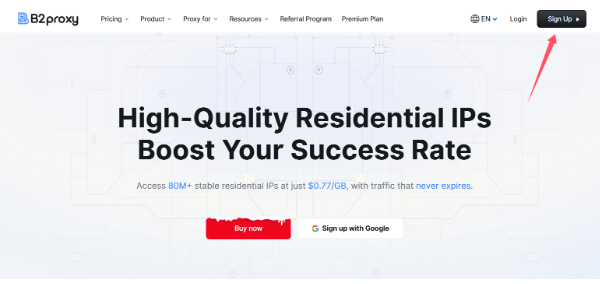
1. Visit the B2Proxy official website:
Click “Sign Up” in the top-right corner to create and log in to your account.
2. Enter the user dashboard and select a proxy plan that fits your needs. Available options include:
- Residential Proxies
- Static Residential Proxies
- Unlimited Residential Proxies
3. Go to the “Username / Password” page to generate your proxy credentials.
4. Configure the following parameters based on your requirements:
- Country / Region
- Session type
- Nearest proxy host
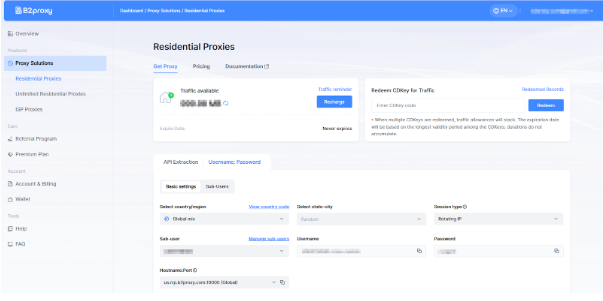
The generated proxy details will include:
- Proxy Host
- Port
- Username
- Password
Please save this information securely, as it will be required when configuring Hidemium
Step 2: Download and Register Hidemium
Download and install the client, then complete account registration and login.
Hidemium is a professional anti-detect browser that creates an independent browser fingerprint, local cache, and network environment for each account, effectively reducing account linkage and risk-control issues.
Step 3: Create a Browser Profile in Hidemium
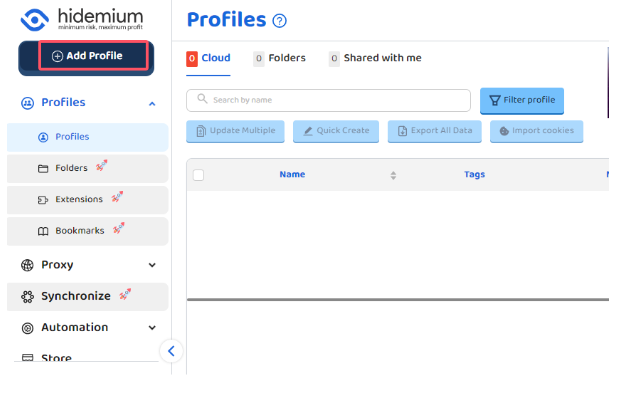
After logging into Hidemium, click “Add Profile.”
Step 4: Bind B2Proxy Residential Proxy in Hidemium
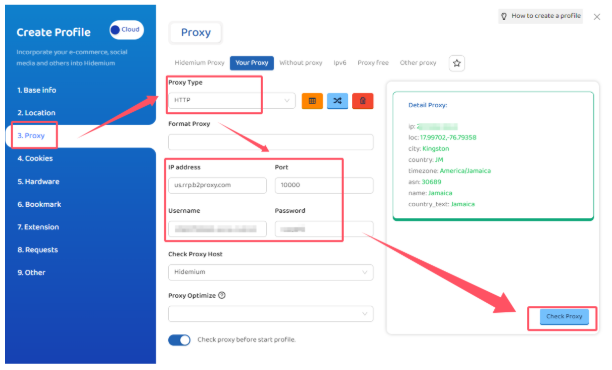
In the browser profile configuration page, locate the Proxy Settings section and fill in the details as follows:
- Proxy Type: HTTP or SOCKS5
- IP / Host: Proxy host provided by B2Proxy
- Port: Corresponding port number
- Username: Proxy username
- Password: Proxy password
Step 5: Test the Proxy and Save the Configuration
After completing the setup, click “Check Proxy.”
Once the system confirms a successful connection, save the browser profile.
Hidemium will then automatically create:
- An independent browser fingerprint environment
- An isolated residential IP network environment
This effectively reduces the risk of account association and improves login success rates and overall stability.
III. Summary
By combining B2Proxy’s real residential proxies with Hidemium’s browser fingerprint isolation, you can effectively solve key challenges in multi-account operations:
- Preventing account linkage
- Creating more realistic and trusted login environments
- High IP purity with lower ban and risk-control rates
- Long-term account stability
- More efficient multi-account and team management
Whether you operate Amazon, TikTok Shop, Temu, Shopee, or independent websites, or engage in advertising campaigns, social media matrix management, or data scraping, the B2Proxy + Hidemium solution can significantly enhance account security and overall operational efficiency.

Related Blogs

User Agent (UA) is an important component that helps browsers recognize and interact with websites effectively. Understanding what User Agent is and how to change it can not only protect your privacy but also optimize your browsing experience according to your personal needs. In this article,Antidetect Browser Hidemium will explain in detail about User Agent, its role and guide you how to change[…]
What is iTop VPN? iTop VPN is a service virtual private network (VPN) that helps protect identity, protect privacy, and increase security when accessing the Internet. This service encrypts access data and hides users' IP addresses, thereby avoiding tracking and overcoming geographical restrictions. In this article, Antidetect Browser Hidemium will guide you in detail Outstanding[…]
Have you ever wondered why the SEO rankings you see are completely different from those of your customers or competitors? This is a common problem that causes many businesses to lose millions of dollars in profits every year.The bottom line is this: over 79% of SEO professionals admit that the search results they see don't match the actual results users get. This is because of personalized[…]

What Are AI Agents for HR and How to Integrate Them Into an Existing BusinessAnyone who’s worked in HR knows the routine: piles of resumes, endless follow-ups, and calendars packed with interviews that get delayed, cancelled, and end up ruining your schedule daily. The new wave of AI agents for HR and recruiting is quietly changing that.These systems don’t hire or fire on their own. They handle[…]

Need to use multiple accounts or storefronts to service your online business? But usually, this will cause many dangers because of browser fingerprinting problems. So is there a way to optimize the management of these multiple accounts? Benefits of running multiple accounts Social networking and e-commerce platforms have become extremely popular in today’s internet world, and the trend of[…]
