.png)

When managing multiple accounts, performing data scraping, or ensuring online privacy, choosing a stable residential proxy is essential. LokiProxy has recently gained attention for its outstanding performance, global IP coverage, and competitive pricing. It also offers an easy-to-use control panel and integrates smoothly with tools like Hidemium.
What is LokiProxy?
LokiProxy is a global residential proxy service provider with over 35 million real residential IPs covering 190+ countries and regions. Whether for e-commerce store management, social media account operations, or automation tasks, LokiProxy delivers a 99.9% connection success rate with millisecond-level response times.
The platform mainly offers four types of proxies:
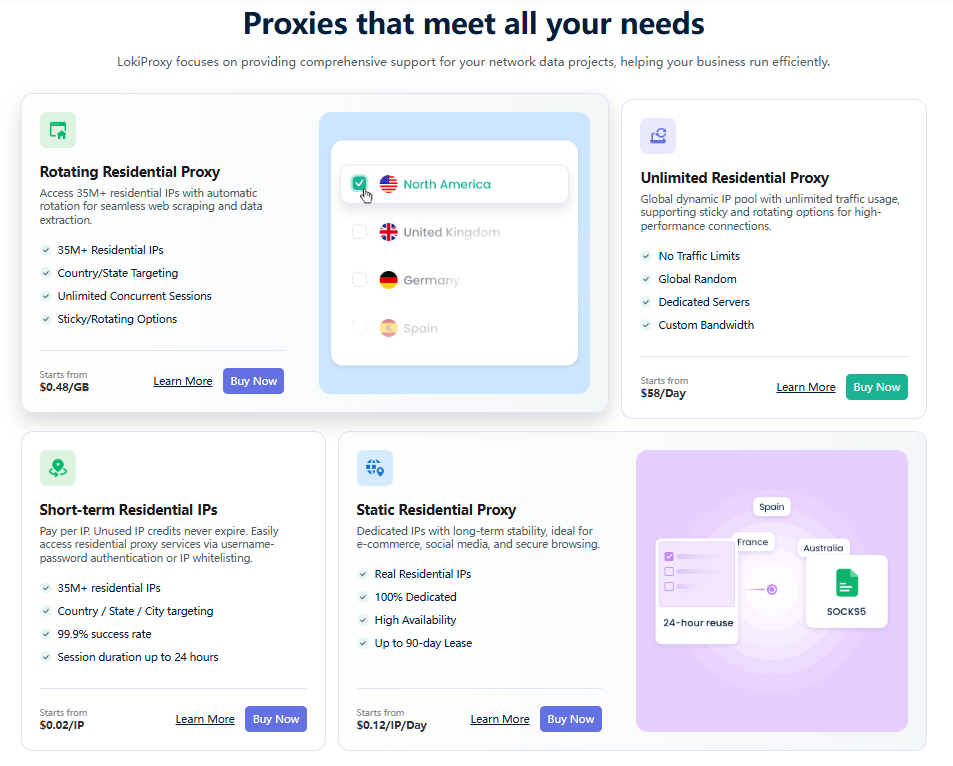
Rotating Residential Proxies: Starting from $0.48/GB, with automatic IP rotation, ideal for web scraping and data collection.
Static Residential Proxies: Provide stable IPs, suitable for long-term sessions such as social media or store accounts.
Unlimited Residential Proxies: Starting from $58/day, designed for high-traffic users with no bandwidth limits and support for persistent connections.
Short-Term IP Plans: Support country/state/city targeting, unlimited traffic, and flexible usage with any number of IPs as needed.
In terms of pricing, LokiProxy is typically about 30% lower than the market average, achieving a strong balance between cost and stability.
How to Integrate LokiProxy with Hidemium?
If you are using Hidemium for account management, connecting it with LokiProxy is very straightforward. Follow this quick guide:
Step 1: Get Proxy Information
Log in to the LokiProxy dashboard
Go to “Residential Proxies” and select your proxy configuration
Copy the proxy details (Host, Port, Username, Password)
Step 2: Open Hidemium
Launch Hidemium and go to the Profile list
Click “Create New Profile” or edit an existing one
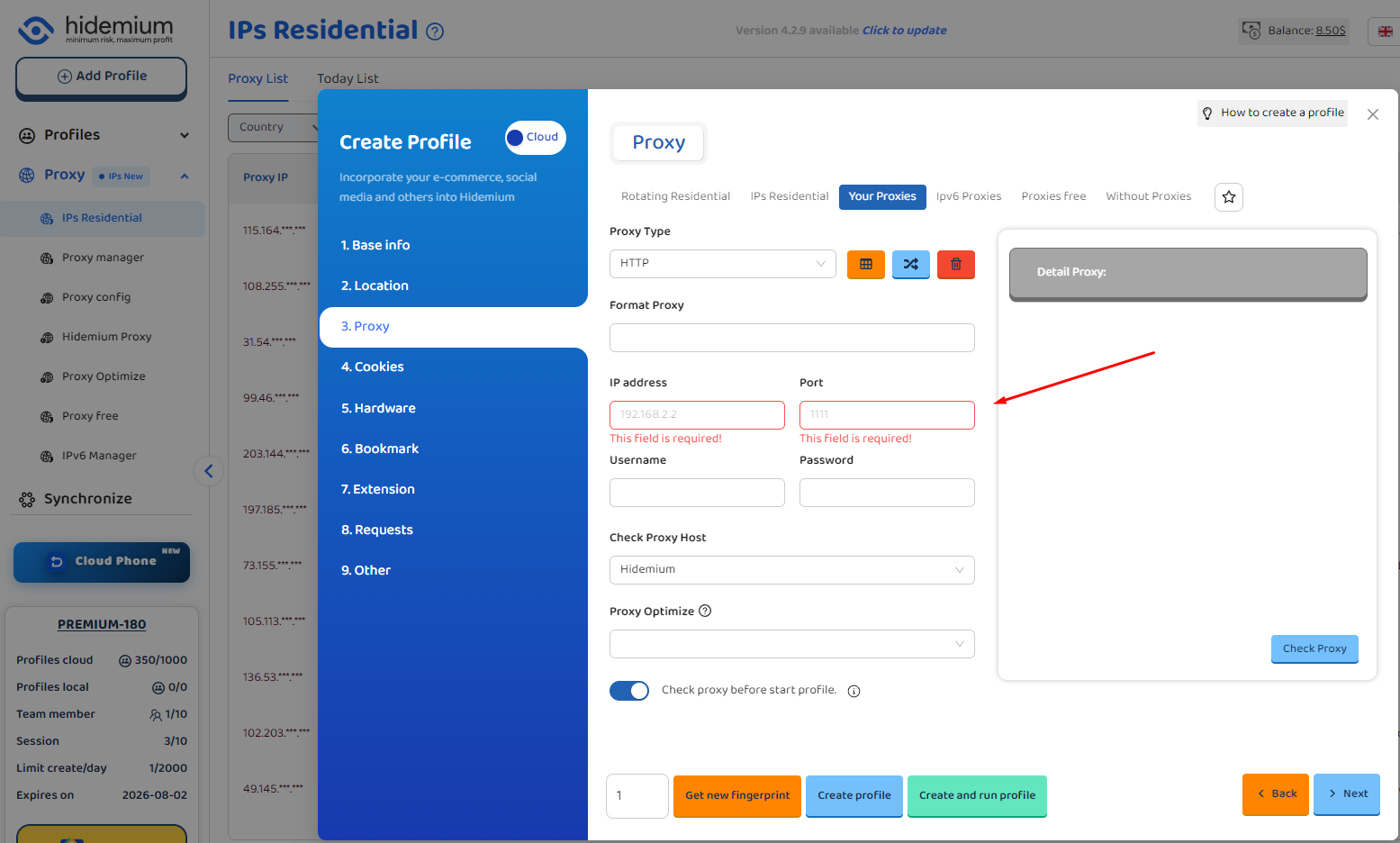
In the proxy settings, choose HTTP or SOCKS5 based on your LokiProxy type
Step 3: Enter Proxy Details
Host: Provided by LokiProxy
Port: Proxy port
Username: Your username
Password: Your password
Click “Check Proxy.” If the displayed location matches the proxy’s region, the connection is successful.
Step 4: Save and Start Using
After verification, click confirm and launch the profile
You are now browsing through a real residential IP via LokiProxy, ensuring stable, fast, and secure connections.
Why Use LokiProxy with Hidemium?
Real residential IPs instead of data center IPs, better for account management
Global coverage, suitable for cross-border business
Stable connections with fast switching support
Excellent compatibility with Hidemium and various anti-detect browsers
Affordable pricing with a free trial for new users
New User Benefits
New users can get 1GB of free trial traffic (valid for 7 days). You can test it with Hidemium first before deciding to purchase.
Conclusion
If you are looking for a cost-effective, high-performance residential proxy service that integrates well with Hidemium, LokiProxy is worth trying. It performs strongly in global coverage, speed, and stability, helping you manage accounts more efficiently and securely.
👉 Visit the official website to try it out: https://lokiproxy.com
Related Blogs

What is CCNP? This is one of the professional computer networking certificates globally recognized, by the world's leading technology corporation – Cisco Systems– level. For IT professionals, CCNP is not only a testament to their in-depth knowledge and practical skills, but also the key to opening up many opportunities for advancement and increased income.In the article below, togetherAntidetect[…]
.png)
If you haven’t heard about OpenClaw yet, chances are you will soon.Since early 2026, this open-source AI agent has been gaining massive attention across communities, especially among marketers looking for smarter ways to automate their workflows. It promises something different from traditional tools — not just content generation, but actual task execution.But here’s the real question:Can[…]

In today’s internet ecosystem, online platforms increasingly rely on advanced detection systems to identify devices and analyze user behavior. One of the key signals used in this process is the browser User-Agent.A User-Agent is more than just a string that identifies your browser and operating system. In practice, it is a critical component of browser fingerprinting, which websites use to[…]
.png)
Nowadays, websites can easily track user behavior through IP address and device parameters. This means that, even if you have changed your IP or used incognito mode on your browser, the system can still detect that you are logging in and operating multiple accounts at the same time.An effective solution to overcome this situation is to use it antidetect browser – specialized tool to help simulate[…]

As scraping, automation, SEO monitoring, market research, and multi-account farming continue to grow in demand, proxy providers are evaluated based on three core factors: anonymity – stability – scalability.IPcook has become a platform gaining attention in the tech community thanks to its 55M+ IP pool, support for 185+ countries, multiple proxy types, and full API integration tailored for large[…]

In the digital era, online platforms such as Facebook, Google, TikTok, Amazon, Shopee, and others continuously leverage AI and Big Data to analyze browser fingerprints, user behavior patterns, and connections between accounts. This puts individuals and businesses managing multiple accounts at high risk of suspension if they lack the right solution. Antidetect browsers have emerged as a “shield,”[…]
