
If your Amazon seller account is suspended, the most important thing is timely handling. This not only disrupts business operations, but also directly affects revenue and cash flow. The good news is that most suspensions can be reinstated if you understand the cause and know how to appeal properly.
In this article, we will guide you through how to check your Amazon account suspension status, analyze common causes, and provide effective steps for handling and appealing. In addition, Hidemium also shares preventive solutions to help sellers minimize the risk of future suspension.
1. How to check if an Amazon account is suspended?
To determine if your Amazon account has been suspended, follow these steps:
Check your registration email: Amazon always sends emails stating the reason for suspension. The content may be related to policy violations, poor performance metrics, or customer complaints. Please check both your primary inbox and Spam folders.
Login Seller Central: If you are a seller, visit Amazon Seller Central. In case of suspension, you will see a notification displayed right on the main interface.
Try logging in to your account: If you cannot log in or a system error occurs, it is likely that the account has been restricted.
View notifications in account: If you are still able to access, please check the notification section for the exact status and reason for suspension.
When suspended, sellers will experience the following problems:
Receive suspension notification email: Content clearly states the cause and policy violated.
All products (ASIN) discontinued: All your product listings will be discontinued.
Cash flow affected: Revenue will be frozen until the account is restored.
👉 As soon as you receive a suspension notice, you need to quickly analyze the cause and prepare Plan of Action (POA) A clear, logical appeal plan to send to Amazon. A detailed and convincing appeal plan will increase your chances of getting your account reinstated quickly.
What does Amazon account suspension mean?
When an Amazon account is suspended, it is not only a stressful situation, but it can also have serious consequences for the seller. Many people think that once an account is suspended, there is no way to recover it, but in fact, Amazon still allows you to file an appeal to reopen it.
Common reasons for Amazon account suspensions are policy violations or failure to meet performance standards set by the platform. This can include: selling counterfeit products, manipulating reviews, late deliveries, or poor product quality.
The immediate consequence of having an Amazon account suspended is that all business activities on the platform are disrupted. Sellers will not be able to list new products, process existing orders, or access sales data. This can easily lead to huge financial losses, affecting revenue and brand reputation.
Another major challenge when your Amazon account is locked is the complicated and uncertain recovery process. Whether your account has been suspended for years or just recently, appealing requires you to go through the right process.
To be restored, you need to clearly identify the reason why your account was locked and submit a request. POA (Plan of Action) details to Amazon, along with supporting documentation. The review process can take anywhere from a few days to a few months. Therefore, preparing a convincing POA, in the correct language and to the standards required by Amazon, will determine the success of the appeal.
>>> Learn more: Why is your Amazon account suspended? Causes and solutions
2. Why is my Amazon account suspended?
Job Amazon account suspensions often occur to protect customer interests and maintain transparency of the trading floor. Common causes leading to this situation include:
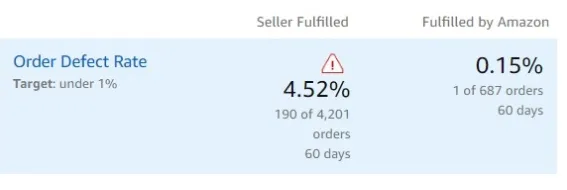
Poor performance index: When the order defect rate (ODR) exceeds 1%, late delivery exceeds 4%, or cancellation exceeds 2.5%, the account is very likely to be suspended. In addition, frequent returns, negative feedback, or repeated complaints also cause Amazon to consider the account unsafe.
Violation of Amazon policy: Behaviors such as manipulating reviews, posting banned products, or violating intellectual property rights can result in immediate suspension, even from just one complaint.
High return rate: Too many A-to-Z refunds and complaints will increase ODR, especially serious if the product is defective or the customer abuses the return policy.
Account verification issue: If you change your banking, tax, or business structure information without providing sufficient documentation, Amazon may place a hold or suspend your account.
Use multiple accounts: Operating multiple selling accounts without Amazon approval is a serious policy violation, leading to the risk of blocking all related accounts.
Rare system error: In rare cases, suspension may occur due to technical problems or unusual logins from automated systems.
👉 In short: Most cases Amazon account suspended all stem from poor performance or policy violations. To avoid risks, sellers need to comply with regulations, control sales metrics well, and handle customer feedback professionally.
>>> Learn more: Effective Strategies to Increase Sales on Amazon
3. Step-by-Step Guide: What to Do When Your Amazon Account Is Suspended
Having your Amazon account suspended is a big worry for any seller. However, if you stay calm and follow the correct process, you can completely Increase Amazon Account Recovery Chances success. Here is a step-by-step guide to help you do it effectively.
Step 1: Determine the reason for suspension
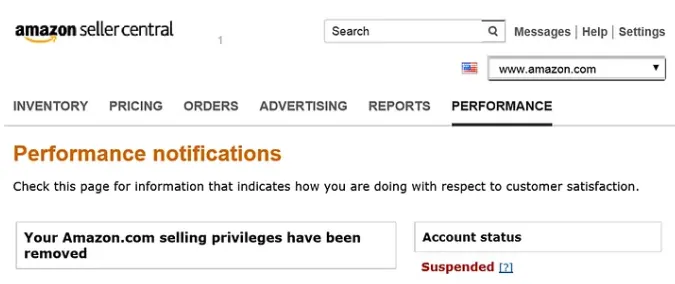
Once the account is locked, Amazon will send an official notification via Seller Central → Performance Notifications or email. Common signs include:
“Sales Privileges Removed” Notice
Product removed or discontinued listing
Frozen account balance
Cannot log in to Seller Central
👉 Read the suspension notice carefully. Focus on important terms such asInauthentic, Order Defect Rate (ODR), Policy Violation...to understand exactly why the account was suspended.
Step 2: Compare with common reasons for Amazon account suspension
Performance index error
Amazon has minimum standards for sellers:
ODR (Order Defect Rate) < 1%
Late delivery rate < 4%
Cancellation rate before processing < 2.5%
How to fix:
Check in Account status dashboard.
Prepare complete invoices from suppliers, with issue date and authentication information.
Provide shipping tracking numbers, delivery receipts, and customer communication history.
Policy violation
Some common errors:
Sale of prohibited or restricted products
Manipulating customer reviews
Intellectual Property (IP) Infringement
How to fix:
Immediately delete the offending listing.
Update internal SOP procedures.
Retrain employees to comply with policy.
Strengthen supplier testing and evaluation.
Link multiple accounts
If Amazon detects multiple accounts sharing the same IP, device, or cookie, all will be at risk of suspension.
Prevention:
Each account must use a separate IP and browser configuration.
Do not log in to multiple accounts on the same device.
Use support tools like Hidemium to isolate browser fingerprints, ensuring safety.
Step 3: Submit a compelling Plan of Action (POA)
To Amazon account suspension appeal, you need to send Plan of Action (POA) clear and structured. The POA should include 3 parts:
Root cause – Briefly state the reason, for example: “The order was delivered late due to a problem with the shipping partner.”
Corrective action – Describe what you did, e.g. “Moved to FBA, refunded customers.”
Precautions – How you prevent recurrence, e.g. “Track ODR daily, enable automatic inventory alerts.”
📌 Tips for writing an effective POA:
Be brief, use bullet points.
Attach proof (invoice, SOP screenshot).
Avoid blaming Amazon or the customer.
Once completed, submit your appeal via Seller Central → Performance Notifications → Complaints. Usually Amazon will respond within 48 hours – 7 days, but some complex cases can take up to 30 days.
✅ With the above process, you can be more proactive and confident in Recover Suspended Amazon Account. It's important to be transparent, professional, and demonstrate that you've actually improved your sales process.
Best Ways to Prevent Amazon Account Lockout
Check your account weekly: Track order defect rate (ODR), late delivery rate, and cancellation rate in Seller Central.
Monthly Policy Review: Amazon regularly updates its selling policies and restricted product categories. When managing multiple accounts, log in with separate profiles to avoid linking IPs or devices.
Store transaction records securely: Record supplier invoices, certifications, and shipping documents in the cloud. Having documentation ready will help you appeal faster if you get suspended.
Avoid black hat tactics: Do not use fake reviews, keyword stuffing or sell prohibited goods. These methods may bring short-term benefits but have the potential to get your account permanently banned.
>>> Learn more: How to Rank Higher on Amazon: Essential SEO Listing Optimization Tips
4. Best Practices to Avoid Amazon Account Suspension
To maintain a safe, stable, and compliant Amazon selling account, sellers should adopt the following practices:
4.1. Manage Multiple Amazon Accounts Securely with Hidemium
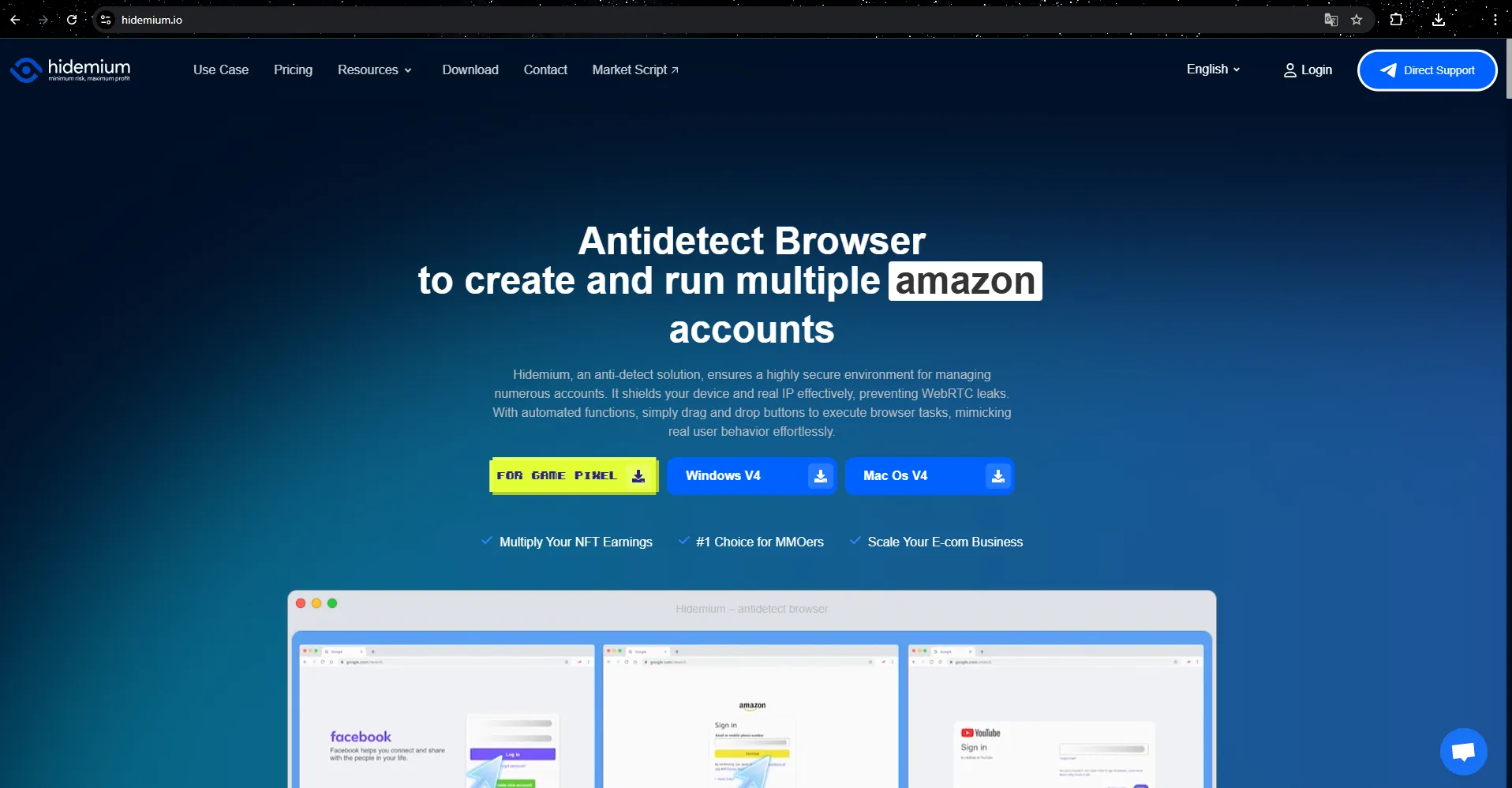
Ensure the independence of each account: Hidemium allows you to manage multiple Amazon accounts efficiently by assigning unique browser fingerprints and proxy IP addresses to each account. This keeps accounts from being cross-linked and keeps them running smoothly.
Secure Team Collaboration: With role-based permissions and detailed activity logs, Hidemium allows teams to access and manage accounts from multiple locations without triggering Amazon’s security system. It’s an optimal choice for businesses that are expanding.
Automation & Competitive Analysis: Integrating RPA and API technology, Hidemium supports automatic collection of data on competitors' prices, reviews, and product listings. From there, sellers can quickly adjust their business strategies, optimize efficiency, and still ensure compliance with Amazon policies.
4.2. Monitor account status periodically
Check your account health dashboard at least once a week. Important metrics like Order Defective Rate (ODR), Late Delivery Rate (LSR), Valid Tracking Rate (VTR) need to be closely monitored. If a downward trend is detected, take timely action to avoid the risk of being suspended by Amazon.
4.3. Update policy & review product list monthly
Amazon regularly updates its policies and category restrictions, so you should review your product listings monthly to ensure compliance. Tools like JungleScout can help you spot new restrictions early and alert you to policy changes.
4.4. Avoid using “black hat” tactics
Sellers should avoid risky tactics like create fake reviews, use misleading keywords, or distribute infringing products. Instead, stick to a “white hat” strategy to both maintain your brand reputation and ensure your account is safe and growing sustainably on Amazon.
4.5. Automatically flag risky and disputed SKUs
To minimize the risk of Amazon account suspension, sellers should use automation tools to detect high-risk or frequently disputed SKUs early. Closely monitoring metrics like return rates, negative feedback, and recurring customer complaints will help you proactively address issues before they impact your business performance. With support from Hidemium, Amazon sellers can maintain a stable activity index, minimizing the risk of account suspension.
4.6. Maintain complete records
Keep complete and accurate documentation such as invoices, shipping documents, product quality certificates, and customer contact history. These are important pieces of evidence that will help you have a solid basis when appealing a suspension or responding to an audit request from Amazon.
4.7. Join the Amazon Seller Community
Keeping up to date with new policies, keeping up with trends, and learning from the Amazon seller community are effective ways to reduce risk. Joining forums and discussion groups will help you access useful information, warn you of potential problems early, and build a more sustainable sales strategy.
4.8. Proactive risk management
Set up alerts for unusual account activity, like unauthorized logins or policy violations. UseHidemiumas is an account monitoring and protection tool that will help you detect problems early, enhance security, and ensure business stability.
>>> Learn more: eBay vs Amazon: Which Platform is Best for Dropshipping?
5. Conclusion
Having an Amazon account suspended can make sellers nervous, but this is not a “death sentence” if you know how to handle it. By accurately identifying the cause, collecting specific evidence and building Plan of Action. Obviously, you will significantly increase your chances of recovering your account. At the same time, to limit future risks, sellers should proactively monitor account status and apply support tools such as Hidemium– a solution to help manage multiple accounts safely and avoid detection. Always comply with Amazon's policies, update the latest knowledge and take timely action when problems arise to maintain stable and sustainable business operations.
6. Frequently Asked Questions (FAQ)
Question 1: How long does it take for Amazon to review and unsuspend a seller account?
Typically, the review process takes 48 hours to 7 business days after you submit your appeal. However, for complex cases or cases with multiple violations, the processing time may be longer.
Question 2: After being suspended, can I open a new Amazon seller account?
No. Opening a new account while the old one is still unresolved is a policy violation and can result in a permanent ban. The safest course of action is to focus on recovering the original account.
Question 3: Can I use multiple Amazon seller accounts at the same time?
Only if you receive written approval from Amazon. If you want to manage multiple related accounts, use Hidemium to operate safely, securely and avoid the risk of being detected for violations.

Related Blogs
“You have been banned” is a situation often faced by most advertisers, affiliate marketers, or e-commerce professionals… on platforms: So why? How to find out why I was banned from Facebook? What do I need to do to solve this problem? Find the answer right away in this article. What if your account has been […]
.png)
In the context of multi-account management on mobile applications becoming increasingly popular, Geelark Antidetect Browser emerging as a breakthrough solution, specifically designed for diverse needs from affiliate marketing, e-commerce to advertising management. Unlike regular antidetect browsers, Geelark provides an ecosystem cloud phone Unique, realistic Android device simulation, helping[…]
.png)
922S5proxy may not be the “absolute strongest” residential proxy provider on the market, but it is very likely the most suitable one for your specific needs. As data-driven operations continue to rise, proxy services have become essential infrastructure for data collection, ad verification, social media management, and cross-border e-commerce. This 2025 review evaluates 922S5proxy from five key[…]

The dark web is a fascinating realm. It's a part of the internet that's hidden from conventional search engines.To access it, you need a special tool. A dark web browser is your gateway to this hidden part of the internet.But not all dark web browsers are created equal. Some offer better security features, while others provide a more user-friendly interface.Choosing the right dark web browser is[…]

Running a dropshipping business on eBay can be highly profitable, but it also comes with a major risk: unexpected account suspensions. For dropshippers, managing multiple accounts on the same computer without proper protection can easily lead to account bans.Even a small mistake—such as using duplicate IP addresses or exposing your browser fingerprint—can result in immediate suspension. So how[…]

The restricted or locked account is probably a headache for businesses and advertising people. Facebook advertising is the leading trend in promoting online business in the 21st century. Most companies choose to advertise if they want to reach the right potential customers and generate sales quickly. Having an account problem will directly affect revenue. So […]
