
Captcha is a popular security tool used on websites to prevent suspicious activities from automated programs (bots). However, Captcha can sometimes be frustrating for users, especially when fast access is needed or when the Captcha becomes overly complex. In this article, we will explore 7 effective ways to bypass Captcha in 2025, allowing you to overcome these barriers legally and safely.
1. What is Captcha and Why is it Used?
Captcha, short for "Completely Automated Public Turing test to tell Computers and Humans Apart," is an automated test designed to distinguish humans from bots. It often appears as distorted characters, image recognition tasks, or simple questions that humans can easily solve but bots cannot.
The main purposes of Captcha include:
Preventing automated attacks like spam, fake account creation, or unauthorized access.
Protecting websites from malicious bot activities.
Ensuring fairness in online activities such as ticket purchasing or survey participation.
However, frequent or overly complicated Captchas can inconvenience users, driving the need for effective bypass methods.
Why Bypass Captcha?
Users might want to bypass Captchas to save time, improve browsing experience, or assist legitimate activities like software testing. However, bypassing Captcha for illegal purposes is not encouraged and can lead to legal consequences.

>>> Learn more: Top 13 Best Captcha Solving Services in 2025
2. Common Types of Captcha
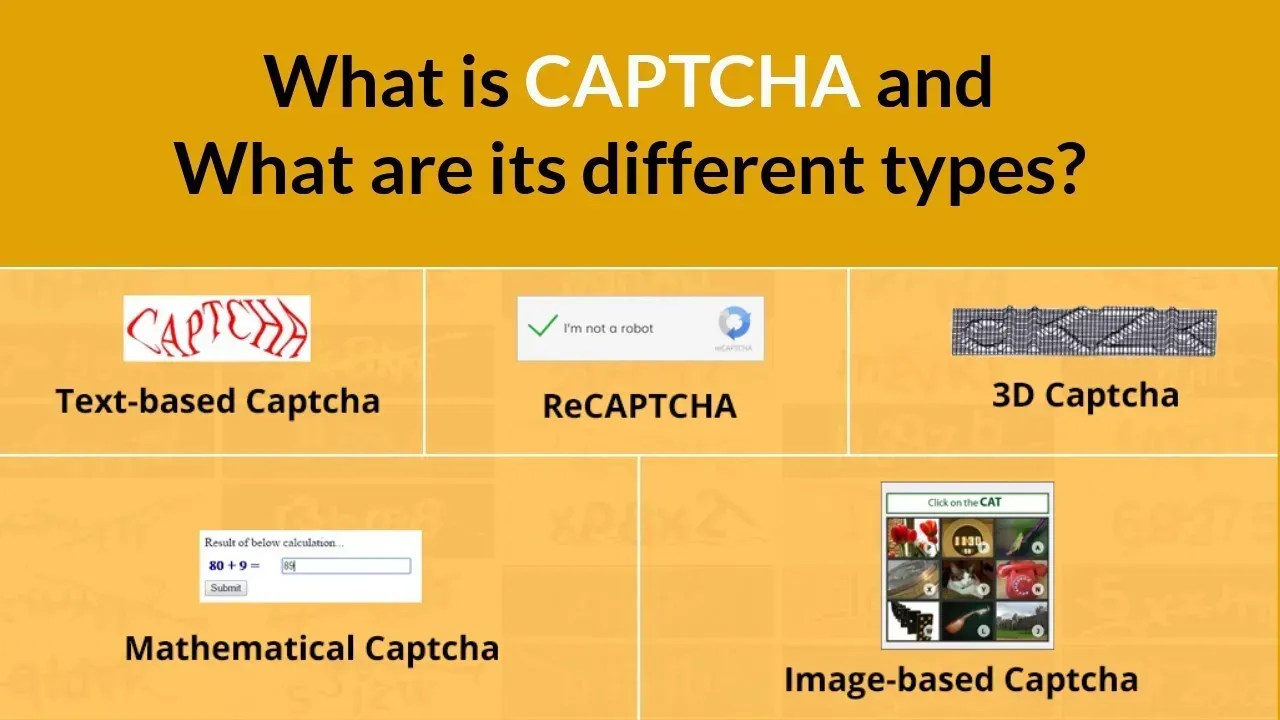
Before learning how to bypass Captcha, let's take a look at the most common types today:
Captcha Type | Description |
| Text-based Captcha | Users enter characters shown in a distorted image, often hard to read. |
| Audio Captcha | Users listen and input the spoken characters, suitable for visually impaired individuals. |
| Image selection Captcha | Users select images matching a description, e.g., "select all images with cars." |
| Drag-and-drop Captcha | Users drag a puzzle piece to the correct position to complete an image. |
| reCaptcha | Google's advanced Captcha requiring image selection or solving a challenge. |
| Mathematical logic Captcha | Users solve a simple math problem, e.g., "2 + 3 = ?" |
Each type of Captcha has its own mechanism but shares the common goal of distinguishing humans from bots.
3. 7 Most Effective Ways to Bypass Captcha
3.1 Change Your IP Address Using a Proxy or VPN
Use a proxy or VPN to change your IP address. Many websites trigger Captchas when they detect unusual activity from an IP, such as repeated access. Changing your IP helps you avoid being flagged as a bot. Use reputable VPN services like NordVPN or ExpressVPN. Install the VPN, select a server from a different location, and revisit the site.
Note: Avoid free proxies as they are often unstable and easily blocked. With Hidemium Antidetect Browser, you can integrate proxies for automatic IP rotation.
3.2 Enable Cookies
Enable cookies in your browser so websites can recognize you as a returning user. Cookies store session data, reducing the chance of Captchas being triggered.
Go to your browser settings (Chrome, Firefox, etc.) and enable cookie acceptance. Avoid clearing cookies after each session.
Some websites require cookies for proper functionality. With Hidemium Antidetect Browser, you can easily manage cookies for each browser profile.
3.3 Interact Naturally
Perform human-like actions on websites, such as random mouse movements, scrolling, or clicking different areas. Natural behavior helps avoid Captchas triggered by bot detection.
Take a few seconds to scroll, click non-essential links, or move your mouse around before submitting forms. Avoid acting too quickly or repetitively.
Advanced Captchas like ReCaptcha analyze user behavior, so natural interaction is a simple yet effective tactic.
3.4 Avoid Using Incognito Mode
Incognito mode doesn’t save cookies or browsing history, making websites suspect you're a bot. Use normal browsing mode to reduce Captcha frequency.
Open your browser in regular mode and ensure cookies are enabled. If you need privacy, use Hidemium Antidetect Browser to create separate profiles that still store cookies.
While incognito mode is good for privacy, it’s not ideal for avoiding Captchas.
3.5 Update Browser and Plugins
Ensure your browser and plugins (such as ad blockers) are updated to the latest versions. Outdated software can cause security vulnerabilities, triggering Captcha systems.
Check for updates in your browser settings and plugin stores. For example, update uBlock Origin or NoScript to prevent Captcha conflicts.
Some ad-blocking plugins may unintentionally trigger Captcha — temporarily disable them if necessary.
3.6 Use an Antidetect Browser
Hidemium offers an Antidetect Browser that creates unique "fingerprints" for each browsing session. This helps avoid bot detection and reduces the frequency of Captchas.
Download the Antidetect Browser from Hidemium, create new browser profiles, and integrate proxies if needed. This tool is ideal for multi-account management and software testing.
It is suitable for technical users, but must be used legally to avoid violating terms of service.
3.7 Use Automatic Captcha Bypass Tools
Use services like AntiCaptcha or Hidemium's API to automatically solve Captchas using AI or human workers. These tools easily integrate with automation systems.
Register for an account with Hidemium or AntiCaptcha, obtain an API key, and integrate it into your software. Hidemium offers free solutions for certain Captchas.
Only use reputable services and comply with legal regulations. Abuse may lead to account suspension.
4. Conclusion
Captcha plays an important role in security, but sometimes it can hinder automation processes. The bypass methods in this article can help you overcome these barriers efficiently. However, always use them responsibly and only when necessary.
If you are a Facebook advertiser or need a solution to protect your account from being locked, Hidemium Antidetect Browser is a great choice. It helps you create multiple browser profiles, change IP addresses with proxies for each account, and integrates advanced features like Cookie import, resource sharing, and workflow automation.
>>> Learn more:
Related Blogs

How to Turn Your Phone into a Passive Income Machine The Untapped Potential in Your Pocket That smartphone you're constantly checking? It could be making you money right now. While you're scrolling through social media or letting it sit idle on your desk, you're missing out on legitimate income opportunities that require almost zero effort.Here's the thing most people don't realize: your phone is[…]
Two-factor authentication (2FA) is one of the most effective methods to protect your account from common security threats. In this article, Hidemium will guide you step-by-step through enabling 2FA on popular platforms, explaining why the feature is important and how it helps improve personal information security.1. What is 2FA? A Simple Explanation for BeginnersTwo-Factor Authentication (2FA) is[…]

The choice AweSun – secure remote access software plays a vital role in helping large businesses, freelancers, and remote workers overcome the barriers of connecting and controlling computers in different locations. The right tools will give you the ability to seamless collaboration, session access and remote file transfer fast, efficient troubleshooting support anywhere in the world.To help you[…]
Are you looking for ways to access websites that are restricted at school, work, or in your area? Hidemium have compiled a list of the top 5 unblocked browsers to help you bypass any barriers easily. These browsers don’t require advanced tech skills, so you can start right away.1. What Are Unblocked Browsers?An unblocked browser is a tool that allows you to access websites that are restricted by[…]

In the context of Surfinite no longer meeting security and automation needs well, many users are turning to more effective alternatives. 2025, Antidetect Browser Hidemium emerges as an option worth considering thanks to its capabilities hidden IP address, anti-tracking, cross-platform support, and AI automation. The article below will Hidemium detailed review – from interface to features to[…]
In today’s digital age, using sample Prompt Scripts to automate browser tasks is becoming more and more popular, especially when combined with the Hidemium antidetect browser. With the powerful support of AI models like ChatGPT, Claude, and Gemini, users can easily perform tasks such as form filling, page scrolling, or content analysis – all without any coding knowledge.This article will[…]
