
What is Cloudflare WARP? This is a service VPN (virtual private network) Developed by Cloudflare, it helps users protect personal data while effectively increasing Internet access speed. If you are looking for a safe, fast and stable web surfing solution, let's go Antidetect Browser Hidemium Explore details about Cloudflare WARP in the article below.
1.What Is Cloudflare WARP and How Does It Work ?
Cloudflare WARP is a privacy and network optimization service from Cloudflare that encrypts traffic between your device and Cloudflare’s network. It is built into the 1.1.1.1 app and is designed to improve connection privacy and routing performance.
In this guide, you’ll learn what Cloudflare WARP is, how it works, its main benefits and limitations, whether it is free, and how to install it on desktop and mobile devices.
Cloudflare WARP is not designed like a traditional consumer VPN for choosing specific countries or bypassing streaming regions.
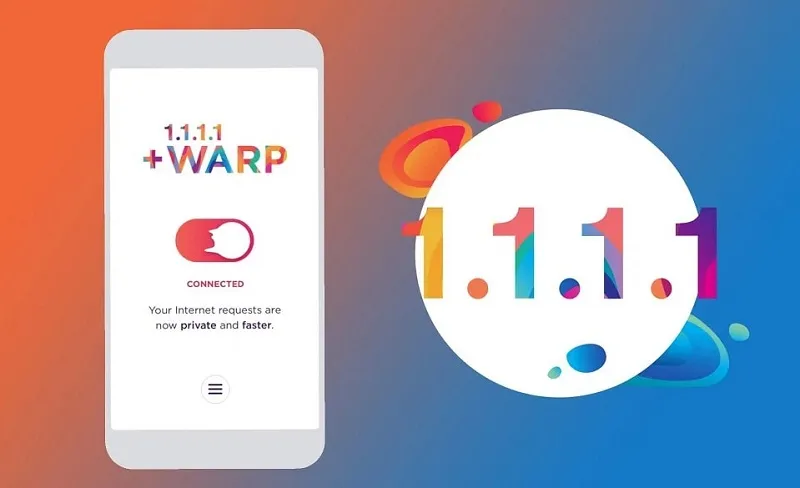
>>> Learn more: What is DNS 1.1.1.1? Instructions for installing & changing DNS 1.1.1.1
2. Should I use Cloudflare WARP?
The answer is: Yes! Cloudflare WARP is the ideal choice if you want to increase privacy, secure personal information, and improve Internet connection speed. With a global server network, WARP helps you connect to services quickly in just a few milliseconds.
Cloudflare WARP is a good option if your priority is improving connection privacy and routing performance without complicated setup. However, it may not be the right choice if you need country-specific IP selection, browser fingerprint isolation, or multi-profile management.
The service is currently offered for free through the 1.1.1.1 application. Users with greater need for speed can upgrade to the WARP+ version, for a small monthly fee, to enjoy priority bandwidth and higher performance.
A big plus point of Cloudflare WARP is its commitment to protecting privacy: it does not store access logs, does not collect personal data, and does not share information with third parties. You absolutely do not need to provide your name, phone number or email to use the service. Cloudflare also partners with independent organizations for periodic security audits, ensuring absolute transparency.
>>> Learn more: How to bypass Cloudflare
3. Outstanding Benefits of Cloudflare WARP
In addition to learning about Cloudflare WARP technology, it is very important to master the advantages it brings. Cloudflare WARP not only helps you browse the web quickly but also protects personal data optimally. This is the ideal choice for those who are looking for a fast, safe and effective internet connection service. Here are the outstanding benefits of Cloudflare WARP:
3.1. High-end security
When using Cloudflare WARP, your data will be fully encrypted thanks to advanced security protocols. This helps protect you from dangers such as tracking, information theft, and unauthorized access from third parties, including internet service providers (ISPs).
Not only does it ensure the safety of your personal information, Cloudflare WARP also protects your browsing history and online activities from being leaked. This is especially important when you use public Wi-Fi networks, where the risk of attacks is high.
3.2. Access geo-restricted content
Cloudflare WARP allows you to route connections through servers in many different countries, making it easy to access geo-restricted content.
For example, you can choose to use another country's IP address to watch TV shows, movies, or streaming services that are exclusive to that region. This not only expands the entertainment experience but also supports work efficiency, especially when you need to access resources from other countries.
3.3. Increase internet connection speed
One of the outstanding advantages of Cloudflare WARP is the ability to optimize routing, helping to significantly improve internet connection speed. By automatically choosing the fastest route for data transfer, WARP significantly reduces latency when accessing web pages and helps increase page load speeds.
This is especially beneficial for people who work online, play games, or stream video. With Cloudflare WARP, you'll have a smoother, faster, and more efficient web browsing experience, whether you're on your phone or computer.
3.4. Friendly interface, easy to use
Cloudflare WARP has an intuitive, easy-to-use user interface, suitable for even those without much experience in technology. The process of installing and activating the application takes place quickly, in just a few minutes with simple instructions.
Additionally, Cloudflare WARP offers flexible customization options, allowing users to easily adjust to their individual needs. You can quickly enable/disable VPN or configure advanced features without requiring in-depth technical knowledge.
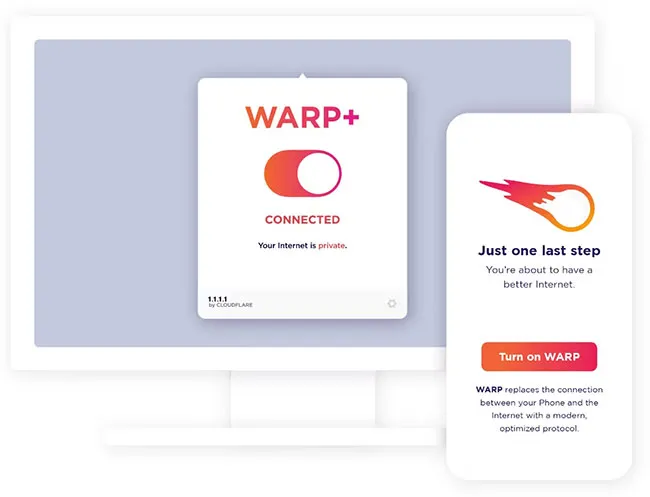
4. Cloudflare WARP vs. Traditional VPN
| Feature | Cloudflare WARP | Traditional VPN |
|---|---|---|
| Encrypts connection | Yes | Yes |
| Hides original IP from websites | Yes, in many cases | Yes |
| Choose specific country | Limited / not its main purpose | Usually yes |
| Geo-unblocking | Not primary use | Common use case |
| Network optimization | Strong focus | Varies |
| Browser fingerprint isolation | No | No |
| Best for | Privacy and routing | Privacy, IP location, geo-routing |
Cloudflare WARP protects network traffic, but it does not isolate browser fingerprints, cookies, or separate browser identities. For workflows that require multiple isolated browser profiles and individual proxy configurations, an anti-detect browser such as Hidemium serves a different purpose.
5. Does Cloudflare WARP charge a fee?
After learning what Cloudflare WARP is, the next important question is about the cost of using this service. Cloudflare stands out for its technology solutions that come with free options, and WARP is no exception.
Users can fully enjoy all WARP features without any bandwidth or usage time limitations, completely free of charge. This makes WARP an ideal choice for those who want to improve their internet connection speed without paying a fee.
In addition, Cloudflare also offers a WARP+ version with faster connection speeds, thanks to its Argo network. WARP+ detects network bottlenecks and optimizes data routing, providing a smoother and more efficient web browsing experience.
The cost of using WARP+ varies by region, but compared to traditional VPN services, the price is very reasonable. Cloudflare is committed to making this technology accessible to everyone, even on limited budgets. For example, in India, the cost of subscribing to WARP+ is only about 1 USD per month, an extremely reasonable price for the value this service brings.
6. Instructions for installing Cloudflare WARP
Once you understand Cloudflare WARP and the benefits this service brings, you will probably want to install WARP on your device. Below are detailed instructions so you can easily install WARP on your phone and computer.
6.1. Install Cloudflare WARP on your phone
Installing Cloudflare VPN on your phone is simple and easy. Below are detailed instructions to install WARP on your mobile device:
Step 1: Go to your phone's app store (Google Play Store for Android or App Store for iOS) and search for the WARP app. Once found, download and install this application.
Step 2: After installation is complete, open the WARP application. The screen will display the boot interface. Click the "Get Started" button to get started, then click "Done" to complete the instructions, and select "Accept" to agree to the terms of the application.
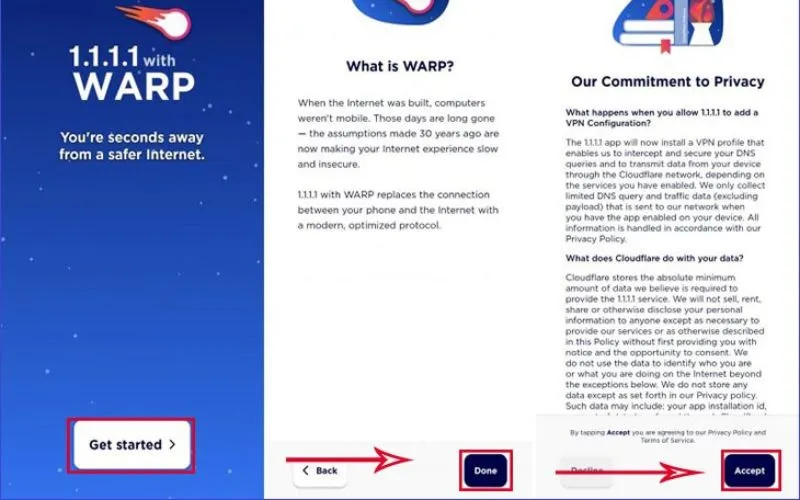
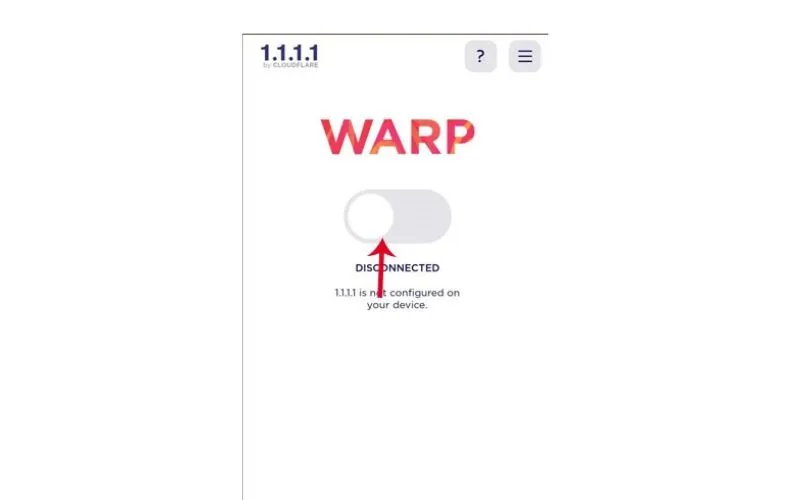
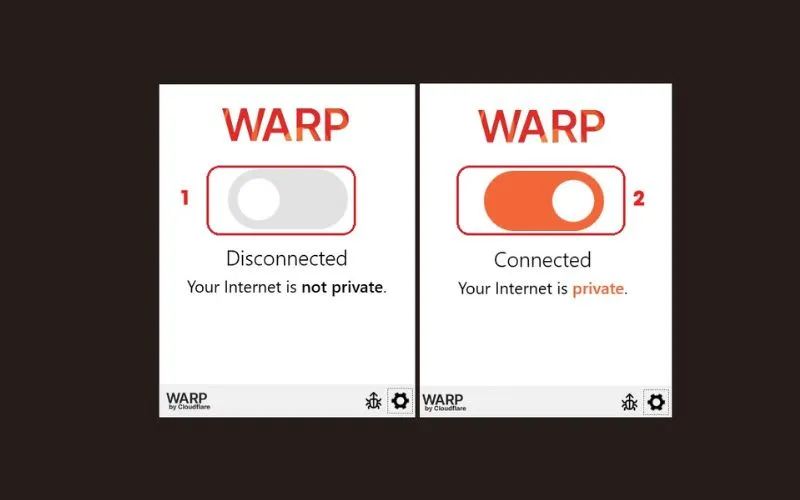
Step 3: At the main interface of the application, you will see a toggle. To turn on VPN, simply pull the switch to the right. This is to activate VPN on your device.
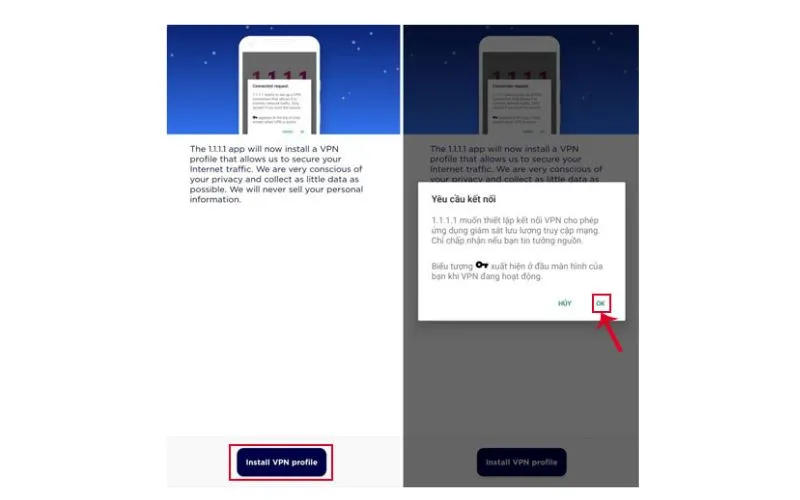
Step 4: Upon initial activation, the app will request access to add a VPN profile to the device. Click "Install VPN Profile" and select "OK" to authorize. Note that this request only appears the first time, you do not need to do this again the next time.
Step 5: After successfully activating Cloudflare's VPN, you can test your internet connection speed and see a noticeable improvement in performance.
6.2. Install Cloudflare WARP on your computer
With the detailed instructions below, you can easily install and use Cloudflare WARP on your computer, helping to improve web browsing speed and secure information more effectively.
Step 1: Visit Cloudflare's official website at https://1.1.1.1/. Here you will find WARP software versions compatible with popular operating systems such as Windows, macOS and Linux. Select the appropriate version and click download.
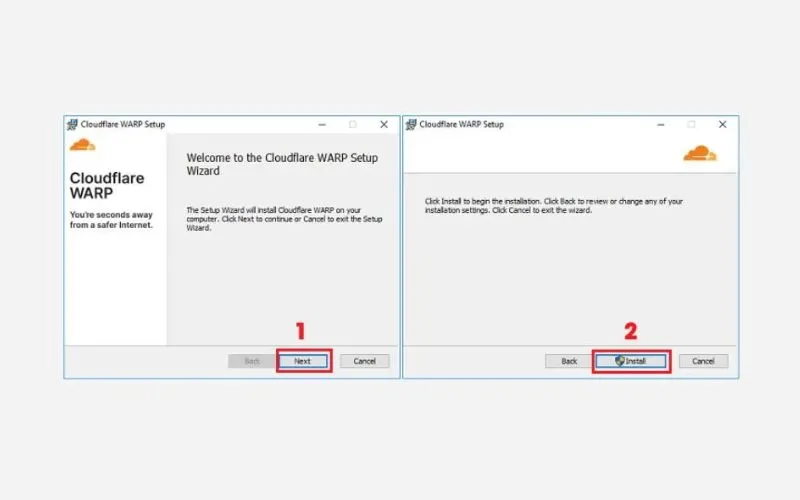
Step 2: Once you finish downloading the installation file, open it and start the installation process. Click "Setup" to start the installer, then click "Next" and "Install" to complete the installation of Cloudflare WARP on your computer.
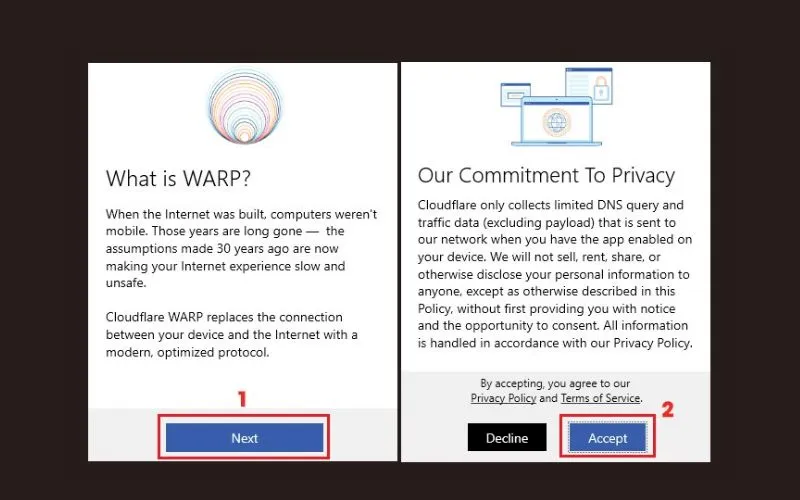
Step 3: After installation is complete, the software will provide basic instructions on how to use. Just click "Next" to go through the steps and select "Accept" to agree to the terms of use.
Step 4: To activate VPN and optimize internet connection speed, you just need to open the WARP software and turn on the switch on the main interface. When VPN is activated, the software icon will minimize and appear on the Taskbar at the bottom of the screen. From here, you can easily access the software anytime when needed.
Cloudflare WARP Pros and Cons
| Pros | Cons |
|---|---|
| Free to use | Limited location control |
| Easy setup | Not designed for streaming geo-unblocking |
| Encrypts network traffic | Does not isolate browser fingerprints |
| Can improve routing | Speed improvements vary by network |
| Available on multiple platforms | Not a replacement for an anti-detect browser |
After completing the above steps, you can enjoy the benefits of Cloudflare WARP in protecting your data and enhancing your browsing experience. Protecting personal information and optimizing internet speed is very important in today's online environment. If you need advice or support on optimal VPN solutions, contact Hidemium immediately for dedicated support!
Conclusion
Cloudflare WARP is a practical option for users who want encrypted network traffic, simpler privacy protection, and optimized routing without complicated setup.
However, WARP does not manage browser fingerprints, cookies, or isolated browser profiles. If your workflow requires separate browser identities, proxy management, and multi-profile isolation, Hidemium is designed for those use cases.
Explore Hidemium for browser profile isolation, proxy management, and multi-account workflows.
>>> SEE MORE
Related Blogs
Have you ever felt tired eyes from constantly staring at the tiny phone screen to text? If so, you are not alone. With nearly 3 billion WhatsApp users worldwide, many of us are also looking for a more convenient solution.The good news is: WhatsApp Web is the perfect choice to help you get rid of that inconvenience. Now, you can chat on a large screen, type faster with a computer keyboard, and[…]
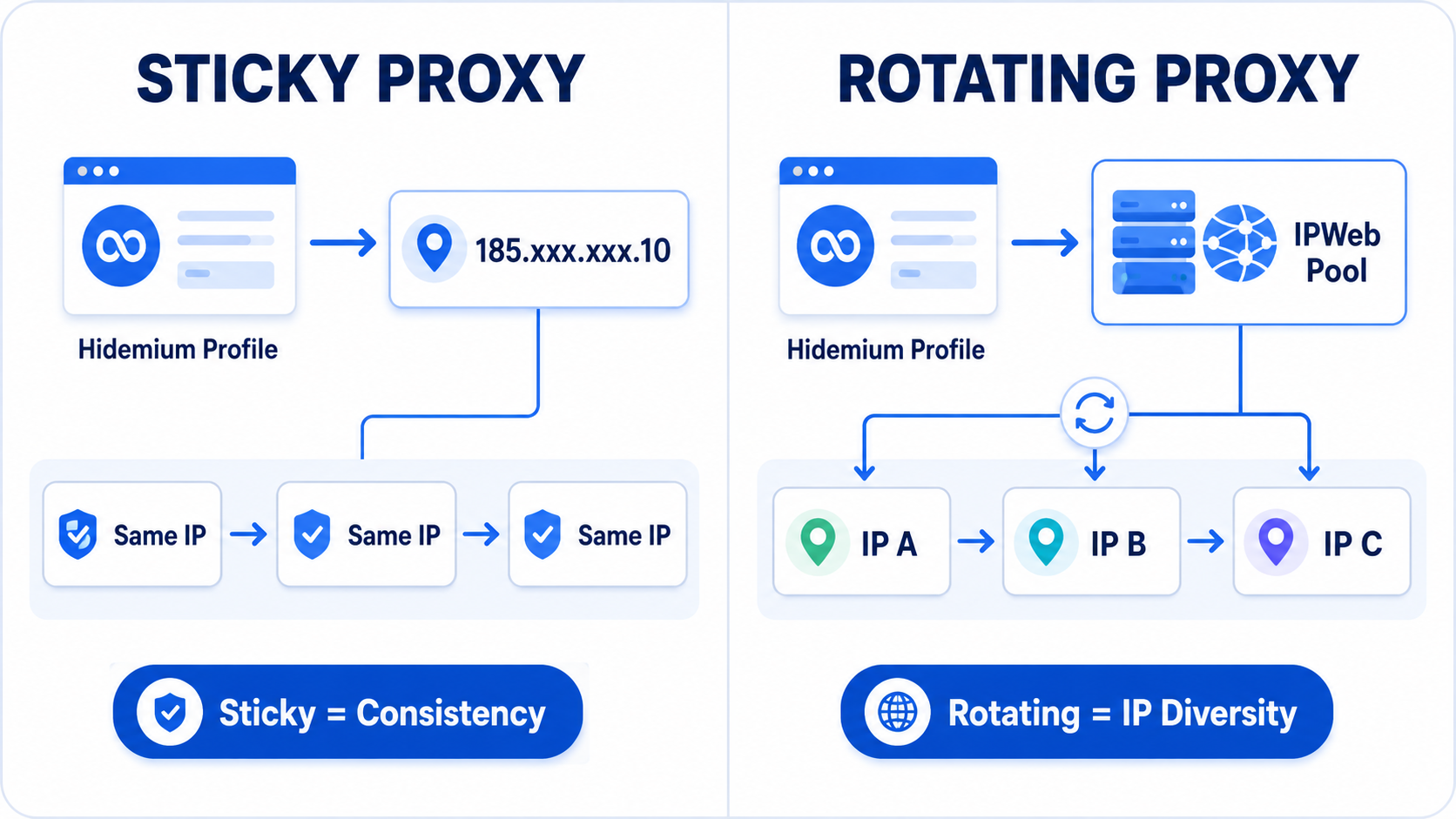
Title:Rotating vs Sticky Proxies for Hidemium: Which IPWeb Setup Should You Use? Meta description:Rotating or sticky proxy for Hidemium? Compare both IPWeb proxy setups, see which works best for stable sessions, research, geo testing and browser profiles. Rotating vs Sticky Proxies in Hidemium: Which IPWeb Proxy Setup Is Right for You?If you're using IPWeb proxies with Hidemium Antidetect[…]
How to Integrate IPRoyal with Hidemium — Complete Privacy at Your FingertipsIn today’s digital landscape, privacy, speed, and scalability are crucial. Whether you’re a digital marketer, developer, or eCommerce entrepreneur, managing multiple accounts and operations demands tools that are secure, seamless, and efficient.That’s why combining Hidemium with IPRoyal creates a powerful solution — one[…]

In the era of rapidly developing e-commerce, many new business models are emerging, including Ghost Commerce stands out as a potential option for beginners. This model not only helps to minimize financial risks, but also facilitates starting a business without much experience. In this article, we will explore what Ghost Commerce is, why this model attracts the attention of many newbies, and how[…]

Selling on Amazon offers great profit potential, but success requires the right strategies. With fierce competition among millions of sellers, optimizing Amazon search engine optimization (SEO) and using Amazon Sponsored Products ads are the keys to increasing visibility and achieving sustainable sales growth. This article will guide you on how to increase Amazon sales by combining these two[…]

The choice AweSun – secure remote access software plays a vital role in helping large businesses, freelancers, and remote workers overcome the barriers of connecting and controlling computers in different locations. The right tools will give you the ability to seamless collaboration, session access and remote file transfer fast, efficient troubleshooting support anywhere in the world.To help you[…]
