
WireGuard VPN is a new generation VPN protocol, featuring fast processing speed, lightweight structure and superior security. In this article, Hidemium Antidetect Browser will help you discover in detail: What is WireGuard VPN, why it is popular with the community, and specific instructions on how to install and configure it to protect your network connection most effectively.
1. What is WireGuard VPN?
WireGuard is an open source VPN protocol, launched in 2016 by Jason A. Donenfeld, with the goal of simplifying the use of VPN while ensuring high performance and security. Using modern encryption algorithms such as Curve25519 and ChaCha20, WireGuard provides faster transmission speeds and saves more system resources than traditional protocols like OpenVPN or IPSec.
Not only that, WireGuard is designed to be compatible with a wide range of platforms including Linux, Windows, macOS, Android and iOS. It supports both addresses IPv4 and IPv6, has the ability to automatically reconnect when the network is interrupted and is especially easy to configure. Thanks to these outstanding advantages, WireGuard is increasingly trusted by both individual users and businesses, becoming the optimal choice for security and stable connection needs.

>>> Learn more: Proxy, VPN and Antidetected Browser Comparison – What are the Main Differences?
2. Encryption principles in WireGuard VPN
WireGuard VPN is known for its strong security and simple yet effective encryption. In addition to protecting data in transit, WireGuard also optimizes the connection setup and key management process, providing a secure and easy-to-use experience for users. Here are the core encryption principles that make WireGuard one of the most highly regarded VPN protocols available today.
2.1 Modern encryption mechanisms
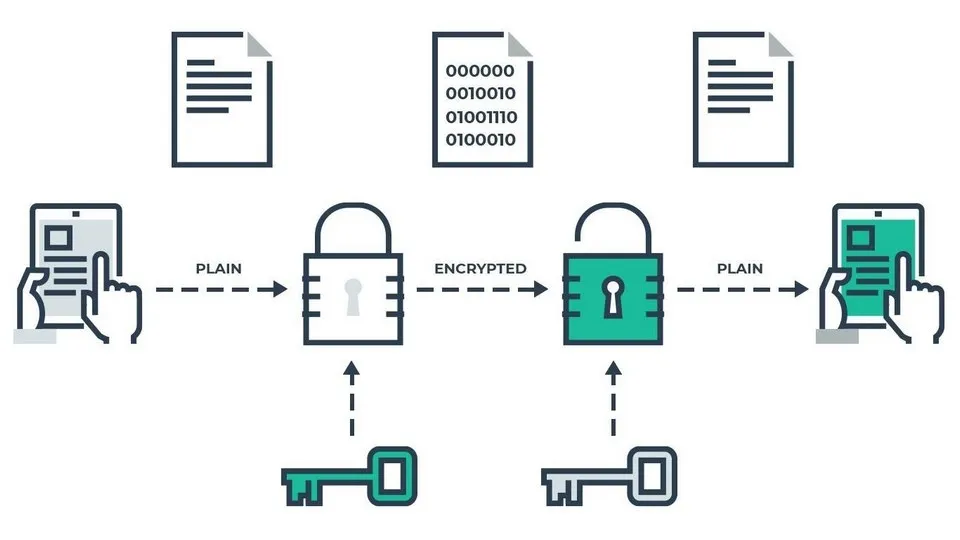
WireGuard uses advanced encryption algorithms to enhance the security of data as it travels across the network. Key technologies include:
Curve25519: The key exchange algorithm uses elliptic curve cryptography (ECC), which helps to establish secret keys between two parties securely and quickly.
ChaCha20: Symmetric encryption algorithm using XOR operation, featured with high performance and stability on multiple platforms.
Poly1305: Message authentication code (MAC) generation mechanism, ensuring data integrity and timely detection of any changes during transmission.
The combination of these three algorithms creates a tight security layer, helping WireGuard effectively protect data against cyber threats.

2.2 Security notes when using WireGuard
To ensure safety when using WireGuard VPN, users need to note the following important points:
Protect private and public keys: The private key must be kept strictly confidential and not shared in any form. The use of the public key must also be carefully controlled.
Correct encryption configuration: Always set up according to the instructions from your VPN provider to avoid using default configurations that may pose a security risk.
Change the key periodically: Regularly updating private and public keys helps increase the security of the system.
Verify peer and key before connecting: Before each connection session, ensure that you are communicating with a trusted entity by verifying the peer information and public key correctly.
>>> Learn more: What is Radmin VPN? How to Download it for Free
3. How does WireGuard VPN work?
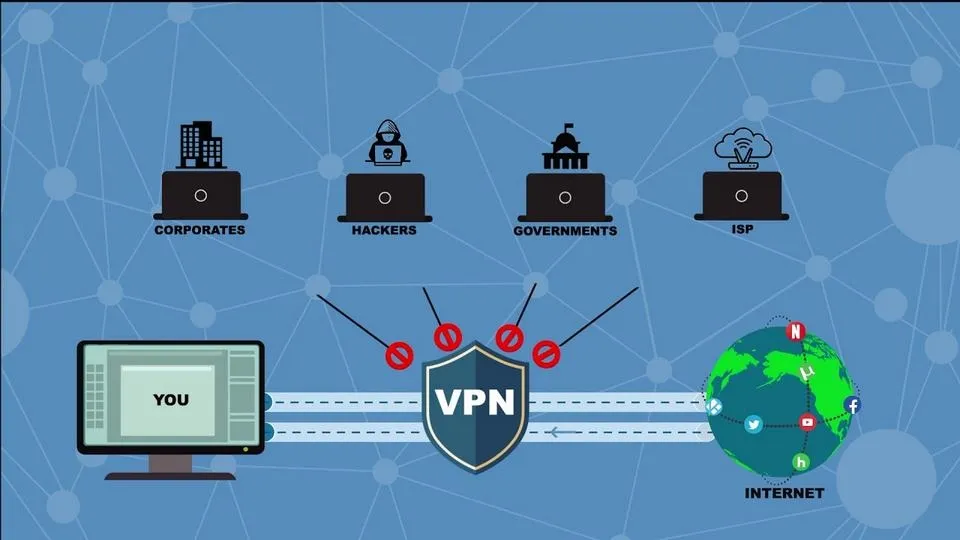
WireGuard VPN works by creating a virtual network interface (virtual network interface) on each device, thereby establishing a secure tunnel to transmit data. Each device (peer) is given a private encryption key along with a list of valid IP addresses, ensuring that only authenticated devices can connect and transfer data to each other.
Unlike traditional protocols that require complex authentication via certificates or accounts, WireGuard only requires public key exchange (public key) between devices, simplifying the configuration process. In addition, WireGuard uses modern encryption algorithms such as Noise Protocol Framework, Curve25519, ChaCha20, and Poly1305 to ensure high security while maintaining optimal performance.
Another outstanding strength is the ability to roaming Smooth. When the device changes IP addresses (like when moving between Wi-Fi networks), the VPN connection remains stable without interruption – ideal for mobile users or IoT devices.
>>> Learn more: Top 10 Best Free VPN Apps for Android in 2025
4. Pros and Cons of WireGuard VPN
As one of the newest VPN protocols, WireGuard is highly regarded for its speed, stability and security. However, there are still certain limitations you need to consider before choosing.
Advantage:
High speed: The lightweight design allows data to be processed and transmitted much faster than protocols like OpenVPN or IPSec.
Save resources: Uses low CPU and memory, especially suitable for low-end devices.
Quick Setup: The setup process is simple, requiring no technical expertise – even for beginners.
Stable connection: Automatically reconnects when network is interrupted, ensuring continuous experience.
Flexible support: Compatible with both IPv4 and IPv6, meeting diverse network needs.
Disadvantages:
Not widely available: Some services and systems do not yet have built-in WireGuard support.
Lack of advanced features: Compared to legacy protocols, WireGuard is limited in terms of in-depth customization for network administrators.
Difficult to deploy in large networks: Some routing configuration limitations may make it difficult to use for enterprise or complex systems.
Low backward compatibility: Does not support legacy protocols such as PPTP, L2TP/IPSec.
Risks in specific environments: While secure, WireGuard is still under development and may have vulnerabilities if deployed in multi-user systems without proper configuration.
>>> Learn more: How to Fake IP Effectively Using VPN and Proxy
5. WireGuard – Optimized performance by integrating directly into the Linux Kernel
Since version 5.6, WireGuard has been integrated directly into the Linux Kernel, opening up many outstanding improvements for users. Thanks to this integration, connection performance is significantly improved, latency is significantly reduced, and stability is enhanced – all without the need to install any additional modules. This not only makes the process of deploying and managing VPNs on Linux simpler, but also supports updates and patches directly from the kernel, providing high security and smoother system operation.

6. Instructions for installing WireGuard VPN server on Linux operating system
Setting up a VPN server using WireGuard on Linux is relatively simple and can be done quickly through the following steps. This helps you build a private, safe and secure network environment:
Step 1: Proceed to update the Linux operating system to the latest version using the appropriate package update command.
Step 2: Install WireGuard through your system's package manager. For example, on Ubuntu, you'd use the following command:

Step 3: Start the WireGuard service and check if it is ready to accept connections. Don't forget to open port 51820/UDP on your firewall and configure security settings to protect your server from external threats.
7. Connection Speed Comparison: WireGuard vs OpenVPN – Which Protocol Is Superior?
WireGuard and OpenVPN are two popular VPN protocols designed to establish secure connections when accessing the Internet. Although connection speeds depend on many factors such as network type, bandwidth, and device configuration, according to many practical tests, WireGuard typically offers faster and more stable performance than OpenVPN.
That's because WireGuard uses lightweight encryption algorithms and network optimization technologies like Multipath TCP (MPTCP) and Fast Handover for Mobile IPv6 (FMIPv6), which helps reduce latency and increase data transfer speeds. However, if you choose OpenVPN, make sure to update to the latest version and configure it properly for optimal performance.
Through the above comparison, Hidemium hopes you can make the right choice for your needs and make the most of its power WireGuard to protect personal data safely and effectively. If you need further assistance, do not hesitate to contact the Hidemium team for detailed advice.
>>> RELATED ARTICLES:

Related Blogs

Scaling Multi-Accounting: How Proxies Complement Anti-Detect BrowsersIf you have ever done multi-accounting, you know that this activity can lead to a ban. Websites and social networks prohibit managing several accounts at the same time and block violators.However, strict bans do not stop everyone. Many users who work on the Internet successfully bypass them and manage accounts without any[…]

LinkedIn Premium offers a variety of plans to suit every professional's needs. In this article, you'll learn how to get LinkedIn Premium for free completely, along with a list of outstanding offers in 2025.Whether you're looking for a job, generating leads, growing your business, or recruiting top talent, LinkedIn Premium is the tool to help. Plus, Hidemiumalso share one New alternatives in 2025,[…]

You're wondering...How to calculate TikTok earningsHow can you maximize your income from today's most popular short-video platform? Understanding TikTok's reward system and applying smart monetization strategies is key to turning your passion for content creation into a stable source of income.This article Hidemium will give you a comprehensive overview of How TikTok calculates earnings, analyze[…]

In the field of affiliate marketing, cookie stuffing is a common form of fraud. This occurs when tracking cookies are installed on users' devices.without their knowledge. This allows fraudsters to receive commissions for actions they didn't actually commit.The consequences extend beyond just lost costs. Businesses also face issues such as inaccurate marketing data, unreliable performance reports,[…]

Opening a store on Etsy is an excellent opportunity to start a business. However, to attract customers and increase traffic to your store, you need a clear strategic plan and effective execution.This article by Hidemium will guide you step-by-step on setting up an Etsy store and share effective strategies to help you drive traffic and boost sales growth. 1. What is Etsy?Etsy is a popular[…]
In the digital age, using two computers in parallel to serve work is becoming more and more popular. To optimize performance and share data easily, connecting 2 computers via IP address is a useful solution, especially when both devices are on the same local network. Here are detailed instructions on how to do it.Antidetect Browser Hidemium:1. How to connect 2 computers via internal IP[…]
