
TikTok is increasingly asserting its position as a potential sales platform in the field of e-commerce. However, many content creators and sellers still face a difficult problem: Cannot attach product links directly on TikTok. This has a significant impact on marketing performance and order conversion. So what is the cause and what is the solution? Together Antidetect Browser Hidemium Find out more below.
1. Reasons why you can't attach product links on TikTok
Many sellers and content creators have trouble attaching product links directly to TikTok videos. This is a common problem, especially for accounts that do not meet the platform's requirements. So why does TikTok not let you add product or website links to videos? Let's find out the reasons in the section below to find the right solution.
1.1 Using non-commercial library music
One of the most common reasons why you can’t link to a product is because you’re using music that isn’t in TikTok’s commercial library. According to platform rules, only business accounts using music from the commercial library are allowed full access to features, including linking. If you violate this rule, your account may be limited, affecting your ability to market your product.
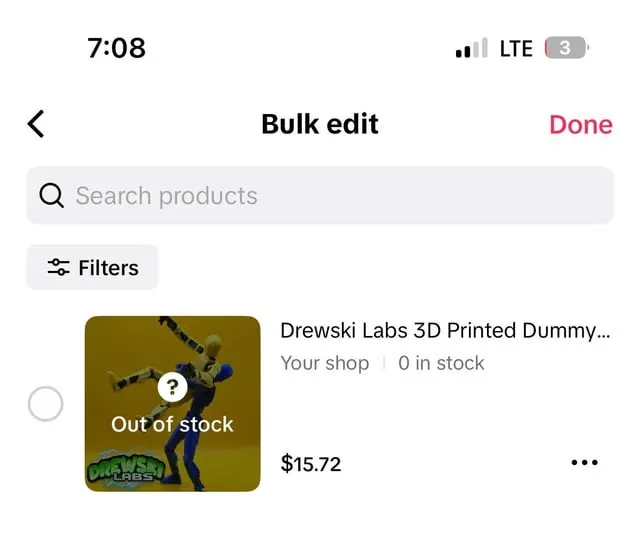
1.2 Products on TikTok Shop are out of stock
When the product you want to promote is out of stock on TikTok Shop, the system will automatically hide or disable the link feature for that product. This is to avoid viewers clicking on a link that is no longer valid. To fix this, you should update your inventory or replace it with a similar product to make the most of the posted content.
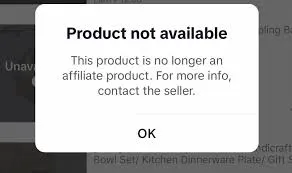
1.3 Products no longer in the Affiliate program
If a product is removed from the affiliate program, you will not be able to post a link. This may be because the store has temporarily suspended its partnership with the content creator. In this case, you should quickly find a replacement product from another store that is still active in the affiliate program to maintain your income.
1.4 Accounts have not reached 1,000 followers
TikTok only allows accounts to reach 1,000+ followers You can attach product links to videos. This is a condition to ensure that the account has enough interaction and reputation to carry out commercial activities. If your account does not have enough followers, focus on building quality content and increasing the number of followers before using advanced features.
>>> Learn more: Tips for Making Money from TikTok for Beginners
2. How to fix the error of not being able to attach product links to TikTok videos
If you encounter an error that prevents you from inserting product links into TikTok videos, don’t worry too much. There are still simple and effective solutions for you to continue to take advantage of this platform in marketing your products. Here is a detailed guide with 3 basic steps:
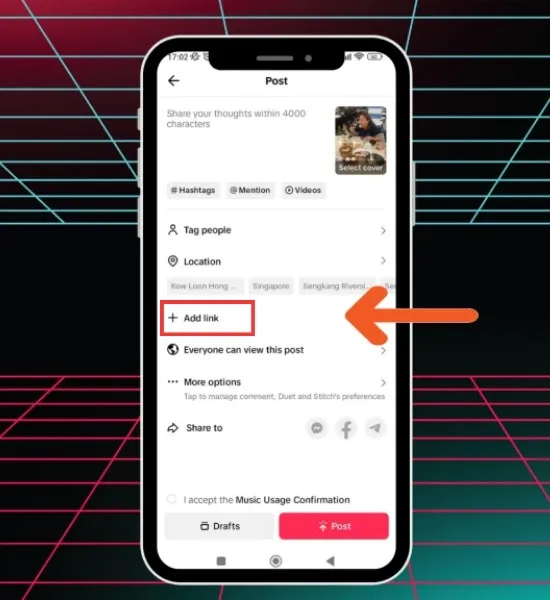
Step 1: Create a product introduction video and post it on your TikTok account. Make sure the video has clear images and engaging content to attract viewers and increase the possibility of spreading.
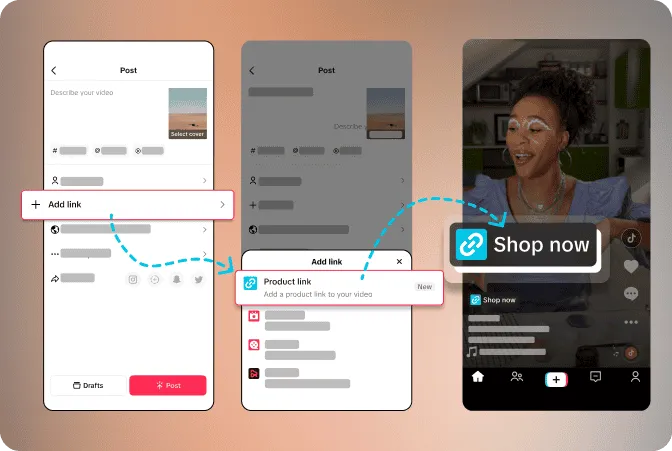
Step 2: After the video is posted, click on the “Add link”. TikTok will display two options:
"Product": to directly attach the product to the video.
“Live Event”: to insert links into live streams.
Step 3: Select "Product", then search for the right product from your store. Once you've identified the product you want to mount, click "More"to complete inserting the link.
Note: If you have followed the steps correctly and still cannot add the link, try deleting the TikTok app and reinstalling it. In case the error persists, contact TikTok support via phone or email for specific technical support.
>>> Learn more: How Does TikTok Pay? Earnings Calculation and Smart Money Making Tips
3. Instructions for attaching product links to TikTok videos
To be able to attach product links on TikTok, you need to switch your personal account to a business account. The process is as follows:
Step 1: Open the TikTok app and go to the Profile.
Step 2: Click on the three dashes in the upper right corner.
Step 3: Select Manage account→ press Switch to Business Account → continue by pressing Next.
Step 4: Select the category that suits your business and click Next to complete the conversion process.
Once your account has successfully converted, you can add a website link to your TikTok profile as follows:
Step 5: Back to page Profile.
Step 6: Press Edit profile→ select Add your website.
Step 7: Enter your website URL and press Save to complete.
>>> Learn more: How to Run Multiple TikTok Accounts Without Getting Banned
4. Important notes when inserting product links into TikTok videos
To insert product links into TikTok videos effectively and without problems, you need to note the following points:
Optimize product name: Keep your product name short, under 30 characters, and easy to understand. While TikTok automatically generates default product names, you can edit them to highlight the material, function, or unique features of the product to attract viewers' attention.
Only attach one product per video: Avoid including multiple links in the same video as this can distract viewers and reduce conversions. It’s best to focus on a specific product to keep your audience’s attention on the main content.
Make sure the video content is relevant to the linked product: Consistency between your video content and your products is an important factor to help you avoid violating TikTok's policies. If you are an affiliate or selling through TikTok Shop, make sure to update the latest policies to operate effectively and safely.
Only insert links to products that do not violate TikTok policies: Avoid linking to products that are in restricted categories, require documentation, or are at risk of violating regulations. These products are more likely to be rejected and may negatively impact your account.
Prioritize products that are easy to sell and easy to get approved.: If you are a beginner, choose products that are popular, accessible, and not on TikTok's control list. This will help you save time waiting for approval and increase the chance of converting orders.
Above are important notes to help you answer the question “Why can't I attach product links on TikTok?” and effective solutions. Hope the article from Hidemium will support you to deploy affiliate marketing or sales campaigns on TikTok smoothly and optimally. If you have any questions, please contact us immediately for timely support!
>>> RELATED ARTICLES:

Related Blogs

In the digital era, making money online (MMO) has become a popular trend, offering flexible and accessible opportunities for everyone. Whether you want to earn extra income or build a long-term business, there are always suitable options available. However, for beginners, the abundance of information can be overwhelming. Don’t worry! This article will guide you through 22 practical ways to make[…]


IPv6 (Internet Protocol version 6) is the latest Internet protocol designed to replace IPv4, which is gradually running out of available addresses. With its 128-bit length, IPv6 provides an almost unlimited number of IP addresses while also improving connection speed, security, and support for IoT devices.However, not all users know whether their network already supports IPv6. Below are 4 simple[…]
Etsy – one of the leading e-commerce platforms today – stands out thanks to its focus on handmade products, antiques and personalized items. This difference makes Etsy more approachable and "human" than its competitors who sell mass-market, impersonal goods. In an era where the market is flooded with mass-produced industrial products, Etsy is the ideal destination for those who appreciate[…]

In China, the Internet censorship system – commonly known as The Great Firewall (GFW)– continuously blocks access to thousands of international websites and applications such as Google, Facebook or WhatsApp. Therefore, for tourists, foreigners living in China or local residents, VPN became an important tool to maintain digital freedom and access the services needed for work and personal[…]
.png)
In the online business and social network management environment, using multiple accounts on the same platform such as Facebook, Twitter or Amazon is a common need. Ghost Browser was born as a convenient solution, helping users easily manage multiple accounts in a single browser interface. This article Hidemium will explain what Ghost Browser is, why it has become the favorite choice of many[…]