
In today’s internet ecosystem, online platforms increasingly rely on advanced detection systems to identify devices and analyze user behavior. One of the key signals used in this process is the browser User-Agent.
A User-Agent is more than just a string that identifies your browser and operating system. In practice, it is a critical component of browser fingerprinting, which websites use to analyze access environments, detect bots, and flag suspicious activity.
For individuals and businesses operating multiple accounts across social media, e-commerce platforms, or marketing systems, understanding and controlling the User-Agent is essential for reducing the risk of account linking or automated bans.
In this article, Hidemium will explore how User-Agent works, how platforms use it in detection mechanisms, and the strategies that help create a secure and consistent browser environment for multi-account management.
1. Browser User Agents as a Digital Fingerprint
A browser User Agent (UA) is far more than a simple identification string. It functions as a critical HTTP header that plays a key role in the communication process between a client and a server, influencing how the server responds to incoming requests.
During the initial handshake between the client and the server, the UA string provides essential information such as the browser type, browser version, operating system, and rendering engine. This data helps the server identify the user environment and determine how to deliver the most appropriate content.
Historically, the main purpose of the User Agent was content optimization, allowing websites to differentiate between mobile and desktop environments. However, in modern security systems, UA has evolved into a fundamental component of device fingerprinting technologies.
The UA string often serves as the first telemetry signal analyzed by security systems to verify the legitimacy of a connection. For professionals managing multiple accounts, understanding the nuances of this “digital handshake” can make the difference between smoothly scaling operations and having accounts flagged or terminated instantly.
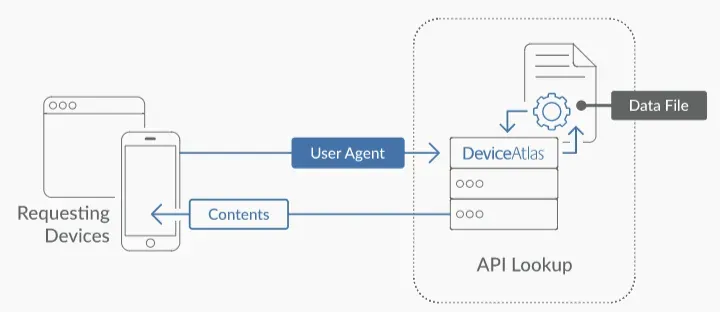
>>> Learn more: What is User Agent? How to change UA on 4 popular browsers today
2. Anatomy of a Browser User-Agent String
A standard User-Agent (UA) string is a structured identifier containing multiple layers of technical information. For professionals operating multi-account environments, understanding each component of this string is essential for maintaining account integrity and avoiding detection by platform security systems.
Browser Engine and Version
Within the UA string, the browser specifies the rendering engine it uses. The most common engines today include Blink (used in Chromium-based browsers), WebKit, and Gecko. Alongside this, the browser version number plays an important role because it communicates both browser capabilities and the level of applied security patches.
Recently, many browsers have started adopting the “UA String Freeze” approach, which limits the level of detail exposed in the UA string to reduce user tracking. Nevertheless, security systems still analyze browser versions to ensure that the client is not operating from an outdated environment, a vulnerable configuration, or an automated bot-driven setup.
Operating System and System Architecture
The UA string also reports the host operating system, such as Windows, macOS, Linux, iOS, or Android. However, modern security systems do not rely on this information at face value.
Instead, they cross-reference the application-level UA string with the operating system’s TCP/IP stack signature. Each operating system has distinctive characteristics in its network packet headers, particularly in values like TTL (Time to Live) and TCP Window Size. If a mismatch occurs—for example, a UA claiming Windows while the TCP/IP signature resembles a Linux-based Android device—this inconsistency becomes a high-entropy anomaly that may immediately trigger spoofing alerts.
Device-Specific Identifiers
In some cases, the UA string also embeds hardware-related metadata that helps servers determine how to allocate resources and render page layouts. This may include the hardware architecture, such as x86_64 or ARM.
To pass modern verification systems, these parameters must remain consistent with the reported browser version and operating system. Any inconsistency between these elements can signal that the environment has been manipulated or artificially simulated.
>>> Learn more: What is a Residential Proxy? A Tool for Online Privacy and Identity Protection
3. How User-Agent Technology Impacts Browser Fingerprinting and Privacy
Browser fingerprinting relies on the concept of entropy, a mathematical measure describing how much identifying information a particular data point contributes when narrowing down a user's identity.
A common User-Agent string typically has low entropy because many users share similar configurations. In contrast, a highly specific or improperly configured UA string produces high entropy, making the device easier to identify or flag as suspicious.
Modern platforms rarely rely on UA alone. Instead, they combine User-Agent data with multiple other signals to generate a nearly unique browser fingerprint, even without cookies. Therefore, when managing multiple accounts, the objective is not to create a completely unique identity but to maintain a natural entropy level that resembles real user behavior.
Professional tip:
Consistency is the most important security metric. Platforms analyze correlations across the entire digital fingerprint, including screen resolution, hardware configuration, timezone, and system attributes. If the UA string changes but the underlying hardware telemetry does not match, the inconsistency can still trigger detection mechanisms.
>>> Learn more: Top 15 Trusted Free Proxy Sites
4. Operational Scenarios for Managing User Agents
For businesses operating large-scale digital infrastructures, User-Agent management is a key element of risk mitigation strategies.
E-commerce Operations
Managing multiple storefronts on platforms like Amazon or eBay requires strictly isolated UA strings. If UA data overlaps or leaks between accounts, platforms may trigger linked-account bans, treating the entire network of accounts as a single high-risk entity.
Social Media Marketing
Platforms such as Meta and TikTok analyze the relationship between User-Agent, IP address, and timezone. For example, logging into dozens of accounts with a UA indicating a Windows device in New York while the proxy and system clock suggest London may immediately trigger automated security checks.
Affiliate Marketing and Traffic Arbitrage
In affiliate marketing and traffic arbitrage, lead-quality algorithms often evaluate UA consistency. If your UA distribution does not match the expected demographics of your audience, the system may label the traffic as non-human or suspicious, leading to reduced traffic value or account restrictions.
>>> Learn more: Which Proxy Should You Buy for Facebook? Amazon? Instagram? Shopify? …
5. Risks of Improper User-Agent Spoofing
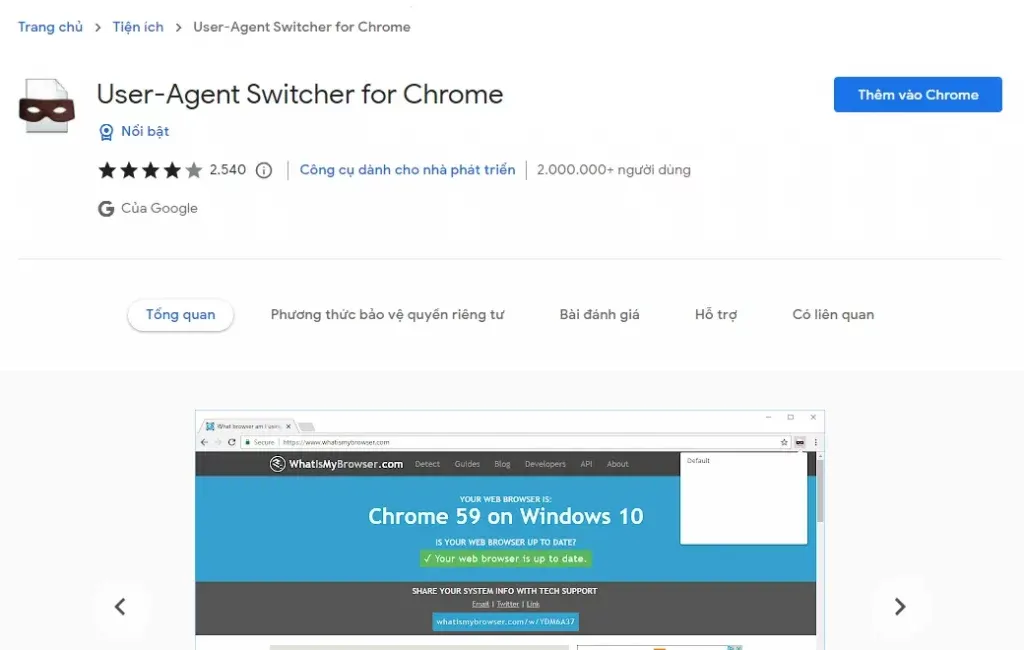
Simple User-Agent spoofing, such as using a basic browser extension to change the UA string, is a high-risk approach that typically fails against modern bot detection systems.
Security tools frequently perform JavaScript runtime checks to verify the actual environment. For example, even if you change the UA to “Safari on iPhone,” the JavaScript property navigator.platform might still return “Win32” if the device is actually running Windows.
This creates a clear software–hardware mismatch, often referred to as a “smoking gun.” If a server detects a UA claiming to be a mobile device while CSS media queries or WebGL renderer metadata indicate a desktop GPU, the identity is quickly exposed.
For this reason, blind spoofing is often more dangerous than not spoofing at all.
6. Strategies for Isolating and Controlling Browser User Agents
Traditional Spoofing vs. Profile Isolation
Traditional User-Agent spoofing is largely superficial. It changes the visible identifier but does not alter the underlying environment of the device. As a result, modern detection systems can still identify inconsistencies.
In contrast, professional browser profile isolation, implemented through tools like DICloak, creates a sandboxed environment for each browser profile. Within this environment, every attribute—from the User-Agent string to the rendering engine and hardware fingerprints—is configured to remain internally consistent.
Each profile therefore behaves like an independent machine, providing a stable environment and reducing the risk of cross-account data leakage in multi-account operations.
The “Hardware–Software Synchronization Mission”
To pass modern security verification systems, maintaining synchronization between hardware and software signals is essential.
If the User-Agent string claims a specific operating system, then other technical indicators must support that claim. These include:
- Canvas fingerprint data
- WebGL renderer metadata
- AudioContext fingerprint
All these signals must align with the declared environment.
When these elements contradict each other—a situation often referred to as “fingerprint soup”—security systems can easily detect anomalies. This inconsistency is one of the most common reasons for automated account bans across many platforms.
7. Standard Methods vs. Hidemium Professional Infrastructure
In multi-account operations, the difference between standard browsers and a dedicated infrastructure such as Hidemium can significantly impact operational security.
Feature / Method | Standard Browser | Hidemium Infrastructure |
| Profile Isolation | Shared cookies and local storage | Independent sandbox environment per profile |
| User-Agent Control | Bound to the host device | Fully customizable per profile |
| OS Simulation | Limited to host OS | Simulates Windows, macOS, Linux, iOS, Android |
| Scalability | Manual management | Bulk profile creation and automation |
| Account Risk | High due to fingerprint leakage | Reduced through synchronized fingerprint environments |
| Detection Resistance | Minimal protection against JS checks | Advanced OS and device signature simulation |
Customizing User-Agent with Hidemium
Hidemium enables the generation and management of valid User-Agent strings using a Chromium-based browser core. This ensures compatibility with modern web standards while managing hundreds or even thousands of accounts on a single device.
Each browser profile can also maintain a unique fingerprint configuration and integrate with proxies (HTTP, HTTPS, or SOCKS5). This guarantees that every identity operates within a consistent environment, reducing the risk of account linkage.
Pro tip:
When scaling operations, create profiles with diverse User-Agent distributions to mimic a natural user base rather than automated traffic.
Leveraging RPA for Automated User-Agent Workflows
Automation is a key driver of digital scaling. The built-in RPA system in Hidemium allows teams to automate repetitive browser actions across multiple profiles.
Tasks such as login automation, posting, data collection, and account monitoring can run simultaneously while maintaining separate UA strings, fingerprints, and IP addresses for each profile.
These workflows become even more secure when combined with activity logs and team permission management, enabling transparent and collaborative operations.
Professional Evaluation of Hidemium for Multi-Account Teams
Advantages
- Infrastructure efficiency: manage thousands of accounts on a single machine
- Flexible proxy integration (SOCKS5, HTTP, HTTPS)
- Secure team collaboration with permission management
- Multi-platform environment simulation
Limitations
- Initial configuration requires careful fingerprint setup
- Advanced automation features may require technical familiarity
FAQ About Browser User-Agent Management
What is the primary purpose of a User-Agent?
It is an HTTP header that informs the server about the client environment, enabling optimized content delivery.
Can changing the User-Agent improve privacy?
Yes, but manual changes often increase fingerprint entropy. Proper privacy requires synchronized changes across UA, hardware signals, and runtime attributes.
How do websites use User-Agent data for security?
They combine UA with network and JavaScript signals to perform passive fingerprinting and detect bot-like behavior.
Is a User-Agent unique to each user?
No. Many users share the same UA string, but when combined with other fingerprint signals it contributes to identifying a specific device.
👉 Don't hesitate, contact Hidemium now for free consultation and experience outstanding features!
>>> Learn more:
- Proxy, VPN and Antidetected Browser Comparison – What are the Main Differences?
- How to Fake IP Effectively Using VPN and Proxy
- What is a UDP Proxy and How Does It Improve Performance?

Related Blogs

NordVPN is a reputable VPN service that helps secure personal data and ensure privacy when accessing the Internet. If you are in need of a solution to hide your IP, bypass regional content restrictions, and browse safely, this article is for you. Antidetect Browser Hidemium will help you better understand NordVPN – from outstanding features to points to note.1. What is NordVPN?NordVPN is a[…]

Managing multiple accounts on Instagram is not a simple thing. Photos and videos aren’t synced to one account, confusing you with posting from one account to another. Using multiple accounts also makes it easy for you to be flagged as suspicious by the platform. So what is the optimal way to manage multiple accounts on […]
.png)
BitBrowser is one of the widely used Antidetect browsers thanks to its ability to change Browser Fingerprint and create multiple independent browser profiles, helping to manage a large number of accounts effectively. However, in the context of many new anti-detection browsers being born with more modern technology, can BitBrowser still remain as competitive and effective as before? Join Hidemium[…]

Trong sự kiện đáng chú ý, chúng tôi rất vui thông báo rằng Hidemium V4 đã được hoàn thiện và chính thức đi vào hoạt động! Phiên bản này không chỉ là một bản cập nhật đơn giản mà còn là một bước tiến lớn đánh dấu sự thay đổi hoàn toàn của Hidemium. Cùng […]

Owning and managing multiple advertising (Ads) accounts is essential for scaling campaigns. However, Facebook continuously tightens its detection mechanisms and is ready to disable multiple accounts at once if it detects that the login environment is not “clean.”In this article, we will guide you through building fully isolated browser environments to minimize abnormal flags and manage Facebook[…]
