.png)

DNS 1.1.1.1 is the leading DNS service, trusted by many people thanks to its outstanding speed and high security. This is the ideal choice for those who want to enhance their safe and smooth web surfing experience. Together Antidetect Browser Hidemium Learn the details about DNS 1.1.1.1 and how to quickly set it up on your device!
1. What is DNS 1.1.1.1? Outstanding benefits when used
DNS (Domain Name Server) is a system that converts domain names into IP addresses, helping computers connect to servers. DNS 1.1.1.1, developed by Cloudflare, stands out for its high performance and ability to protect user information.
Benefits of using DNS 1.1.1.1:
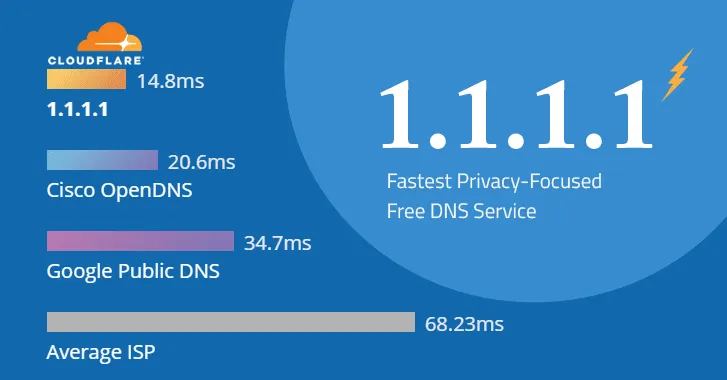
Increase Internet access speed: With more than 1,000 servers globally and access to more than 7 million domains, Cloudflare's DNS 1.1.1.1 ensures quick responses, making domain name resolution efficient.
Optimal security: Cloudflare commits to not storing user data long-term, only keeping logs for 24 hours for troubleshooting. This service uses advanced security technologies such as query name minimization, sending only necessary information to the DNS server. Furthermore, Cloudflare performs annual audits to ensure security policy compliance, providing complete peace of mind.
Comply with transparency: The system is audited annually by an independent third party to maintain a high level of security and build trust with users.
2. IPv4 and IPv6 addresses of DNS 1.1.1.1
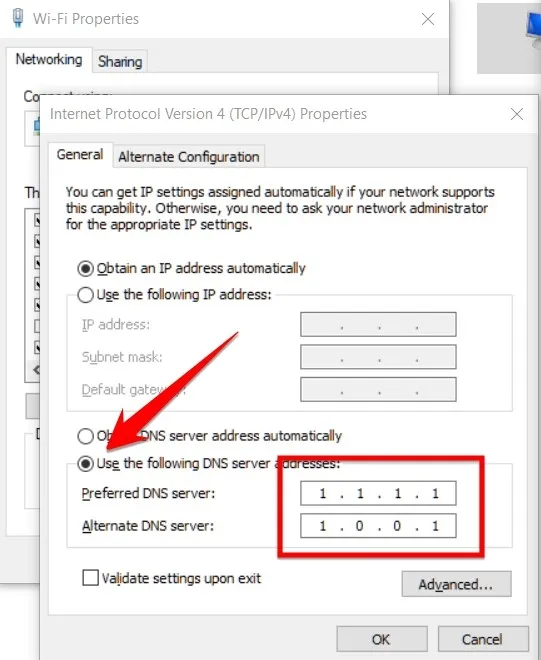
IPv4: DNS 1.1.1.1 uses two addresses viz 1.1.1.1 and 1.0.0.1.
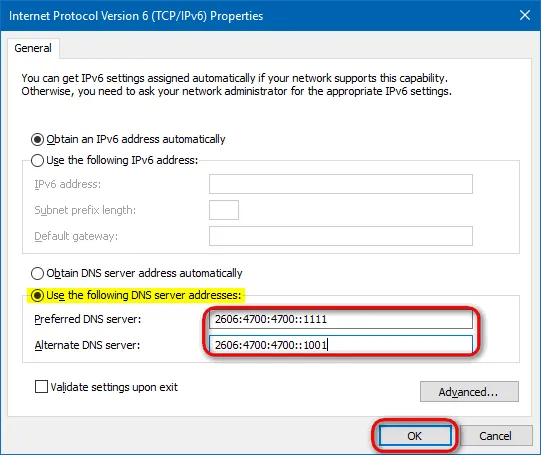
IPv6: Represented through two addresses: 2606:4700:4700::1111 and 2606:4700:4700::1001.
Antidetect Browser Hidemium encourages you to use DNS 1.1.1.1 to improve network performance and safety. In the following sections, we will show you how to set up this DNS on any device simply and quickly.
3. Advantages and disadvantages of DNS 1.1.1.1
Cloudflare's DNS 1.1.1.1 is one of the public DNS services that is highly rated for performance and privacy. However, like any other technology, this service also has both strengths and limitations. Below is a summary of those Advantages and disadvantages of DNS 1.1.1.1 that you should consider before using:
Advantage | Disadvantages |
| Enhance the security of personal information when accessing the internet. | Absolute safety cannot be guaranteed, which may mislead users into thinking that all activities are protected. |
| Improve web access speed, especially when the carrier's default DNS is not optimal. | Some carriers (ISPs) may block DNS 1.1.1.1, making the service unavailable on their networks. |
| Enhance privacy when data is not stored permanently. | Some anonymized data may still be used by Cloudflare for research and analysis purposes. |
| Able to bypass content censorship from internet service providers, helping to access restricted websites. | — |
Choosing DNS 1.1.1.1 depends on your security needs, access speed and level of reliability you desire. To ensure maximum effectiveness, you should combine use with other security tools such as VPN or private browser.
>>> Learn more: How to fix "Network Blocking Encrypted DNS" error on iOS
4. How to effectively change DNS 1.1.1.1 for your computer
Changing DNS to 1.1.1.1 on your computer or phone is a simple way to speed up Internet access and improve personal data security. Below are detailed instructions to change DNS 1.1.1.1 on your computer, easily applicable to both Macbooks and Windows PCs.
4.1. Instructions for changing DNS 1.1.1.1 on Macbook
To configure DNS 1.1.1.1 on Macbook, you just need to do the following steps:
Click on the Apple icon and select System Preferences.
Go to section Network, select Wi-Fi, then press the button Advanced.
Go to tab DNS.
Click the plus symbol “+” to add a new DNS address, enter 1.1.1.1.
Continue pressing the plus sign "+" to add a secondary DNS address, enter 1.0.0.1.
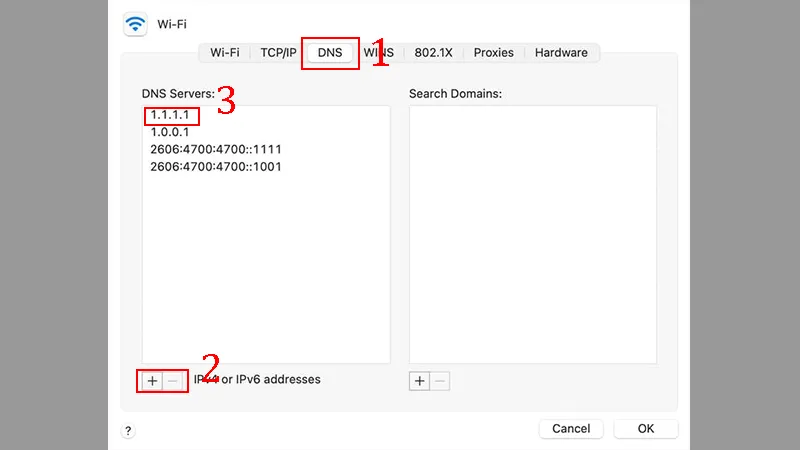
Once completed, press OK to save settings. Changing DNS on Macbook is now extremely easy!
Note: Please note down the current DNS addresses before changing them for easy recovery if necessary.
4.2. Instructions for changing DNS 1.1.1.1 on Windows PC
To change DNS 1.1.1.1 on a Windows computer, you can follow these steps:
Click on the icon Windows, open Control Panel, then select Network and Internet.
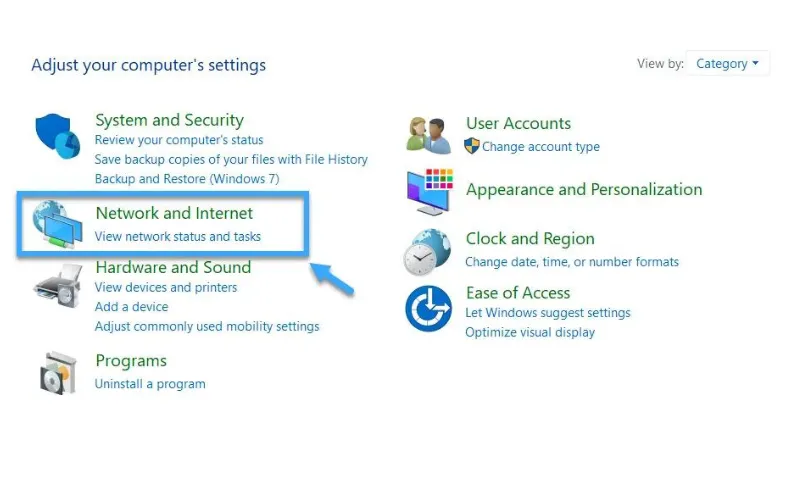
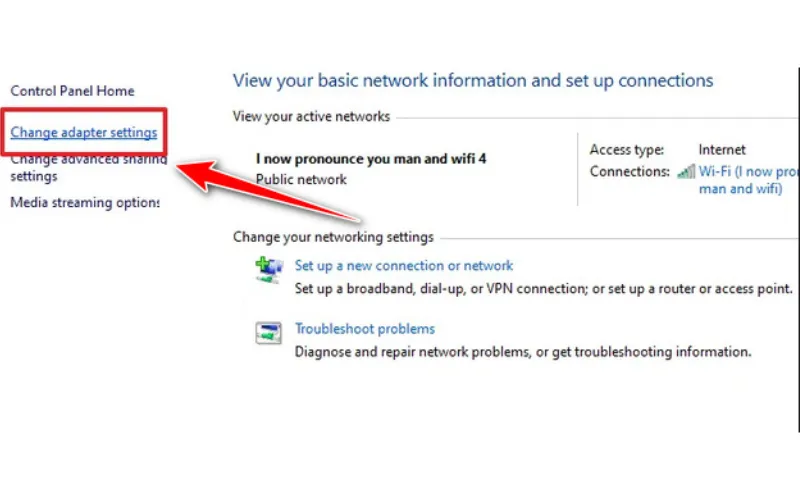
Click Change Adapter Settings, then select the Wi-Fi network in use.
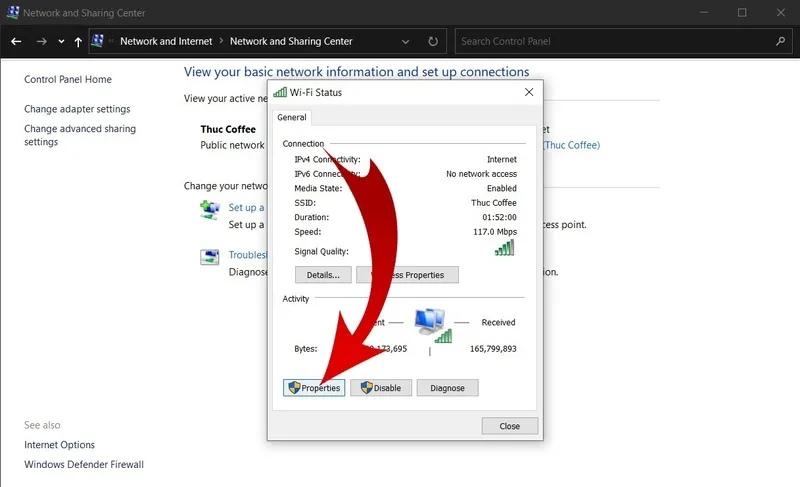
Press Properties, select Internet Protocol Version 4 (TCP/IPv4), then press Properties again.
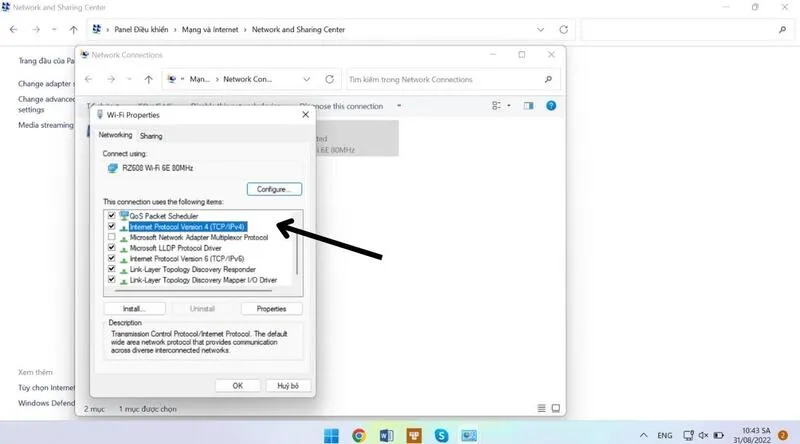
In the DNS server section, enter 1.1.1.1 Go to the Preferred DNS box and 1.0.0.1 Click the Alternate DNS box, then click OK to save.
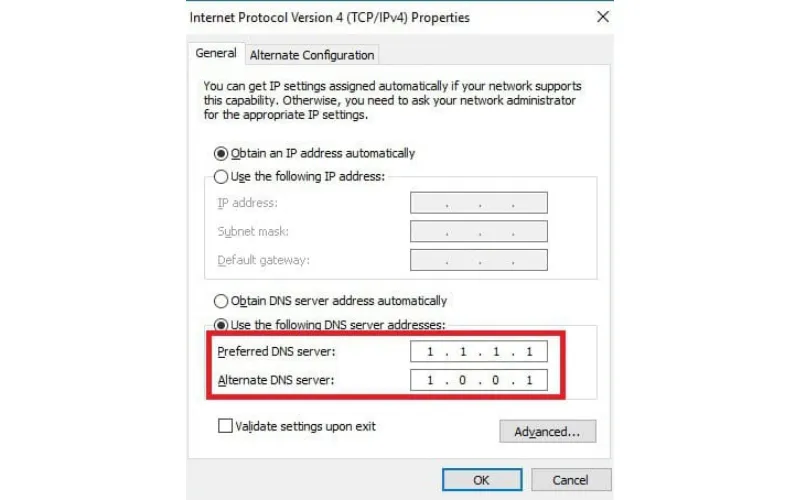
Completing the above steps, your Windows computer has been successfully configured with DNS 1.1.1.1, helping to increase speed and security when surfing the web.
5. Instructions on how to change DNS 1.1.1.1 on the phone
Changing DNS to 1.1.1.1 (or 1.0.0.1) helps improve network access speed, increase security and overcome web blocking barriers. Below are specific instructions on how to configure DNS 1.1.1.1 for Android and iOS phones.
5.1. Change DNS 1.1.1.1 on Android phone
To set up DNS 1.1.1.1 on your Android device, follow these steps:
Step 1: Enter Setting, select Wi-Fi (or Network connection depending on Android version).
Step 2: Press and hold the name of the Wi-Fi network you are connecting to, then select Repair network or Network configuration.
Step 3: In section IP configuration, select Static IP.
Step 4: Enter the DNS address in the corresponding box:
DNS 1: 1.1.1.1
DNS 2: 1.0.0.1
Press Save to complete.
5.2. Change DNS 1.1.1.1 on iPhone (iOS)
For iPhone users, changing DNS is also very simple:
Step 1: Enter Setting, select Wi-Fi, then click the “i” icon next to the network you are connecting to.
Step 2: Scroll down and select Configure DNS.
Step 3: Select Customize, then delete the old DNS by pressing the red minus icon.
Step 4: Press Add server, enter:
1.1.1.1
1.0.0.1
Finally press Save to apply the new settings.
This way of changing DNS not only helps access the Internet faster but also helps improve privacy when using the network on mobile devices.
6. Simple and quick instructions for installing DNS 1.1.1.1 application
Depending on the device you are using, the way to install DNS 1.1.1.1 will be a little different. Below are detailed instructions for you to easily set up and optimize your Internet access speed safely.
6.1. How to install DNS 1.1.1.1 on phone
You can install Cloudflare's 1.1.1.1: Faster Internet app on your iPhone or Android in just a few steps:
Step 1: Go to App Store (for iOS) or Google Play Store (for Android).
Step 2: Search for the app “1.1.1.1: Faster Internet” with the green icon.
Step 3: Press Setting or Download to get started.
Step 4: Open the application after installation is complete.
Step 5: Press Begin when you see the welcome screen.
Step 6: Allows the app the necessary access to operate.
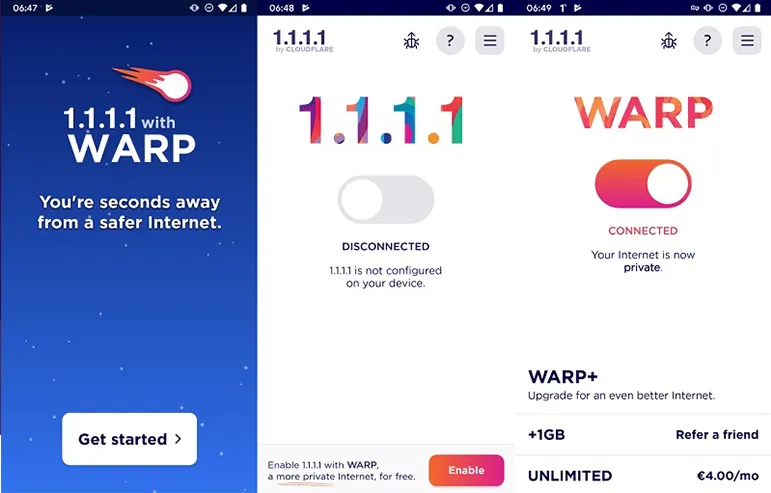
Step 7: Press Activate or Enable to enable DNS 1.1.1.1.
Step 8: After successful activation, press OK to complete.
This application is always available on the App Store and Google Play, ensuring good compatibility with most mobile devices today. Once installed, you'll have a faster and more secure Internet experience.
6.2. How to install DNS 1.1.1.1 on your computer
Setting up DNS 1.1.1.1 on your computer is also extremely simple:
Step 1: Visit Cloudflare's official page: https://1.1.1.1/
Step 2: Find and select “Get 1.1.1.1 for Windows” or “Get 1.1.1.1 for Mac” depending on the operating system.
Step 3: Download the installation file and open it to start the installation process.
Step 4: If there is a security notice, select it Allow or Continue.
Step 5: Provide administrative rights or enter the computer password when requested.
Step 6: When the installation is complete, the application will automatically activate.
Step 7: The application icon will display in the system tray or taskbar. Click to access advanced settings.
Installing DNS 1.1.1.1 on your computer helps improve access speed and enhance security when surfing the web - ideal for both individuals and businesses.
Although DNS 1.1.1.1 stands out with its fast access speed and effective privacy protection, if you are an MMO maker and need a more comprehensive security solution, using Proxy Combined with Hidemium anti-detection browser will be the optimal choice. Hidemium allows you to be completely anonymous by hiding Browser Fingerprint information and creating unique digital identities for each profile, the first browser to integrate AI (Chat GPT, Gemini, Claude) to automatically create Prom Snippets. Thanks to that, you can easily manage multiple accounts at the same time without being detected by the system.
Not only does it ensure privacy, Hidemium also enhances your safe browsing experience, giving you the freedom to access all platforms without worrying about being tracked. Download the software now and experience it for free for 3 days with 1000 free profiles to feel the outstanding difference that Hidemium brings.
In short, DNS 1.1.1.1 is a reliable domain name resolution service. However, to achieve a higher level of security in your MMO activities, you should consider a comprehensive solution like Hidemium. If you need further assistance on how to set up DNS or use Antidetect Browser, don't hesitate to contact the Hidemium team for detailed advice!
>>> Refer to related articles:
Related Blogs

Have you ever wondered why many Amazon sellers are able to generate more revenue? $10,000 per month? In fact, they are not smarter than you, they just know how to Safe business expansion. While most sellers are limited to a single account and struggle to grow, successful ones leverage Multiple Amazon Accounts to capture niche markets and maximize profits.The problem is, Amazon AI system are[…]
To turn off fingerprint unlock for Chrome passwords, open Google Password Manager or your device’s biometric security settings and disable fingerprint, Face ID, or Touch ID authentication where available. Chrome will then use another supported device authentication method, such as a PIN, password, or passcode.In this article, Hidemium will guide you in detail on how to disable fingerprint[…]
.png)
Why You Might Need Two Venmo AccountsWhether you are launching a new side hustle, organizing payments for a community group, or simply trying to separate your weekend spending from your professional income, you might find yourself wondering about the logistics of your digital wallet. If you are asking yourself, can I have two Venmo accounts, you are certainly not alone. As our financial lives[…]
.png)
When managing multiple accounts, performing data scraping, or ensuring online privacy, choosing a stable residential proxy is essential. LokiProxy has recently gained attention for its outstanding performance, global IP coverage, and competitive pricing. It also offers an easy-to-use control panel and integrates smoothly with tools like Hidemium.What is LokiProxy?LokiProxy is a global residential[…]
Are you looking for Shadowrocket – a tool to support fast, stable and secure internet access on iOS devices? In the context of 2025, when the need for private internet and circumvention is increasing, Shadowrocket becomes an application that many people are interested in and trust. So, why is Shadowrocket so popular? What is Shadowrocket? How does it work, and is it easy to install and use?[…]
If you are searching for an Ultra VPN extension, you are probably looking for a quick way to change the IP address used by your browser, access region-specific content, or add another layer of privacy while browsing.A browser VPN extension can be useful for those tasks, but it is important to understand what it actually changes.A VPN or proxy-style browser extension primarily affects network[…]
